FabCon is coming to Atlanta
Join us at FabCon Atlanta from March 16 - 20, 2026, for the ultimate Fabric, Power BI, AI and SQL community-led event. Save $200 with code FABCOMM.
Register now!- Power BI forums
- Get Help with Power BI
- Desktop
- Service
- Report Server
- Power Query
- Mobile Apps
- Developer
- DAX Commands and Tips
- Custom Visuals Development Discussion
- Health and Life Sciences
- Power BI Spanish forums
- Translated Spanish Desktop
- Training and Consulting
- Instructor Led Training
- Dashboard in a Day for Women, by Women
- Galleries
- Data Stories Gallery
- Themes Gallery
- Contests Gallery
- QuickViz Gallery
- Quick Measures Gallery
- Visual Calculations Gallery
- Notebook Gallery
- Translytical Task Flow Gallery
- TMDL Gallery
- R Script Showcase
- Webinars and Video Gallery
- Ideas
- Custom Visuals Ideas (read-only)
- Issues
- Issues
- Events
- Upcoming Events
The Power BI Data Visualization World Championships is back! Get ahead of the game and start preparing now! Learn more
- Power BI forums
- Forums
- Get Help with Power BI
- Desktop
- Re: DAX measure to get percentage by group
- Subscribe to RSS Feed
- Mark Topic as New
- Mark Topic as Read
- Float this Topic for Current User
- Bookmark
- Subscribe
- Printer Friendly Page


- Mark as New
- Bookmark
- Subscribe
- Mute
- Subscribe to RSS Feed
- Permalink
- Report Inappropriate Content
DAX measure to get percentage by group
i wanted to create a measure that can give me the daily rate of qty.
i have a table example like this:
| DATE | TYPE | QTY |
| 1/1/2018 | Fruit | 2 |
| 1/1/2018 | Fruit | 3 |
| 1/1/2018 | Fruit | 1 |
| 1/1/2018 | Vege | 4 |
| 1/1/2018 | Vege | 5 |
| 1/1/2018 | Meat | 3 |
| 2/1/2018 | Vege | 4 |
| 2/1/2018 | Meat | 6 |
| 2/1/2018 | Meat | 1 |
| 2/1/2018 | Meat | 5 |
| 2/1/2018 | Fruit | 7 |
| 2/1/2018 | Fruit | 2 |
I wanted to get their daily rate such that the formula should be something like [sum(qty) of each type of each day] / [sum all (qty) of each day].
result table like this:
| DATE | TYPE | DAILY RATE |
| 1/1/2018 | Fruit | 0.333333333 |
| 1/1/2018 | Vege | 0.5 |
| 1/1/2018 | Meat | 0.166666667 |
| 2/1/2018 | Fruit | 0.36 |
| 2/1/2018 | Vege | 0.16 |
| 2/1/2018 | Meat | 0.48 |
I tried this but the SUMX is getting the sum all of the entire table instead of each type
=SUM(qty)/SUMX(ALL(table), qty)
this is not working as well
=SUM(qty)/SUMX(VALUE(datetable[date]), qty)
how should i write the DAX formula to achieve this?

- Mark as New
- Bookmark
- Subscribe
- Mute
- Subscribe to RSS Feed
- Permalink
- Report Inappropriate Content
% of Total Sales:=([Total SalesAmount]) / CALCULATE([Total SalesAmount], ALLSELECTED(Sales[Category],Sales[SubCategory]))
OR
% of Total Sales:=DIVIDE(([Total SalesAmount]) , CALCULATE([Total SalesAmount], ALLSELECTED(Sales[Category],Sales[SubCategory])))
WHERE Total Sales = SUM('Sales'[SalesAmount])
- Mark as New
- Bookmark
- Subscribe
- Mute
- Subscribe to RSS Feed
- Permalink
- Report Inappropriate Content
hi guys,
Appreciate your help again.
Extend to this scenario, lets say there are 2 levels of grouping.
| Date | Group | TYPE | QTY |
| 1/1/2018 | Plant | Fruit | 2 |
| 1/1/2018 | Plant | Fruit | 3 |
| 1/1/2018 | Plant | Fruit | 1 |
| 1/1/2018 | Plant | Vege | 4 |
| 1/1/2018 | Plant | Vege | 5 |
| 1/1/2018 | Animal | Meat | 3 |
| 2/1/2018 | Plant | Vege | 4 |
| 2/1/2018 | Animal | Meat | 6 |
| 2/1/2018 | Animal | Meat | 1 |
| 2/1/2018 | Animal | Meat | 5 |
| 2/1/2018 | Plant | Fruit | 7 |
| 2/1/2018 | Plant | Fruit | 2 |
is there a way where i can have a measure that can calculate the rate no matter i drill up to group or i drill down to type? how to combine this 2 dax?
= SUM ( 'animal and plant'[qty] ) / CALCULATE ( SUM ( 'animal and plant'[qty] ), ALL ( 'animal and plant'[Group] ) )
= SUM ( 'animal and plant'[qty] ) / CALCULATE ( SUM ( 'animal and plant'[qty] ), ALL ( 'animal and plant'[Type] ) )
thank you in advance.
- Mark as New
- Bookmark
- Subscribe
- Mute
- Subscribe to RSS Feed
- Permalink
- Report Inappropriate Content
nevermind guys, i got it already. as simple as just put 2 column in the ALL().
= SUM ( 'animal and plant'[qty] ) / CALCULATE ( SUM ( 'animal and plant'[qty] ), ALL ( 'animal and plant'[Type], 'animal and plant'[group] ) )


- Mark as New
- Bookmark
- Subscribe
- Mute
- Subscribe to RSS Feed
- Permalink
- Report Inappropriate Content
tRY this one
=
SUM ( TableNmae[qty] )
    / CALCULATE ( SUM ( TableNmae[qty] ), ALL ( TableName[Type] ) )
Regards
Zubair
Please try my custom visuals

- Mark as New
- Bookmark
- Subscribe
- Mute
- Subscribe to RSS Feed
- Permalink
- Report Inappropriate Content
his should definitely work
- Mark as New
- Bookmark
- Subscribe
- Mute
- Subscribe to RSS Feed
- Permalink
- Report Inappropriate Content
or your own MEASURE with this revision
=
SUM ( TableName[qty] )
    / SUMX ( VALUES ( datetable[date] ), CALCULATE ( SUM ( TableName[qty] ) ) )
Regards
Zubair
Please try my custom visuals
- Mark as New
- Bookmark
- Subscribe
- Mute
- Subscribe to RSS Feed
- Permalink
- Report Inappropriate Content
thx @Zubair_Muhammad!
but both your suggestion return 1, which is not what i intended. 😞
- Mark as New
- Bookmark
- Subscribe
- Mute
- Subscribe to RSS Feed
- Permalink
- Report Inappropriate Content
HI @joiecy
It gives me correct results... I will try to upload the file
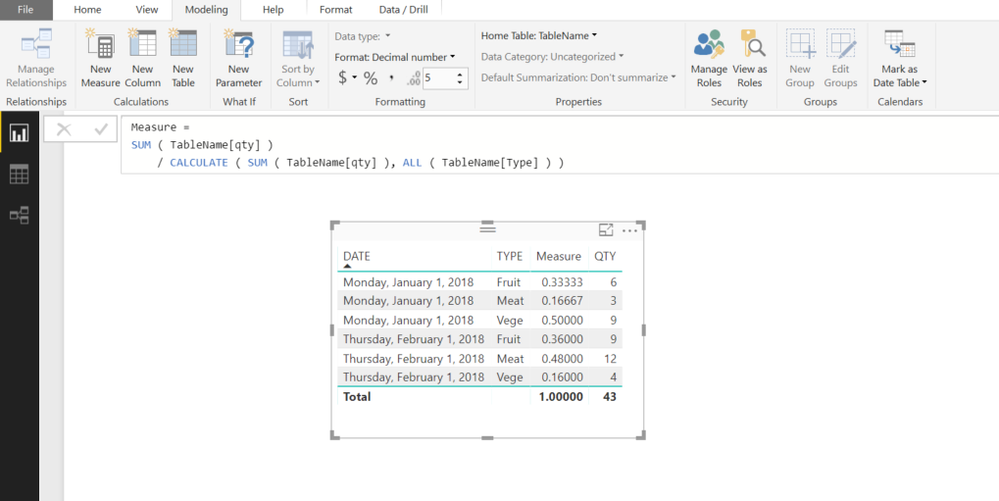
Regards
Zubair
Please try my custom visuals
- Mark as New
- Bookmark
- Subscribe
- Mute
- Subscribe to RSS Feed
- Permalink
- Report Inappropriate Content
Helpful resources

Power BI Monthly Update - November 2025
Check out the November 2025 Power BI update to learn about new features.

Fabric Data Days
Advance your Data & AI career with 50 days of live learning, contests, hands-on challenges, study groups & certifications and more!

FabCon Atlanta 2026
Join us at FabCon Atlanta, March 16-20, for the ultimate Fabric, Power BI, AI and SQL community-led event. Save $200 with code FABCOMM.


