FabCon is coming to Atlanta
Join us at FabCon Atlanta from March 16 - 20, 2026, for the ultimate Fabric, Power BI, AI and SQL community-led event. Save $200 with code FABCOMM.
Register now!- Power BI forums
- Get Help with Power BI
- Desktop
- Service
- Report Server
- Power Query
- Mobile Apps
- Developer
- DAX Commands and Tips
- Custom Visuals Development Discussion
- Health and Life Sciences
- Power BI Spanish forums
- Translated Spanish Desktop
- Training and Consulting
- Instructor Led Training
- Dashboard in a Day for Women, by Women
- Galleries
- Data Stories Gallery
- Themes Gallery
- Contests Gallery
- QuickViz Gallery
- Quick Measures Gallery
- Visual Calculations Gallery
- Notebook Gallery
- Translytical Task Flow Gallery
- TMDL Gallery
- R Script Showcase
- Webinars and Video Gallery
- Ideas
- Custom Visuals Ideas (read-only)
- Issues
- Issues
- Events
- Upcoming Events
View all the Fabric Data Days sessions on demand. View schedule
- Power BI forums
- Forums
- Get Help with Power BI
- Desktop
- Re: DAX - max function that takes filters into con...
- Subscribe to RSS Feed
- Mark Topic as New
- Mark Topic as Read
- Float this Topic for Current User
- Bookmark
- Subscribe
- Printer Friendly Page


- Mark as New
- Bookmark
- Subscribe
- Mute
- Subscribe to RSS Feed
- Permalink
- Report Inappropriate Content
DAX - max function that takes filters into consideration dynamically
Hello,
Need help with DAX function please.
Below is a pic of my data source, I'm interested in populating the field "Is Maximum Date" with 1 / 0 values.
| Row Number | Date | Transaction Number | Customer | Customer Category | Is Maximum Date |
| 1 | 6-Mar-18 | 100 | A-John | A | |
| 2 | 6-Mar-18 | 200 | B-Kim | B | |
| 3 | 7-Mar-18 | 300 | A-John | A | |
| 4 | 7-Mar-18 | 400 | A-John | A |
I want that field to be calculated according to filters applied by the user -
If user select in filter Customer = "A-John", I want to see Is Maximum Date =1 for row 3 and 4
If user select in filter Customer Category = "B", I want to see Is Maximum Date =1 for row 2
and so on...
How can I do this please?
Thanks!

- Mark as New
- Bookmark
- Subscribe
- Mute
- Subscribe to RSS Feed
- Permalink
- Report Inappropriate Content
Hi @Yael,
Please check out a demo here.
1. You need dimensional tables in your scenario.
2. Two slicers.
3. The measure could be like this:
Measure =
VAR maxdate =
    CALCULATE ( MAX ( 'Table1'[Date] ), ALL ( 'Table1'[Row Number] ) )
RETURN
    IF ( MIN ( 'Table1'[Date] ) = maxdate, 1, 0 )
Best Regards,
Dale
If this post helps, then please consider Accept it as the solution to help the other members find it more quickly.
- Mark as New
- Bookmark
- Subscribe
- Mute
- Subscribe to RSS Feed
- Permalink
- Report Inappropriate Content
Thanks @v-jiascu-msft. Tried creating the measure in the DateDim:
IsMaxDate =
VAR maxdate =
CALCULATE (MAX(dim[Date]), ALL(dim[DatePK]))
RETURN
IF (MAX(dim[Date]) = maxdate, 1, 0 )
When I drag this measure to my fact table, I see that it's duplicating the rows for dates that don't exist in the fact + all rows are getting 1 in "IsMaxDate"


- Mark as New
- Bookmark
- Subscribe
- Mute
- Subscribe to RSS Feed
- Permalink
- Report Inappropriate Content
HI @Yael
Try this one
IsMaxDate =
VAR maxdate =
    CALCULATE ( MAX ( dim[Date] ), ALLSELECTED () )
RETURN
    IF ( MAX ( dim[Date] ) = maxdate, 1, 0 )
Regards
Zubair
Please try my custom visuals
- Mark as New
- Bookmark
- Subscribe
- Mute
- Subscribe to RSS Feed
- Permalink
- Report Inappropriate Content
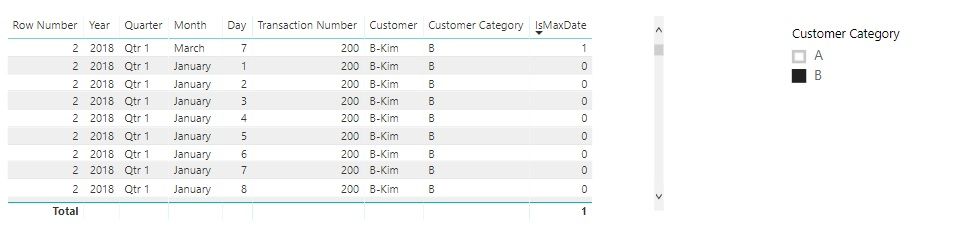
Now I recieve 1 in one row only, but the fact still displays rows for all dates (even those which don't exist in the fact):
- Mark as New
- Bookmark
- Subscribe
- Mute
- Subscribe to RSS Feed
- Permalink
- Report Inappropriate Content
Any other ideas on how we can create a general function that calculates MAX and Min according to values in filters / slicers?


- Mark as New
- Bookmark
- Subscribe
- Mute
- Subscribe to RSS Feed
- Permalink
- Report Inappropriate Content
Hi Yael,
On the one hand, you can't create calculated columns depending on report filters because the values of these columns are calculated when the data is loaded before the user select the filter.
On the other hand, if you want to fill your column with 1/0, where 1 is once per user we can do it:
Is Maximum Date =
VAR CUSTOMER = MAX(Customer)
RETURN
IF(
Date = CALCULATE(
MAX(Date);
ALL(TransactionsTable);
Customer = CUSTOMER
);
1;
0
)
Hope this can help you,
Jorge.
- Mark as New
- Bookmark
- Subscribe
- Mute
- Subscribe to RSS Feed
- Permalink
- Report Inappropriate Content
Thanks @GeorgeBuster! the above DAX ereturns an error message, not specifing where is the issue...
- Mark as New
- Bookmark
- Subscribe
- Mute
- Subscribe to RSS Feed
- Permalink
- Report Inappropriate Content
Could you share a screenshot? Maybe we can find the error. Thanks.

Helpful resources

Power BI Monthly Update - November 2025
Check out the November 2025 Power BI update to learn about new features.

Fabric Data Days
Advance your Data & AI career with 50 days of live learning, contests, hands-on challenges, study groups & certifications and more!

FabCon Atlanta 2026
Join us at FabCon Atlanta, March 16-20, for the ultimate Fabric, Power BI, AI and SQL community-led event. Save $200 with code FABCOMM.


