Join us at FabCon Vienna from September 15-18, 2025
The ultimate Fabric, Power BI, SQL, and AI community-led learning event. Save €200 with code FABCOMM.
Get registered- Power BI forums
- Get Help with Power BI
- Desktop
- Service
- Report Server
- Power Query
- Mobile Apps
- Developer
- DAX Commands and Tips
- Custom Visuals Development Discussion
- Health and Life Sciences
- Power BI Spanish forums
- Translated Spanish Desktop
- Training and Consulting
- Instructor Led Training
- Dashboard in a Day for Women, by Women
- Galleries
- Data Stories Gallery
- Themes Gallery
- Contests Gallery
- Quick Measures Gallery
- Notebook Gallery
- Translytical Task Flow Gallery
- TMDL Gallery
- R Script Showcase
- Webinars and Video Gallery
- Ideas
- Custom Visuals Ideas (read-only)
- Issues
- Issues
- Events
- Upcoming Events
Enhance your career with this limited time 50% discount on Fabric and Power BI exams. Ends August 31st. Request your voucher.
- Power BI forums
- Forums
- Get Help with Power BI
- Desktop
- Re: DAX count unique rows is counting ALL rows?
- Subscribe to RSS Feed
- Mark Topic as New
- Mark Topic as Read
- Float this Topic for Current User
- Bookmark
- Subscribe
- Printer Friendly Page

- Mark as New
- Bookmark
- Subscribe
- Mute
- Subscribe to RSS Feed
- Permalink
- Report Inappropriate Content
DAX count unique rows is counting ALL rows?
Hey folks, I have an issue that I hope is an easy fix.
I have a little bit of DAX code that's misbehaving. Here's the code in question:
Total Courses in a Program = IF ( HASONEVALUE ( CP[Column1] ) , CALCULATE( COUNTROWS ( ALL ( (CP) ) ) ) )
and here's a table to demonstrate how my data is laid out in the (CP) table:
| Program Title | Program Grouping | Course Title |
| Example Power BI Program | Subgroup 1 | Introduction to DAX |
| Example Power BI Program | Subgroup 1 | DAX 101 |
| Example Power BI Program | Subgroup 1 | DAX 102 |
Example Power BI Program | Subgroup 1 | DAX 201 |
| Example Power BI Program | Subgroup 1 | DAX 202 |
| Example Power BI Program | Subgroup 1 | DAX 301 |
| Example Power BI Program | Subgroup 1 | DAX 302 |
| Example Power BI Program | Subgroup 2 | Learning to Code |
| Example Power BI Program | Subgroup 2 | Learning to Debug |
So for my DAX code, what it SHOULD be doing is counting the total # of courses (Column 3 of my table directly above) within a Program (Column 1 of my table directly above). So the formula should look at this chunk of the data set and realize that there are 9 total courses within the Example Power BI Program.
Instead, it's returning the total # of rows in the dataset (836) instead of the # of courses in the Program (9). I think it's the ALL function within the formula, but I thought I needed that there to be sure to count ALL of the courses within the program. If I remove it then the results are less wrong, but still not correct.
For context as to why I needed the ALL piece there, I need Power BI to set the # of courses as an immutable, unchanging number. That way, if a user in my dataset is missing courses, Power BI will still use the correct # of courses in a Program rather than the # of courses it finds for a user (meaning a user may only complete 2 of those 9 courses, and without the ALL function, it returns 2 for the # of courses in a program because that's what the user has completed, and that # is wrong).
This was working before, but isn't now, and I'm not sure what I did to break it. Can anyone give me insight into what I can do to accomplish my desired outcome without having to worry about it being incorrect in the future? Any insight/advice is greatly appreciated! 🙂


- Mark as New
- Bookmark
- Subscribe
- Mute
- Subscribe to RSS Feed
- Permalink
- Report Inappropriate Content
Hi,
Please try this:
Total Courses in a Program =
IF ( HASONEVALUE ( CP[Column1] ), CALCULATE ( COUNTROWS ( CP ), ALL ( CP ) ) )
Best Regards,
Giotto Zhi
- Mark as New
- Bookmark
- Subscribe
- Mute
- Subscribe to RSS Feed
- Permalink
- Report Inappropriate Content
Hello @v-gizhi-msft,
Thank you for your suggestion! I tried it and unfortunately it returns the total number of rows within the sheet (836). The one bright side is that the # of 836 with your formula doesn't change, so that's at least half way perfect!
A question for anyone still willing to assist with this (my own ignorance with Power BI paired with the inability to find a resolution has to be a huge turn off, I know), would trying to do a calculation of some kind in a calculated column on the table itself be a more foolproof method to accomplish this? I just learned about calculated columns earlier this morning, and it sounds like figuring out a way to do this through a calculated column would allow me to reference that calculated column for my division formula but still give me an accurate # since it would calculate on the table and ignore slicers (in theory, again, brand new to calculated columns).
Whether anyone is able/willing to answer or not, I do want to take a moment to issue a sincere thank you to anyone and everyone who has taken time out of their day to attempt to help me with this. This community is great and I hope everyone knows that your contributions and assistance are genuinely appreciated and valued.


- Mark as New
- Bookmark
- Subscribe
- Mute
- Subscribe to RSS Feed
- Permalink
- Report Inappropriate Content
Hey @Anonymous ,
you may consider creating sample data, that reflects your data model.
From my understanding, you need something that returns a table that contains at least two columns (program | course). Of course, you can also count the rows inside this table, COUNTROWS(<virtualtable>) eq 9. But you have to use this table to filter the table that contains the employee, the program, and the completed course. Maybe this table also has a column that represents the status of the course (in progress, failed, completed), then it's necessary to filter for completed courses only.
But without further knowledge of your data model it's really hard, and creating sample data is tedious, and will most likely never match your data model.
Regards,
Tom
Did I answer your question? Mark my post as a solution, this will help others!
Proud to be a Super User!
I accept Kudos 😉
Hamburg, Germany
- Mark as New
- Bookmark
- Subscribe
- Mute
- Subscribe to RSS Feed
- Permalink
- Report Inappropriate Content
Hey there,
Per your request, I scrubbed (hopefully) all of the sensitive data in my file and replaced it with dummy data. In order to speed things up I just made changes en masse, so some of the information might not line up or behave properly.
Also, be forewarned that my Fields view and Data Modeling are terribly messy, as I'm brand new to this program and haven't taken the time yet to go clean things up. As a result there are a lot of unused measures, and my data modeling is probably pretty bad.
To test how this is breaking, I suggest using Course Program 1 since it has a lot of courses in it, and then Employee Name 100 as the example of someone who only has 1 course done in Course Program 1 (filtering with the employee then updates the data which is what I'm trying to avoid).
Lastly, I've been through so many iterations of this that the Measure (located in the CP table/sheet/field) that should be doing the calculation, Total Courses In Program isn't updated.
Please let me know if you have any clarifying questions and I'll do my best to help clear things up. Thank you!
Link to the file (DAXTest.pbix): https://drive.google.com/open?id=1UH6ycRqRC9EPT2hXAx9Q8RQSd88MtMbE
- Mark as New
- Bookmark
- Subscribe
- Mute
- Subscribe to RSS Feed
- Permalink
- Report Inappropriate Content
Hey @Anonymous ,
thanks for providing the pbix.
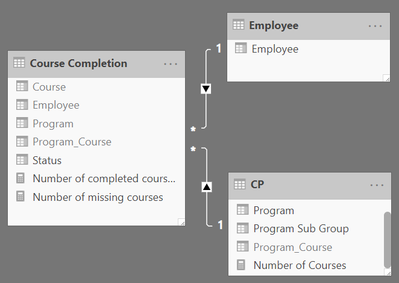
Inspired by this, I created a very simple data model, that contains 3 tables:
- Employees
- CP - this reflects the Program, Sub Group and of course the Course
As a course can be part of multiple programs I created a unique identifier by concatenating the Program and Course columns - CP completion
This reflects the progress of an employee regarding a certain Program, this table also has the unique identifier Program_Course
Here is a screenshot of the data model:
I created these measures:
Number of Courses =
CALCULATE(
    DISTINCTCOUNT('CP'[Program_Course])
    , ALL('CP'[Program Sub Group])
)
Number of completed courses =
IF(HASONEVALUE('Employee'[Employee])
    ,CALCULATE(
        COUNTROWS('Course Completion')
        , KEEPFILTERS('Course Completion'[Status] = "completed")
    )
    , BLANK()
)
Number of missing courses =
IF(HASONEVALUE('Employee'[Employee])
    , [Number of Courses] - [Number of completed courses]
    , BLANK()
)
Depending on your analytical requirements it can become necessary to use the iterator function AVERAGEX(...) to create a reasonable number for the measures ...missing and ...completed.
This allows to create a report like this:
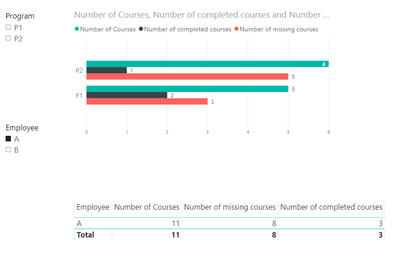
Here you will find the pbix file:
Hopefully, this provides some ideas to tackle your challenges.
From my personal experience, the data model is key, and I tend to avoid m*n relationships between tables whenever possible, of course sometimes this is not possible 🙂
Regards,
Tom
Did I answer your question? Mark my post as a solution, this will help others!
Proud to be a Super User!
I accept Kudos 😉
Hamburg, Germany

- Mark as New
- Bookmark
- Subscribe
- Mute
- Subscribe to RSS Feed
- Permalink
- Report Inappropriate Content
- Mark as New
- Bookmark
- Subscribe
- Mute
- Subscribe to RSS Feed
- Permalink
- Report Inappropriate Content
Hey there, thanks for the reply!
Using the example above, I want to count the rows where the value in column A is the same but the value in column C is unique. So in the table from my original post, you can see that Column A is titled Example Power BI Program and that is a unique title within my data set. But within that Program there are 9 courses. The course names can repeat throughout the data set (since the same course can belong to mulitple Programs), but I just want to know "How many unique courses are there within the Program titled Example Power BI Program?"
There are around 90 Programs and each one is comprised of a variety of courses.
Hopefully that made/makes sense and answers your question. Would using DISTINCTCOUNT in some way help alleviate the issue based on that clarification?
- Mark as New
- Bookmark
- Subscribe
- Mute
- Subscribe to RSS Feed
- Permalink
- Report Inappropriate Content
Hey @Anonymous
not sure what the outcome should look like, for this I created 2 measures:
distinct courses A =
IF(HASONEVALUE('CP'[Program Title])
    , CALCULATE(
        DISTINCTCOUNT('CP'[Course Title])
        , ALL('CP'[Program Grouping])
        , ALL(CP[Course Title])
    )
)
and
distinct courses B =
IF(HASONEVALUE('CP'[Program Title])
    ,
    CALCULATE(
        DISTINCTCOUNT('CP'[Course Title])
        --, ALL('CP'[Program Grouping])
        , ALL(CP[Course Title])
    )
)
The following screenshot shows the difference:

Hopefully, this provides what you are looking for.
Regards,
Tom
Did I answer your question? Mark my post as a solution, this will help others!
Proud to be a Super User!
I accept Kudos 😉
Hamburg, Germany
- Mark as New
- Bookmark
- Subscribe
- Mute
- Subscribe to RSS Feed
- Permalink
- Report Inappropriate Content
Hey Tom, thanks for your reply! I tried both and tested them and I'm encountering the same issue. I'm including screenshots to show what I mean.
In the first screenshot, you can see that I've selected a Program, and in the Pie Chart it correctly summarizes how many courses are in that program (18) using either of the formulas you provided. So far so good!
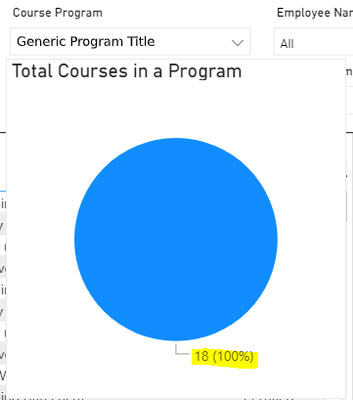
But then if I choose an Employee so I can see how many of the required 18 courses she's completed, the Total Courses in Program formula updates to the total number of courses the employee has looked at/signed up for. So then the 18 goes to 6 because the Employee has only looked at 6 of the required 18 courses.

I have a table that's doing a very basic division calculation, but for that to be correct, the Total Courses in Program must remain static and correctly count the number of courses in a program, regardless of filters. But so far filters impact the Total Courses in Program calculation and it makes the division calculation I mentioned incorrect.
Hopefully that context may help identify where I'm doing something wrong.


- Mark as New
- Bookmark
- Subscribe
- Mute
- Subscribe to RSS Feed
- Permalink
- Report Inappropriate Content
Hi @Anonymous
Try this:
Total Courses in a Program =
IF(
    HASONEVALUE( CP[Course Title] ),
    CALCULATE(
        DISTINCTCOUNT( CP[Course Title] ),
        ALLEXCEPT( CP, CP[Program Title] )
    )
)
This will remove all filters except the one on Program Title.
Best regards,
Martyn
- Mark as New
- Bookmark
- Subscribe
- Mute
- Subscribe to RSS Feed
- Permalink
- Report Inappropriate Content
Thanks @MartynRamsden I appreciate the help!
I HAVE to be doing something wrong, because all of the proposed solutions work at first, but the second I add a filter to anything the # count updates. Most recently, using your code, I created a Measure, entered your DAX formula, and saved it (though, in case it helps, putting it on a card to see if it was getting the correct # resulted in a (Blank)). It seemed like it returned the correct # of Courses, but the second I applied a filter it updated to the incorrect # again.
Would there be a higher likelihood of success if I just did a count of the Program title in Column A and disregarded Column C with the course titles in it? No 2 Programs are titled the same so there wouldn't be a concern about it counting separate programs twice.
@TomMartens My apologies, I try to keep my threads short/concise and, since I'm very new to Power BI, wasn't sure what I needed to share without overwhelming people with too much unnecessary context. If I can't resolve the issue I'll try creating a test book, however the report I've created has so many measures and associations, along with a very large set of sensitive data, so I'm not sure I could genuinely recreate the environment I'm working in. Regardless, thank you very much for taking the time to write a formula at all, it's genuinely appreciated.
- Mark as New
- Bookmark
- Subscribe
- Mute
- Subscribe to RSS Feed
- Permalink
- Report Inappropriate Content
Hey @Anonymous ,
your initial post did not mention what you are looking for as it does not mention
an employee
the number of not-completed courses within a program,
this means I spent some time to provide an answer to a question not asked. 😞
Please create a pbix that contains some sample data, but still reflects your data model, meaning also contains employee information and completed courses. Upload the pbix to onedrive or dropbox and share the link.
As a course can be inside multiple programs, does an employee has to complete the course multiple times if she/he wants to complete multiple programs?
Regards,
Tom
Did I answer your question? Mark my post as a solution, this will help others!
Proud to be a Super User!
I accept Kudos 😉
Hamburg, Germany
Helpful resources

Power BI Monthly Update - August 2025
Check out the August 2025 Power BI update to learn about new features.

Fabric Community Update - August 2025
Find out what's new and trending in the Fabric community.


| User | Count |
|---|---|
| 78 | |
| 72 | |
| 46 | |
| 43 | |
| 40 |


