Forum Discussion

DAX Running total by another column
- 10 years ago
Hello nhanser,
for me it looks like you want to add a calculated column, but the DAX code you use is for beeing used in a pivot table.
I copied your raw data, but used different dates.
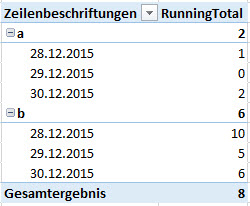
The pivot I created looks like this and I hope this is what you want:
The code I used is close to the one you used, but slightly different:
RunningTotal :=
CALCULATE (
 SUM ( Tabelle1[QTY] );
 FILTER ( ALL ( Tabelle1 ); Tabelle1[Date] <= MAX ( Tabelle1[Date] ) );
 VALUES ( Tabelle1[Item] )
)
The key here is the VALUES() which puts the Items into the filter context of the CALCULATE()-statement. Otherwise you would have running totals on the dates, but it would be the same for all your Items.
Hope that helps a bit.
Greets,
Lars



 Advocate I
This is a great solution, thank you. Worth noting you can stack multiple variables in the value cluase to allow aggregation across multiple / different dimensions, (similar to partition by in sql I guess).
However, I have run into a slight issue. If you have a value or combination of values that are empty i.e. there is no row in your dataset for that value or combination of values, the running total becomes incorrect until the next time a row matching those criteria exists, at which point it 'catches up'.
For example, if you are creating a running total of sales by month and team across a year, using a data set like:
Month Team Sales
Jan A 100
Jan B 200
Feb A 150
Feb B 210
Mar A 300
Apr A 120
Apr B 400
In March, if Team B has a month where they have no sales (and therefore no row in the dataset), your running total for the business as a whole will ignore all Team B's previous data in the calculation of a running total, returning 550 as the total, rather than 690.
I'm yet to find a fix for this (despite habving tried every combination of isempty i can think of). If anyone has any ideas I'd love to hear them
Robbie
The following month if Team B has
