FabCon is coming to Atlanta
Join us at FabCon Atlanta from March 16 - 20, 2026, for the ultimate Fabric, Power BI, AI and SQL community-led event. Save $200 with code FABCOMM.
Register now!- Power BI forums
- Get Help with Power BI
- Desktop
- Service
- Report Server
- Power Query
- Mobile Apps
- Developer
- DAX Commands and Tips
- Custom Visuals Development Discussion
- Health and Life Sciences
- Power BI Spanish forums
- Translated Spanish Desktop
- Training and Consulting
- Instructor Led Training
- Dashboard in a Day for Women, by Women
- Galleries
- Data Stories Gallery
- Themes Gallery
- Contests Gallery
- QuickViz Gallery
- Quick Measures Gallery
- Visual Calculations Gallery
- Notebook Gallery
- Translytical Task Flow Gallery
- TMDL Gallery
- R Script Showcase
- Webinars and Video Gallery
- Ideas
- Custom Visuals Ideas (read-only)
- Issues
- Issues
- Events
- Upcoming Events
The Power BI Data Visualization World Championships is back! Get ahead of the game and start preparing now! Learn more
- Power BI forums
- Forums
- Get Help with Power BI
- Desktop
- Re: DAX Running total by another column
- Subscribe to RSS Feed
- Mark Topic as New
- Mark Topic as Read
- Float this Topic for Current User
- Bookmark
- Subscribe
- Printer Friendly Page

- Mark as New
- Bookmark
- Subscribe
- Mute
- Subscribe to RSS Feed
- Permalink
- Report Inappropriate Content
DAX Running total by another column
Hello,
I need help to create a DAX column/measure that will create a running total by another column.
So for example, looking at this table
 Item  |       Date      |  QTY
----------------------------------
    a    | 12/31/2015 |    1
    a    | 12/31/2015 |    -1
    a    | 12/31/2015 |    2
    b    | 12/31/2015 |    10
    b    | 12/31/2015 |    -5
    b    | 12/31/2015 |    1
What I need at the end is to add another field/column that will create a running total, something like this:
 Item  |       Date      |  QTY  | RunTotal
------------------------------------------------
    a    | 12/31/2014  |    1     |     1
    a    | 1/15/2015    |    -1   |      0
    a    |  2/28/2015   |    2     |     2
    b    | 12/31/2015  |    10   |   10
    b    | 4/6/2015      |    -5   |     5
    b    | 5/5/2015      |    1     |    6
I have tried using a calucalte function and filetering on the date, but it only seems to create a running total for everytihng, not filtering by the item. Similar to this:
On Hand = CALCULATE( SUM('Table'[QTY]),
	FILTER(
		ALL('Table'),
		'Table'[Date] <= MAX('Table'[Date])
	)
)
Any ideas would be much appericated. Thanks for any and all help in advance!
Solved! Go to Solution.


- Mark as New
- Bookmark
- Subscribe
- Mute
- Subscribe to RSS Feed
- Permalink
- Report Inappropriate Content
Hello @nhanser,
for me it looks like you want to add a calculated column, but the DAX code you use is for beeing used in a pivot table.
I copied your raw data, but used different dates.

The pivot I created looks like this and I hope this is what you want:
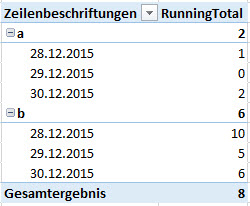
The code I used is close to the one you used, but slightly different:
RunningTotal :=
CALCULATE (
 SUM ( Tabelle1[QTY] );
 FILTER ( ALL ( Tabelle1 ); Tabelle1[Date] <= MAX ( Tabelle1[Date] ) );
 VALUES ( Tabelle1[Item] )
)
The key here is the VALUES() which puts the Items into the filter context of the CALCULATE()-statement. Otherwise you would have running totals on the dates, but it would be the same for all your Items.
Hope that helps a bit.
Greets,
Lars
- Mark as New
- Bookmark
- Subscribe
- Mute
- Subscribe to RSS Feed
- Permalink
- Report Inappropriate Content
Hello @nhanser,
for me it looks like you want to add a calculated column, but the DAX code you use is for beeing used in a pivot table.
I copied your raw data, but used different dates.
The pivot I created looks like this and I hope this is what you want:
The code I used is close to the one you used, but slightly different:
RunningTotal :=
CALCULATE (
 SUM ( Tabelle1[QTY] );
 FILTER ( ALL ( Tabelle1 ); Tabelle1[Date] <= MAX ( Tabelle1[Date] ) );
 VALUES ( Tabelle1[Item] )
)
The key here is the VALUES() which puts the Items into the filter context of the CALCULATE()-statement. Otherwise you would have running totals on the dates, but it would be the same for all your Items.
Hope that helps a bit.
Greets,
Lars


- Mark as New
- Bookmark
- Subscribe
- Mute
- Subscribe to RSS Feed
- Permalink
- Report Inappropriate Content
@LarsSchreiber Is it possible to create the 70th percentile on the results per each Item?
Thanks,
Zaid
- Mark as New
- Bookmark
- Subscribe
- Mute
- Subscribe to RSS Feed
- Permalink
- Report Inappropriate Content
Hi @LarsSchreiber,
your solution didn't workout in my scenario..!!
DimItem(ItemKey,ItemNumber,CompanyKey) (One ItemNumber can have Multiple ItemKey because of CompanyKey)
FactRevenue(ItemKey,CompanyKey,CustomerKey,BrandKey,AccountingDate,Revenue) (Fact is day level)
Fact and Dim Item Joined on ItemKey.
when i try to put ItemNumber from DimItem and Revenue from FactRevenue in a table visual with following Measures.
TotalRevenue = CALCULATE(SUM(FactRevenue[Revenue]),ALL(DimItem[ItemNumber]))
RContr = DIVIDE(SUM(FactRevenue[Revenue]),[TotalRevenue],0)
RT = CALCULATE([RContr],FILTER(ALL(FactRevenue),FactRevenue[AccountingDate] <= MAX(FactRevenue[AccountingDate])),VALUES(DimItem[ItemNumber]))
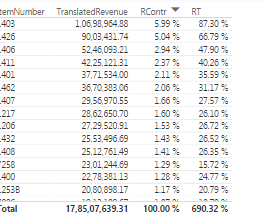
I am not getting good results. Please consider the output:
5.99+5.04 = 11.03 or something.


- Mark as New
- Bookmark
- Subscribe
- Mute
- Subscribe to RSS Feed
- Permalink
- Report Inappropriate Content
@LarsSchreiber I need your help. I am looking for same solution but somehow its not working for me.

RunningTotal =
CALCULATE (
SUM ( TabelForecast[Forcast] );
FILTER ( ALL ( TabelForecast ); TabelForecast[MonthYear] <= MAX ( TabelForecast[MonthYear] ) );
VALUES ( TabelForecast[M#] )
)
I have tried your formula in power BI but its not giving me running total but total for all the rows 😞 Any suggestions?
- Mark as New
- Bookmark
- Subscribe
- Mute
- Subscribe to RSS Feed
- Permalink
- Report Inappropriate Content
Hi @FawadRehman,
sorry, I haven't been here for a while. Could you solve your problem already?!
regards,
Lars
- Mark as New
- Bookmark
- Subscribe
- Mute
- Subscribe to RSS Feed
- Permalink
- Report Inappropriate Content


- Mark as New
- Bookmark
- Subscribe
- Mute
- Subscribe to RSS Feed
- Permalink
- Report Inappropriate Content
This is a great solution, thank you. Worth noting you can stack multiple variables in the value cluase to allow aggregation across multiple / different dimensions, (similar to partition by in sql I guess).
However, I have run into a slight issue. If you have a value or combination of values that are empty i.e. there is no row in your dataset for that value or combination of values, the running total becomes incorrect until the next time a row matching those criteria exists, at which point it 'catches up'.
For example, if you are creating a running total of sales by month and team across a year, using a data set like:
Month Team Sales
Jan A 100
Jan B 200
Feb A 150
Feb B 210
Mar A 300
Apr A 120
Apr B 400
In March, if Team B has a month where they have no sales (and therefore no row in the dataset), your running total for the business as a whole will ignore all Team B's previous data in the calculation of a running total, returning 550 as the total, rather than 690.
I'm yet to find a fix for this (despite habving tried every combination of isempty i can think of). If anyone has any ideas I'd love to hear them
Robbie
The following month if Team B has

- Mark as New
- Bookmark
- Subscribe
- Mute
- Subscribe to RSS Feed
- Permalink
- Report Inappropriate Content


- Mark as New
- Bookmark
- Subscribe
- Mute
- Subscribe to RSS Feed
- Permalink
- Report Inappropriate Content
Hi @robbie337 did you find a solution to your problem?
I have a similar problem, since I want to display my Running Total Measure in a Line Chart and I need to to filter on different categories in a slicer.
If I include my VALUES[Category column] in the Running Total Measure all is fine as long as I ALWAYS have one of the Categories selected in my slicer. If I deselect all in the Category Slicer the Line Chart will jump up and down and not continue to increase as intended.
To fix this I can just leave out the VALUES([Category column] of my Running Total Measure, but then my Running Total would just show an aggregation across all categories and not calculate PER category as intended.
...This is such an easy task in Excel Pivot Tables where Running Total Calculation is a standard option - why is this still missing in PowerBI.

- Mark as New
- Bookmark
- Subscribe
- Mute
- Subscribe to RSS Feed
- Permalink
- Report Inappropriate Content
- Mark as New
- Bookmark
- Subscribe
- Mute
- Subscribe to RSS Feed
- Permalink
- Report Inappropriate Content
Hi @sridhark Yes, since Quick Measures was introduced i PowerBI now I actually just created a Quick Measure for my Values column and selected Running Total by Date (remember to have a seperate Data Dimension table and use this with your Running Total measure).
It now works with 3 different dimension slicers as I needed.

- Mark as New
- Bookmark
- Subscribe
- Mute
- Subscribe to RSS Feed
- Permalink
- Report Inappropriate Content
@LarsSchreiber - I was looking for a similar solution as @nhanser. Your solution worked perfectly!
The key, as you mentioned, is the VALUES() function to put the running total calculation in context of the field needing to be grouped.
Thank you for the very useful response!
- Mark as New
- Bookmark
- Subscribe
- Mute
- Subscribe to RSS Feed
- Permalink
- Report Inappropriate Content
- Mark as New
- Bookmark
- Subscribe
- Mute
- Subscribe to RSS Feed
- Permalink
- Report Inappropriate Content
- Mark as New
- Bookmark
- Subscribe
- Mute
- Subscribe to RSS Feed
- Permalink
- Report Inappropriate Content
Have you tried:
On Hand = CALCULATE( SUM('Table'[QTY]),
	FILTER(
		ALLSelected('Table'),
		'Table'[Date] <= MAX('Table'[Date])
	)
)

Helpful resources

Power BI Dataviz World Championships
The Power BI Data Visualization World Championships is back! Get ahead of the game and start preparing now!

Power BI Monthly Update - December 2025
Check out the December 2025 Power BI Holiday Recap!

FabCon Atlanta 2026
Join us at FabCon Atlanta, March 16-20, for the ultimate Fabric, Power BI, AI and SQL community-led event. Save $200 with code FABCOMM.

| User | Count |
|---|---|
| 39 | |
| 37 | |
| 33 | |
| 32 | |
| 29 |


| User | Count |
|---|---|
| 132 | |
| 88 | |
| 82 | |
| 68 | |
| 64 |


