Forum Discussion

DAX Running total by another column
- 10 years ago
Hello nhanser,
for me it looks like you want to add a calculated column, but the DAX code you use is for beeing used in a pivot table.
I copied your raw data, but used different dates.
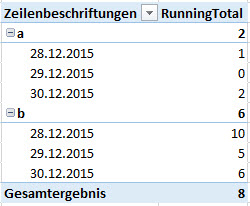
The pivot I created looks like this and I hope this is what you want:
The code I used is close to the one you used, but slightly different:
RunningTotal :=
CALCULATE (
 SUM ( Tabelle1[QTY] );
 FILTER ( ALL ( Tabelle1 ); Tabelle1[Date] <= MAX ( Tabelle1[Date] ) );
 VALUES ( Tabelle1[Item] )
)
The key here is the VALUES() which puts the Items into the filter context of the CALCULATE()-statement. Otherwise you would have running totals on the dates, but it would be the same for all your Items.
Hope that helps a bit.
Greets,
Lars


 Responsive Resident
Hello nhanser,
for me it looks like you want to add a calculated column, but the DAX code you use is for beeing used in a pivot table.
I copied your raw data, but used different dates.
The pivot I created looks like this and I hope this is what you want:
The code I used is close to the one you used, but slightly different:
RunningTotal :=
CALCULATE (
 SUM ( Tabelle1[QTY] );
 FILTER ( ALL ( Tabelle1 ); Tabelle1[Date] <= MAX ( Tabelle1[Date] ) );
 VALUES ( Tabelle1[Item] )
)
The key here is the VALUES() which puts the Items into the filter context of the CALCULATE()-statement. Otherwise you would have running totals on the dates, but it would be the same for all your Items.
Hope that helps a bit.
Greets,
Lars

 Resolver III
LarsSchreiber - I was looking for a similar solution as nhanser. Your solution worked perfectly!
The key, as you mentioned, is the VALUES() function to put the running total calculation in context of the field needing to be grouped.
Thank you for the very useful response!
- LarsSchreiber10 years ago
 PeterBI10 years ago
Helper I