Forum Discussion

nhanser
10 years agoRegular Visitor
DAX Running total by another column
Hello, I need help to create a DAX column/measure that will create a running total by another column. So for example, looking at this table Item | Date | QTY
------------------...
- 10 years ago
Hello nhanser,
for me it looks like you want to add a calculated column, but the DAX code you use is for beeing used in a pivot table.
I copied your raw data, but used different dates.
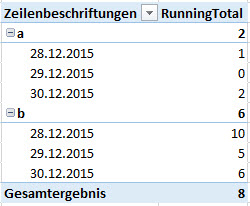
The pivot I created looks like this and I hope this is what you want:
The code I used is close to the one you used, but slightly different:
RunningTotal :=
CALCULATE (
 SUM ( Tabelle1[QTY] );
 FILTER ( ALL ( Tabelle1 ); Tabelle1[Date] <= MAX ( Tabelle1[Date] ) );
 VALUES ( Tabelle1[Item] )
)
The key here is the VALUES() which puts the Items into the filter context of the CALCULATE()-statement. Otherwise you would have running totals on the dates, but it would be the same for all your Items.
Hope that helps a bit.
Greets,
Lars



PowerBIGuy Responsive Resident
10 years agoResponsive ResidentHave you tried:
On Hand = CALCULATE( SUM('Table'[QTY]),
	FILTER(
		ALLSelected('Table'),
		'Table'[Date] <= MAX('Table'[Date])
	)
)