cancel
Showing results for 
Search instead for 
Did you mean: 

The Power BI Data Visualization World Championships is back! Get ahead of the game and start preparing now! Learn more

Reply
Anonymous
Not applicable

DAX Queries

In my Power BI Report I'm having,

Month        Value

August        1,24,000

September   2,46,789

October       8,49,000

November   2,04,985

December    90,485

Now, I want to display the value of all the months to above 8,00,000 through DAX Queries. How can I do that.

1 ACCEPTED SOLUTION
v-sihou-msft
Microsoft Employee
Microsoft Employee

@Anonymous


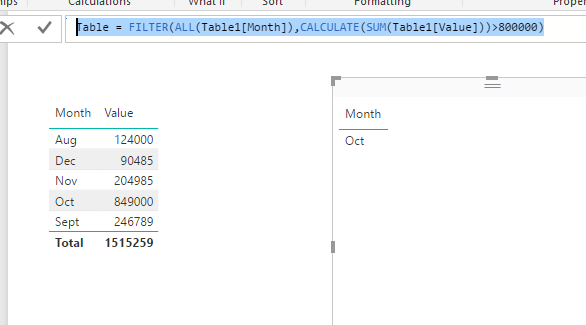
You can create a calculated table like below: 


Table = FILTER(ALL(Table1[Month]),CALCULATE(SUM(Table1[Value]))>800000)

234.PNG


Regards,

View solution in original post

1 REPLY 1
v-sihou-msft
Microsoft Employee
Microsoft Employee

@Anonymous


You can create a calculated table like below: 


Table = FILTER(ALL(Table1[Month]),CALCULATE(SUM(Table1[Value]))>800000)

234.PNG


Regards,

Helpful resources

Announcements
Power BI DataViz World Championships

Power BI Dataviz World Championships

The Power BI Data Visualization World Championships is back! Get ahead of the game and start preparing now!

December 2025 Power BI Update Carousel

Power BI Monthly Update - December 2025

Check out the December 2025 Power BI Holiday Recap!

FabCon Atlanta 2026 carousel

FabCon Atlanta 2026

Join us at FabCon Atlanta, March 16-20, for the ultimate Fabric, Power BI, AI and SQL community-led event. Save $200 with code FABCOMM.