cancel
Showing results for 
Search instead for 
Did you mean: 

Learn from the best! Meet the four finalists headed to the FINALS of the Power BI Dataviz World Championships! Register now

Reply
thhmez7
Helper III
Helper III

DAX Measure: Filter in concatenatex

Hi,

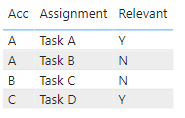
I'd like to filter the concatenated column value in the DAX statement with CONCATENATEX, in this example:

Only Assignments with Relevant = Y should be shown for each account.

thhmez7_0-1656927042310.png

So in the end, the measure should only show Task A for Acc A, blank for B and Task D for C.

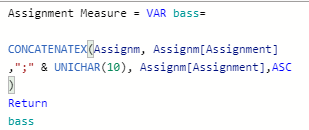
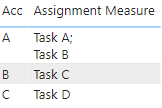
So far my measure works without the filter:

thhmez7_1-1656927136232.png

thhmez7_2-1656927151966.png

How can I now add the filter part in this measure?

Thank you.


1 ACCEPTED SOLUTION
tamerj1
Community Champion
Community Champion

Hi @thhmez7 
Please try 

Assignment Measure =
VAR FilteredTable =
    FILTER ( Assignm, Assignm[Relevant] = "Y" )
VAR Result =
    CONCATENATEX (
        FilteredTable,
        Assignm[Assignment],
        ";" & UNICHAR ( 10 ),
        Assignm[Assignment], ASC
    )
RETURN
    Result

View solution in original post

2 REPLIES 2
tamerj1
Community Champion
Community Champion

Hi @thhmez7 
Please try 

Assignment Measure =
VAR FilteredTable =
    FILTER ( Assignm, Assignm[Relevant] = "Y" )
VAR Result =
    CONCATENATEX (
        FilteredTable,
        Assignm[Assignment],
        ";" & UNICHAR ( 10 ),
        Assignm[Assignment], ASC
    )
RETURN
    Result

Thank you, it works.

Helpful resources

Announcements
Join our Fabric User Panel

Join our Fabric User Panel

Share feedback directly with Fabric product managers, participate in targeted research studies and influence the Fabric roadmap.

February Power BI Update Carousel

Power BI Monthly Update - February 2026

Check out the February 2026 Power BI update to learn about new features.

FabCon Atlanta 2026 carousel

FabCon Atlanta 2026

Join us at FabCon Atlanta, March 16-20, for the ultimate Fabric, Power BI, AI and SQL community-led event. Save $200 with code FABCOMM.