Forum Discussion

DAX - How calculate a Running Total 2 from previous Running Total 1
Hi,
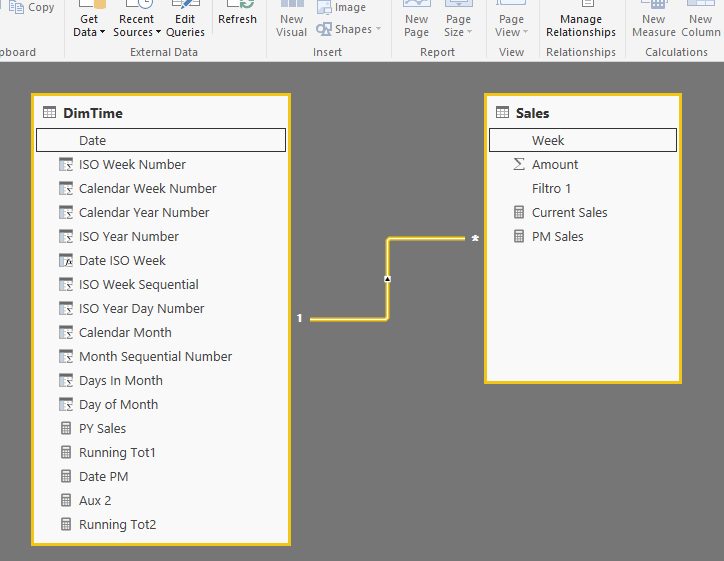
I need create a measure (Running Tot2) that calculates running total based on an earlier measure that calculates the a previous running total (Running Tot1)
PM Sales := sum(Sales[Current Sales])
Running Tot1 = CALCULATE([PM Sales],FILTER(ALLSELECTED(DimTime[Date]),DimTime[Date] <= MAX(DimTime[Date])))
Running Tot2 = CALCULATE([Running Tot1],FILTER(ALLSELECTED(DimTime[Date]),DimTime[Date]<= max(DimTime[Date])))
Regards
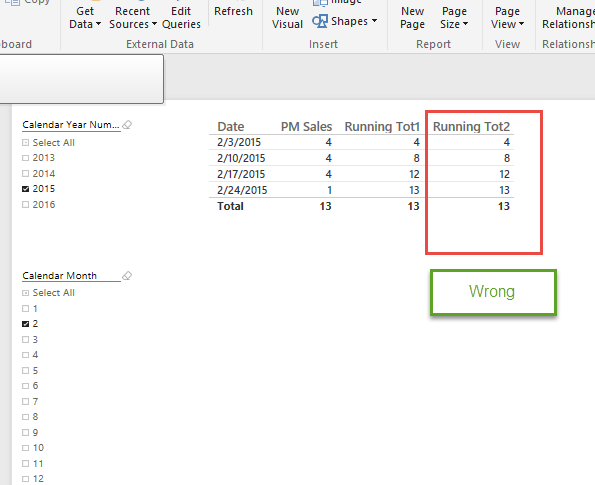
After various tests, I found a solution. :smileyvery-happy:
Running Tot2 = SUMX(FILTER(ALLSELECTED(DimTime[Date]),DimTime[Date] <= MAX((DimTime[Date]))),[Running Tot1])


5 Replies
 leonardmurphy
Skilled Sharer
You didn't say what you're expecting to see. I imagine you want [running tot2] to be a date behind [running tot1]. In other words, 2/3 would be blank, 2/10 would be 4, 2/17 would be 8 and 2/24 would be 12. Is that right?