Forum Discussion
DAX Function for 'Customers also bought'
- 9 years ago
Hi JosephJC
A Basket Analysis pattern will work for this.
http://www.daxpatterns.com/basket-analysis/
Here's a dummy example pbix
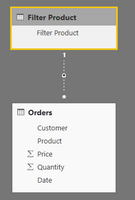
First create a 'Filter Product' table with an inactive relationship with your Orders table:
You use the 'Filter Product' table to select the product(s) to be analysed.
Then, assuming you have created your base measures for Quantity/Price etc, you create 'basket analysis' measures with this pattern (taken from DAX Patterns):
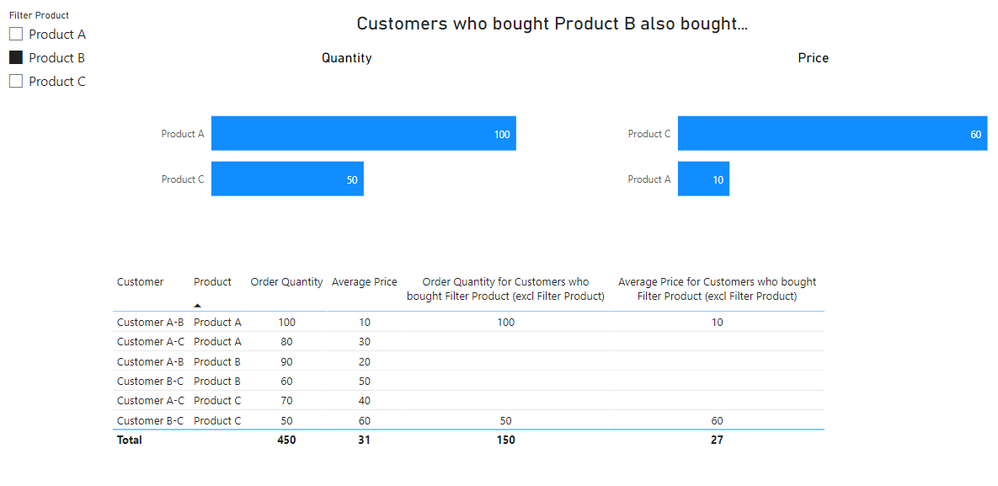
Order Quantity for Customers who bought Filter Product = CALCULATE ( [Order Quantity], CALCULATETABLE ( SUMMARIZE ( Orders, Orders[Customer] ), ALL ( Orders[Product] ), USERELATIONSHIP ( Orders[Product], 'Filter Product'[Filter Product] ) ) )This measure will return the Order Quantity for any Products purchased by Customers who purchased the products selected in 'Filter Product'.
Hopefully this or something similar meets your needs.
Cheers,
Owen
I want the filter production selection that i make on the slicer to not show up on table that i return afterwards.
E.g. i want to see all OTHER products in the baskets that contain product X , but not show product X itself.
Right now when i click for example "pants", It might say
Pants : 5
Socks : 3
Shoes : 2
Hats : 1
I want it to just say
Socks : 3
Shoes : 2
Hats : 1
(Product X is actually going to be a long selection in my model, but should be similar solution)
Hi,
Just for my information, why do you not want to see Pants: 5? Also, i think the way to depict data is in the form of a matrix visual.
- AlexaderMilland4 years ago
Helper III
Hi Ashish,
2 reasons mainly.
- My actual model is not just a selection of brands, it's a selection of 100 products compared to the remaining 50.000, so it might clutter up.
- It's going to be a comparrison between 100 products and another 100 products, so it should be easier to compare if the selected products themselves do not appear.