cancel
Showing results for 
Search instead for 
Did you mean: 

View all the Fabric Data Days sessions on demand. View schedule

Reply
Anonymous
Not applicable

DAX Create column LAST status based on MAX date by Id

Hi,


I am having trouble with an already discussed topic in here but I have a slightly different version. My data structure is the following one: 

idvalueDate entered
1y10/12/2018
1x10/13/2018
2x10/12/2018
2z10/13/2018
2y10/16/2018

I want to add one new column which should have the latest Value per ID on each row. The solution should work when I apply the explicit filter on the Date entered.

I got the following working code already (This calculates me the max Date) :

max date = 
var mind=MINX(ALLSELECTED('calendar'),'calendar'[Date]) 
var maxd=MAXX(ALLSELECTED('calendar'),'calendar'[Date])   
return CALCULATE(MAX('Table 2'[dateentered]), FILTER(ALL('Table 2'), 'Table 2'[id]=MIN('Table 2'[id]) && 'Table 2'[dateentered]>=mind && 'Table 2'[dateentered]<=maxd))

 Now I want to return the latest vale of the max Date. Therefore I got the following code but the Lookupvalue expression doesn't work because I have duplicates in the date entered column. Can someone please help me which expression I should use instead.

max value = LOOKUPVALUE('Table 2'[value],'Table 2'[dateentered],[max date])

 The result should be the following one:

idvaluedate enteredLatest DateLatest Value
1y10/12/201810/13/2018X
1x10/13/201810/13/2018X
2x10/12/201810/16/2018y
2z10/13/201810/16/2018y
2y10/16/201810/16/2018y

Thank you very much

1 ACCEPTED SOLUTION
richbenmintz
Resident Rockstar
Resident Rockstar

Hi @Anonymous,


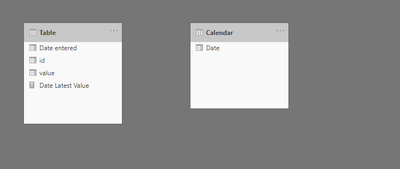
Assuming you data Model looks like this

richbenmintz_0-1596203844201.png

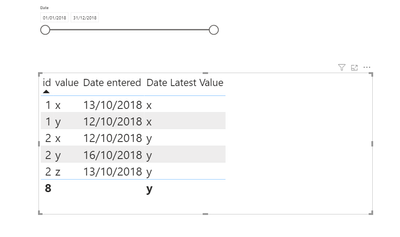
The following Measure provides the expected results

Date Latest Value = 
var datesSelected = VALUES('Calendar'[Date])
var tid = VALUES('Table'[id])
var maxDate = CALCULATE(MAX('Table'[Date entered]),ALL('Table'), 'Table'[Date entered] in datesSelected, 'Table'[id] in tid)
var maxValue = CALCULATE(max('Table'[value]), FILTER(ALL('Table'), 'Table'[Date entered] = maxDate && 'Table'[id] in tid))
return maxValue


richbenmintz_1-1596203898751.png

pbix file here, sample.pbix 

I Hope this helps,


Richard


Did I answer your question? Mark my post as a solution!
Did my answers help arrive at a solution? Give it a kudos by clicking the Thumbs Up!


I hope this helps,
Richard

Did I answer your question? Mark my post as a solution! Kudos Appreciated!

Proud to be a Super User!


View solution in original post

4 REPLIES 4
richbenmintz
Resident Rockstar
Resident Rockstar

Hi @Anonymous,


Assuming you data Model looks like this

richbenmintz_0-1596203844201.png

The following Measure provides the expected results

Date Latest Value = 
var datesSelected = VALUES('Calendar'[Date])
var tid = VALUES('Table'[id])
var maxDate = CALCULATE(MAX('Table'[Date entered]),ALL('Table'), 'Table'[Date entered] in datesSelected, 'Table'[id] in tid)
var maxValue = CALCULATE(max('Table'[value]), FILTER(ALL('Table'), 'Table'[Date entered] = maxDate && 'Table'[id] in tid))
return maxValue


richbenmintz_1-1596203898751.png

pbix file here, sample.pbix 

I Hope this helps,


Richard


Did I answer your question? Mark my post as a solution!
Did my answers help arrive at a solution? Give it a kudos by clicking the Thumbs Up!


I hope this helps,
Richard

Did I answer your question? Mark my post as a solution! Kudos Appreciated!

Proud to be a Super User!


mahoneypat
Microsoft Employee
Microsoft Employee

Please try this expression


Latest Value Measure =
VAR latestdate =
    CALCULATE (
        MAX ( Latest[date entered] ),
        ALL ( Latest ),
        VALUES ( Latest[id] )
    )
RETURN
    CALCULATE (
        MIN ( Latest[value] ),
        ALL ( Latest ),
        VALUES ( Latest[id] ),
        Latest[date entered] = latestdate
    )


If this works for you, please mark it as the solution.  Kudos are appreciated too.  Please let me know if not.

Regards,

Pat


Did I answer your question? Mark my post as a solution! Kudos are also appreciated!

To learn more about Power BI, follow me on Twitter or subscribe on YouTube.


@mahoneypa HoosierBI on YouTube


amitchandak
Super User
Super User

@Anonymous , Try

lastnonblankvalue(Table[Date entered], max(Table[value]))


The option are use it with all except with ID

calculate(lastnonblankvalue(Table[Date entered], max(Table[value])),allexcept(Table[ID]))

Share with Power BI Enthusiasts: Full Power BI Video (20 Hours) YouTube
Microsoft Fabric Series 60+ Videos YouTube
Microsoft Fabric Hindi End to End YouTube
Greg_Deckler
Community Champion
Community Champion

@Anonymous - Use MAXX or MINX instead of LOOKUPVALUE. Basically this is the Lookup Min/Max pattern found here: https://community.powerbi.com/t5/Quick-Measures-Gallery/Lookup-Min-Max/m-p/985814#M434


Follow on LinkedIn
@ me in replies or I'll lose your thread!!!
Instead of a Kudo, please vote for this idea
Become an expert!: Enterprise DNA
External Tools: MSHGQM
YouTube Channel!: Microsoft Hates Greg
Latest book!:
DAX For Humans

DAX is easy, CALCULATE makes DAX hard...

Helpful resources

Announcements
November Power BI Update Carousel

Power BI Monthly Update - November 2025

Check out the November 2025 Power BI update to learn about new features.

Fabric Data Days Carousel

Fabric Data Days

Advance your Data & AI career with 50 days of live learning, contests, hands-on challenges, study groups & certifications and more!

FabCon Atlanta 2026 carousel

FabCon Atlanta 2026

Join us at FabCon Atlanta, March 16-20, for the ultimate Fabric, Power BI, AI and SQL community-led event. Save $200 with code FABCOMM.

Top Solution Authors
Top Kudoed Authors