Forum Discussion

Anonymous's avatar
Anonymous
Not applicable
6 years ago

DATEDIFF with a Rankx column

Hi All! I'm not terribly experienced with nesting functions and I'm brain locked on how best to tackle this issue. I need to calculate the datediff for [Pay_Date] between [Rank_Order] in this data example. 


Here is the code I used to create the Rank_Order measure for reference.


Rank_Order =
VAR CurrentCustomer = Max(orders_grouped_mnth_dif[customer_id])
RETURN
RANKX(
FILTER(ALLSELECTED(orders_grouped_mnth_dif),orders_grouped_mnth_dif[customer_id] = CurrentCustomer),
CALCULATE(SUM(orders_grouped_mnth_dif[id])),
,ASC,Dense)


My plan is to use this to do further analysis on how quickly customers place the second and third order after placing their first. 


Thank you!
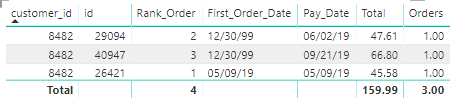


Data Example

Ideally, the data output would be something like this:


Row 1 - Days_Diff would equal 24

Row 2 - Days_Diff would equal 111

Row 3 - Days_Diff would equal 0 (being Rank_Order 1)

5 Replies

  • VasTg's avatar
    VasTg
    Icon for Memorable Member rankMemorable Member

    Anonymous 


    I believe you are looking to create a column with number of days difference.


    Try this.

     
    Column =
    VAR CURR_CUSTOMER = 'Table'[Customer ID]
    VAR CURR_DATE = 'Table'[Pay_date]
    VAR PREV_DATE = CALCULATE(MAX('Table'[First Order Date]),FILTER('Table','Table'[Rank]=1&&'Table'[Customer ID]=CURR_CUSTOMER))
    RETURN DATEDIFF(PREV_DATE,CURR_DATE,DAY)
     
    If it helps, mark it as a solution.
    Kudos are good too.


    • Anonymous's avatar
      Anonymous
      Not applicable

      Thank you VERY MUCH for taking the time to respond! Much appreciated! Using your approach, I implemented your code and PBI is has raised a circular reference error. Details below...might there be an easy fix? Thank you!


      Number_of_days =
      VAR CURR_CUSTOMER = 'orders_grouped_mnth_dif'[customer_id]
      VAR CURR_DATE = 'orders_grouped_mnth_dif'[Pay_date]
      VAR PREV_DATE = CALCULATE(MAX('orders_grouped_mnth_dif'[First_Order_Date]),FILTER('orders_grouped_mnth_dif','orders_grouped_mnth_dif'[Rank_Order]=1&&'orders_grouped_mnth_dif'[customer_id]=CURR_CUSTOMER))
      RETURN DATEDIFF(PREV_DATE,CURR_DATE,DAY)
       
       
      Circular Reference Error
      • VasTg's avatar
        VasTg
        Icon for Memorable Member rankMemorable Member

        Anonymous 


        Did you create the Rank column just to get the number of days differences or do you need that for some other calculations?


        If the rank was created to get the no of days differences, I would delete it and use the below DAX to get the days differences.


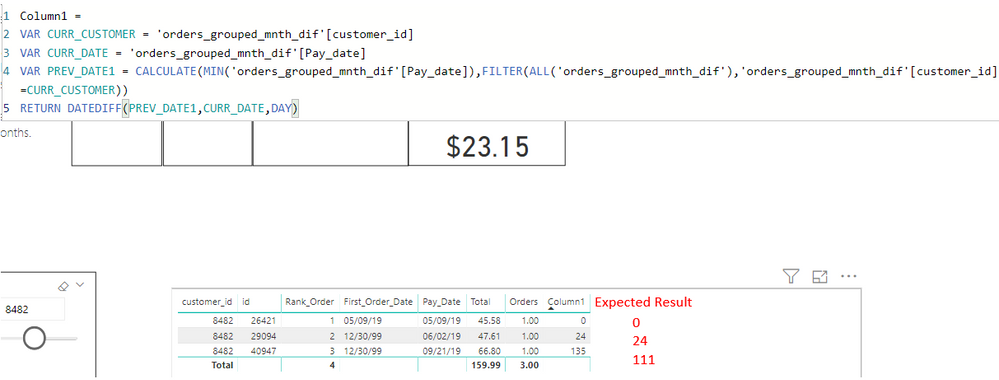
        Column =
        VAR CURR_CUSTOMER = 'Table'[Customer ID]
        VAR CURR_DATE = 'Table'[Pay_date]
        VAR PREV_DATE1 = CALCULATE(MIN('Table'[Pay_date]),FILTER(ALL('Table'),'Table'[Customer ID]=CURR_CUSTOMER))
        RETURN DATEDIFF(PREV_DATE1,CURR_DATE,DAY)
  • I think EARLIER should help you here


    https://community.powerbi.com/t5/Desktop/Explanation-of-the-EARLIER-formula/td-p/529469

    https://docs.microsoft.com/en-us/dax/earlier-function-dax


    Appreciate your Kudos. In case, this is the solution you are looking for, mark it as the Solution. In case it does not help, please provide additional information and mark me with @
    Thanks.

    My Recent Blog - https://community.powerbi.com/t5/Community-Blog/Comparing-Data-Across-Date-Ranges/ba-p/823601