Don't miss your chance to take the Fabric Data Engineer (DP-600) exam for FREE! Find out how by watching the DP-600 session on-demand now through April 28th.
Learn moreJoin the FabCon + SQLCon recap series. Up next: Power BI, Real-Time Intelligence, IQ and AI, and Data Factory take center stage. All sessions are available on-demand after the live show. Register now
So I've been struggling with this for a few weeks, but now I can't even get a custom visualization to behave, so I'm fed up and wanted to reach out for a solution. Here's the problem. By the way I've tried starting from fresh on a new report, and still experience the same problems.
Around 2 months ago, custom visuals started misbehaving in the "Format" window. It was mostly just an annoyance; the main area was when setting colors of various things, I'd choose the color for the option, and it would "jump" to a different color. Green would turn to grey, etc. The only way to override it was to use HTML to override the color.
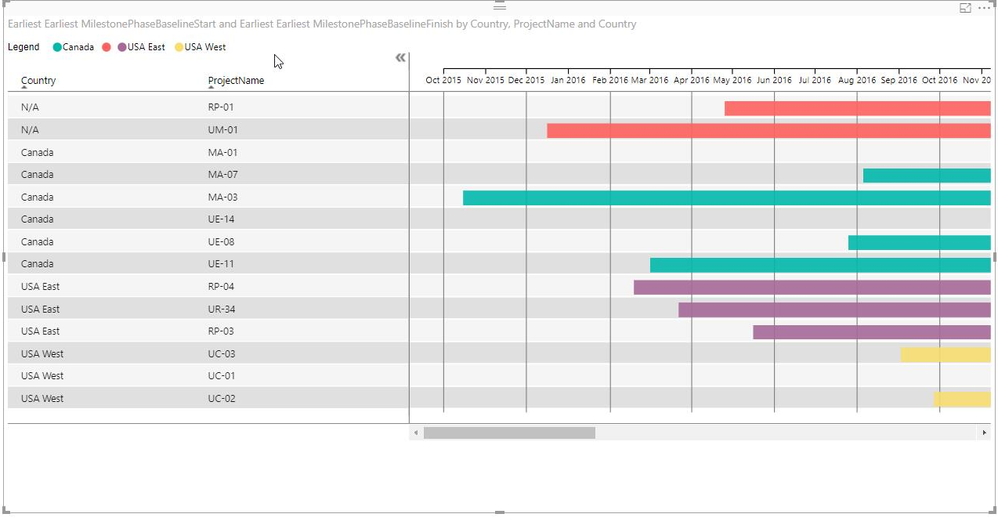
Today, I was trying to edit a MAQ Gantt visual. When I drop in my Category and my Start & End dates, the visualization shows up, but doesn't display the time as a bar. Just little blips on either end of a non-existant bar. When I add sub-tasks under Category, the whole visual disappears (except the timeline). When I go to the Format window and try to turn "Category" on/off, it immediately reverts back to "on". When I try to change any other option in Format, it jumps back to where it was originally.
This is really aggrevating and I am under a lot of pressure here. I've tried doing a new report, I've tried downloading an update of the custom visual, etc.
I want to note... this is NOT JUST the MAQ Gantt visual. These problems are with ANY custom visual.
Please help!
I face the same issue while trying to create an export report for leogreen with data from my workflow charts. I tried all updates - they simply don't work. Probably they need some time to fix it? Did you get an answer from team?
Hi @Anonymous,
Kindly update your Power BI desktop to the latest version and try again.
Reagrds,
Frank
I'm already running on the November 21 release.
I figured out the second part of my problem; it's a problem with the MAQ Gantt chart visualization. If there is a "blank" in a column in the Category field, then it kicks out the whole visualization. I had to add filters to remove null value rows, and it loaded, but the problem is that kills the schedule and removes whole lines.
That doesn't fix the color/setting flip-flop issue.
Hi @Anonymous,
Again, I cannoy reproduce your issue here. You can create a support ticket for help here.
Regards,
Frank
I've submitted a ticket.
Check out the April 2026 Power BI update to learn about new features.
If you have recently started exploring Fabric, we'd love to hear how it's going. Your feedback can help with product improvements.
A new Power BI DataViz World Championship is coming this June! Don't miss out on submitting your entry.
| User | Count |
|---|---|
| 43 | |
| 35 | |
| 35 | |
| 21 | |
| 15 |
| User | Count |
|---|---|
| 63 | |
| 58 | |
| 28 | |
| 27 | |
| 25 |