cancel
Showing results for 
Search instead for 
Did you mean: 

The Power BI Data Visualization World Championships is back! Get ahead of the game and start preparing now! Learn more

Reply
BellaM7
Frequent Visitor

Custom Tooltip Page Appears in Other Pages

Hi All~


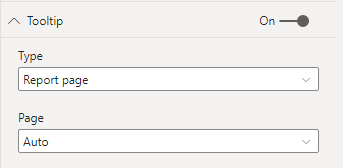
I have a page with a custom tooltip , which I want to be shown in one report page. However the tooltip is apprearing in all the other pages when the tooltip setting is as follows:

BellaM7_0-1633633410493.png


I do  not to want to change the tooltip to "default" in the other pages. Is there a way to have my custom tooltip page show up in the desired report page only and not accross the other pages? 


Thank you,

BM

1 ACCEPTED SOLUTION
v-henryk-mstf
Community Support
Community Support

Hi @BellaM7 ,


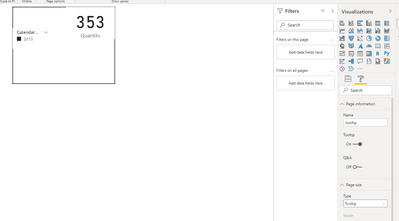
According to your description, you can create a separate page for custom tooltip, and then you can set visual to use the specified tooltip. visual without specifying will use the default tooltip, if you don't want to show it, you can just turn this feature off. I have done some tests and the reference is as follows:


vhenrykmstf_0-1633935089336.png


vhenrykmstf_1-1633935182978.pngvhenrykmstf_2-1633935230978.png


If the problem is still not resolved, please provide detailed error information and let me know immediately. Looking forward to your reply.


Best Regards,
Henry


If this post helps, then please consider Accept it as the solution to help the other members find it more quickly.

View solution in original post

3 REPLIES 3
v-henryk-mstf
Community Support
Community Support

Hi @BellaM7 ,


According to your description, you can create a separate page for custom tooltip, and then you can set visual to use the specified tooltip. visual without specifying will use the default tooltip, if you don't want to show it, you can just turn this feature off. I have done some tests and the reference is as follows:


vhenrykmstf_0-1633935089336.png


vhenrykmstf_1-1633935182978.pngvhenrykmstf_2-1633935230978.png


If the problem is still not resolved, please provide detailed error information and let me know immediately. Looking forward to your reply.


Best Regards,
Henry


If this post helps, then please consider Accept it as the solution to help the other members find it more quickly.

KNP
Super User
Super User

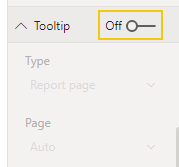
@BellaM7 - If you don't want the default tooltip and don't have a specific page to specify you can just turn it off.


KNP_0-1633635231302.png


Have I solved your problem?
Please click Accept as Solution so I don't keep coming back to this post, oh yeah, others may find it useful also ;).
xOIEmaj

If you found this post helpful, please give Kudos.
It gives me a sense of instant gratification and, if you give me Kudos enough times, magical unicorns will appear on your screen.
If you find my signature vaguely amusing, please give Kudos.
image
fabric-SUbadge
Proud to be a Super User!
sirlanceohlott
Advocate III
Advocate III

@BellaM7 ,

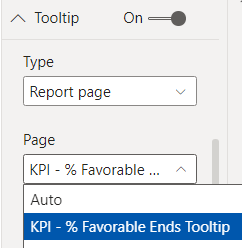
I might be misunderstanding the issue, but if you are wanting to utilize a specific tooltip you've created you can select it from the page dropdown menu, instead of allowing it to be set to auto.


sirlanceohlott_0-1633634163498.png


Helpful resources

Announcements
Power BI DataViz World Championships

Power BI Dataviz World Championships

The Power BI Data Visualization World Championships is back! Get ahead of the game and start preparing now!

November Power BI Update Carousel

Power BI Monthly Update - November 2025

Check out the November 2025 Power BI update to learn about new features.

FabCon Atlanta 2026 carousel

FabCon Atlanta 2026

Join us at FabCon Atlanta, March 16-20, for the ultimate Fabric, Power BI, AI and SQL community-led event. Save $200 with code FABCOMM.