cancel
Showing results for 
Search instead for 
Did you mean: 

View all the Fabric Data Days sessions on demand. View schedule

Reply
navrichard
New Member

Custom QTR and sum by running year

Hi team,


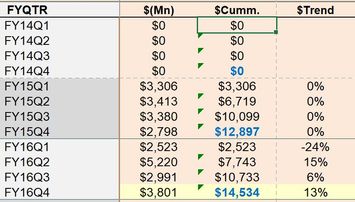
I have a column that is connected to a SSAS cube and has multiple dimensions and measures and we have a custom quarter already built in, but i need to have a running QTR total by Fiscal Yr. and also calculate the % trend. any help will be much appreciated, havnt worked much on PBi, a step by step guide will really help to learn and share.


Cumm_total.JPG


3 REPLIES 3
v-danhe-msft
Microsoft Employee
Microsoft Employee

Hi @navrichard,

Based on my test, you could refer to below steps:

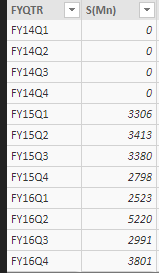
Your sample data:

1.PNG

Create three calculated columns:

Mid2 = MID('Table1'[FYQTR],3,2)
Cumm = CALCULATE(SUM(Table1[S(Mn)]),FILTER('Table1','Table1'[FYQTR]<=EARLIER(Table1[FYQTR])&&'Table1'[Mid2]=EARLIER(Table1[Mid2])))
Trend = var a=SUBSTITUTE('Table1'[FYQTR],MID('Table1'[FYQTR],3,2),[Mid2]-1)
var b=CALCULATE(SUM('Table1'[Cumm]),FILTER('Table1','Table1'[FYQTR]=a))
var c= IF(b=BLANK(),BLANK(),IF(Table1[Cumm]=0,0,([Cumm]-b)/b))+0
return IF([Cumm]=0,BLANK(),c)

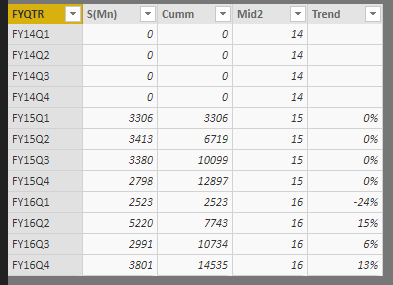
Result:

1.PNG

You could also download the pbix file to have a view.


Regards,

Daniel He


Community Support Team _ Daniel He
If this post helps, then please consider Accept it as the solution to help the other members find it more quickly.
v-danhe-msft
Microsoft Employee
Microsoft Employee

Hi @navrichard,

You could create a new measure:

Measure = CALCULATE(SUM(YourTable[$Cumm.]),FILTER(ALL(YourTable),'YourTable'[$Cumm.]<=MAX('YourTable'[$Cumm.])))
% trend = CALCULATE(SUM(YourTable[%Trend]),FILTER(ALL(YourTable),'YourTable'[%Trend]<=MAX('YourTable'[%Trend])))

Regards,

Daniel He

Community Support Team _ Daniel He
If this post helps, then please consider Accept it as the solution to help the other members find it more quickly.

Hi Daniel


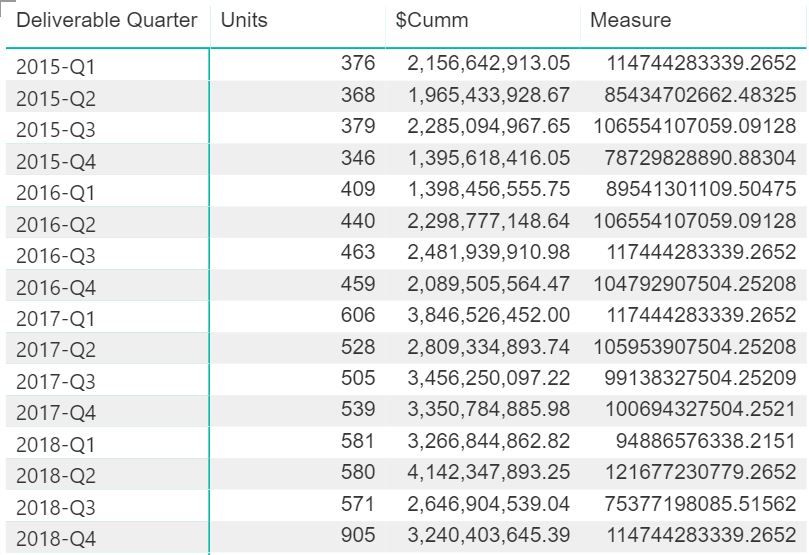
Thank you for your reply, but unfortunately the numbers are incorrect as seen in the first image


Image.JPG


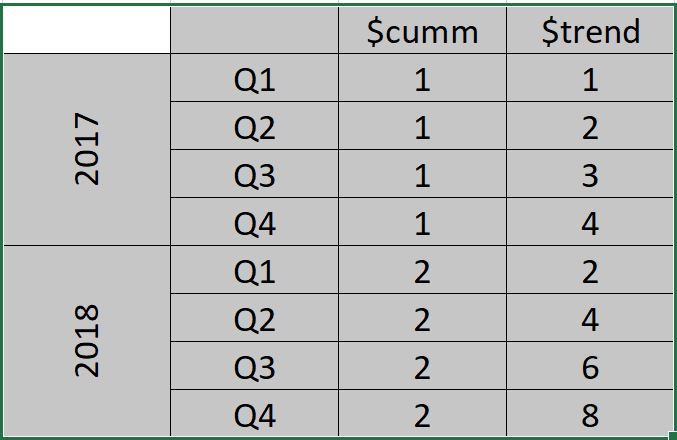
What i Ma trying to do is as below


image2.JPG


Helpful resources

Announcements
November Power BI Update Carousel

Power BI Monthly Update - November 2025

Check out the November 2025 Power BI update to learn about new features.

Fabric Data Days Carousel

Fabric Data Days

Advance your Data & AI career with 50 days of live learning, contests, hands-on challenges, study groups & certifications and more!

FabCon Atlanta 2026 carousel

FabCon Atlanta 2026

Join us at FabCon Atlanta, March 16-20, for the ultimate Fabric, Power BI, AI and SQL community-led event. Save $200 with code FABCOMM.

Top Solution Authors
Top Kudoed Authors