Join us at FabCon Atlanta from March 16 - 20, 2026, for the ultimate Fabric, Power BI, AI and SQL community-led event. Save $200 with code FABCOMM.
Register now!Get Fabric Certified for FREE during Fabric Data Days. Don't miss your chance! Request now
Solved! Go to Solution.
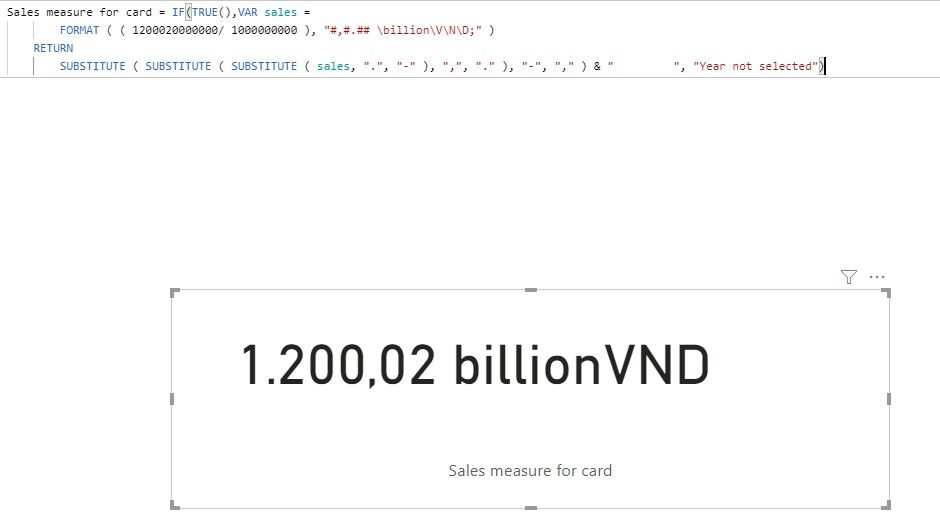
Hi @phuonganhtdinh ,
We can also change the measure as following to meet your requirement:
Update formula: consider it may have negative value, we use "@" as a temp char instead of previous "-"
Sales measure for card =
IF (
ISFILTERED ( Dim_Date ),
VAR sales =
FORMAT ( ( [Sales] / 1000000000 ), "#,#.## \billion\V\N\D;" )
RETURN
SUBSTITUTE ( SUBSTITUTE ( SUBSTITUTE ( sales, ".", "@" ), ",", "." ), "@", "," ) & " ",
"Year not selected"
)
By the way, PBIX file as attached.
Best regards,
Try "Standard" format. Although this format is not visible in the list by default, you can still overwrite it as the display format.
For integers use custom format #,0.
Hi @phuonganhtdinh ,
We can also change the measure as following to meet your requirement:
Update formula: consider it may have negative value, we use "@" as a temp char instead of previous "-"
Sales measure for card =
IF (
ISFILTERED ( Dim_Date ),
VAR sales =
FORMAT ( ( [Sales] / 1000000000 ), "#,#.## \billion\V\N\D;" )
RETURN
SUBSTITUTE ( SUBSTITUTE ( SUBSTITUTE ( sales, ".", "@" ), ",", "." ), "@", "," ) & " ",
"Year not selected"
)
By the way, PBIX file as attached.
Best regards,
Why if you use a comma in the format to separate thousands, why is there a period for the thousands separator?
Great answer @v-lid-msft
I've been searching for this solution for a while. It is a witty one. Thanks for sharing 😉
Check out this video
Documentation: https://docs.microsoft.com/en-us/power-bi/desktop-custom-format-strings
Did I answer your question? Mark my post as a solution!
Appreciate with a kudos 🙂
Check out the November 2025 Power BI update to learn about new features.
Advance your Data & AI career with 50 days of live learning, contests, hands-on challenges, study groups & certifications and more!