This time we’re going bigger than ever. Fabric, Power BI, SQL, AI and more. We're covering it all. You won't want to miss it.
Learn moreLevel up your Power BI skills this month - build one visual each week and tell better stories with data! Get started
I'm trying to concatenate a [Full Title] column, combining values from a [Title] column and a [Subtitle] column. That bit seems pretty easy; "= [Title] & " " & [Subtitle]"
But some of the books don't have subtitles, so the concatenated column throws up a null.
How can I get the column to display the information it does have, even when the second value is missing?
Solved! Go to Solution.
I resolved the issue using Column From Examples to create a combined column 🙂
Thanks for the help!
Hi @sgross,
Use this formula
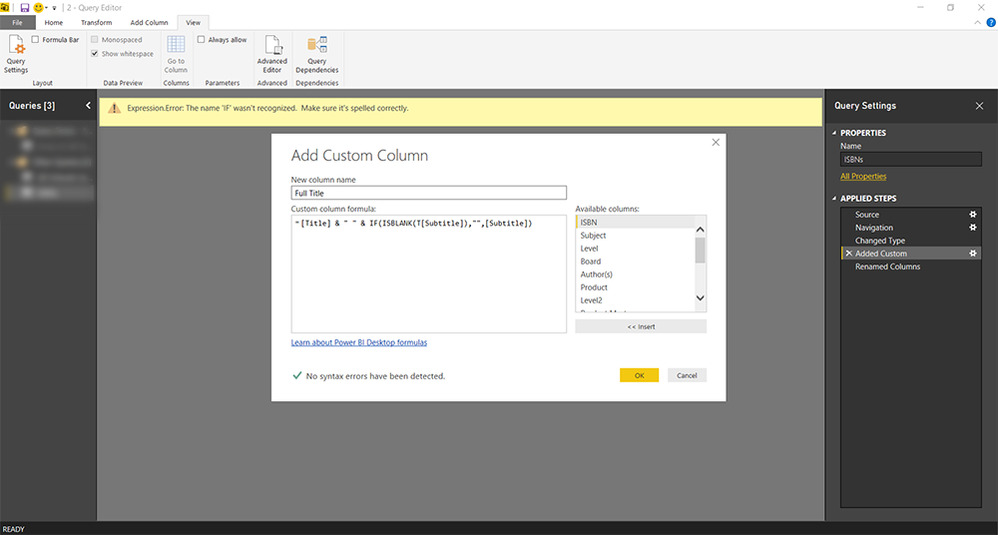
= [Title] & " " & IF(ISBLANK(T[Subtitle]),"",[Subtitle])
Regards,
MFelix
Regards
Miguel Félix
Proud to be a Super User!
Check out my blog: Power BI em PortuguêsHmm... Using that exact forumula I'm receiving an Expression Error:
Expression.Error: The name 'IF' wasn't recognized. Make sure it's spelled correctly.
Regards
Miguel Félix
Proud to be a Super User!
Check out my blog: Power BI em PortuguêsI'm sorry, I don't understand what you mean. Here's a screenshot of what I'm looking at right now in the Query Editor:
I resolved the issue using Column From Examples to create a combined column 🙂
Thanks for the help!
Check out the April 2026 Power BI update to learn about new features.
Sign up to receive a private message when registration opens and key events begin.
If you have recently started exploring Fabric, we'd love to hear how it's going. Your feedback can help with product improvements.
| User | Count |
|---|---|
| 38 | |
| 29 | |
| 28 | |
| 20 | |
| 18 |
| User | Count |
|---|---|
| 66 | |
| 36 | |
| 30 | |
| 25 | |
| 24 |