Join us at FabCon Atlanta from March 16 - 20, 2026, for the ultimate Fabric, Power BI, AI and SQL community-led event. Save $200 with code FABCOMM.
Register now!View all the Fabric Data Days sessions on demand. View schedule
Hello,
I have a problem with the cumulative values.
I have built a measure that allows me to display the cumulative values month by month.
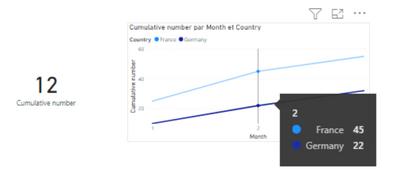
The question is: I would like, when I filter on a month, that the map gives me the value of the cumulative measure for this month, and not the value of this month not cumulated
Thanks in advance for your help!
87 is the sum of the last cumulated values of France and Germany
When I click on the curve for Germany in the second month, I would like it to show me 22 instead of 12 (which is the non-cumulative value of the second month)
My measure is
Solved! Go to Solution.
Hi @Thomas94401
Try this:
Cumulative number =
VAR _Max =
MAX ( 'Table'[Month] )
RETURN
CALCULATE (
SUM ( 'Table'[Number] ),
FILTER ( ALL ( 'Table'), 'Table'[Month] <= _Max )
)
If this post helps, please consider accepting it as the solution to help the other members find it more quickly.
Appreciate your Kudos!!
LinkedIn: www.linkedin.com/in/vahid-dm/
Hi @Thomas94401
Try this:
Cumulative number =
VAR _Max =
MAX ( 'Table'[Month] )
RETURN
CALCULATE (
SUM ( 'Table'[Number] ),
FILTER ( ALL ( 'Table'), 'Table'[Month] <= _Max )
)
If this post helps, please consider accepting it as the solution to help the other members find it more quickly.
Appreciate your Kudos!!
LinkedIn: www.linkedin.com/in/vahid-dm/
Check out the November 2025 Power BI update to learn about new features.
Advance your Data & AI career with 50 days of live learning, contests, hands-on challenges, study groups & certifications and more!