FabCon is coming to Atlanta
Join us at FabCon Atlanta from March 16 - 20, 2026, for the ultimate Fabric, Power BI, AI and SQL community-led event. Save $200 with code FABCOMM.
Register now!- Power BI forums
- Get Help with Power BI
- Desktop
- Service
- Report Server
- Power Query
- Mobile Apps
- Developer
- DAX Commands and Tips
- Custom Visuals Development Discussion
- Health and Life Sciences
- Power BI Spanish forums
- Translated Spanish Desktop
- Training and Consulting
- Instructor Led Training
- Dashboard in a Day for Women, by Women
- Galleries
- Data Stories Gallery
- Themes Gallery
- Contests Gallery
- QuickViz Gallery
- Quick Measures Gallery
- Visual Calculations Gallery
- Notebook Gallery
- Translytical Task Flow Gallery
- TMDL Gallery
- R Script Showcase
- Webinars and Video Gallery
- Ideas
- Custom Visuals Ideas (read-only)
- Issues
- Issues
- Events
- Upcoming Events
Get Fabric Certified for FREE during Fabric Data Days. Don't miss your chance! Request now
- Power BI forums
- Forums
- Get Help with Power BI
- Desktop
- Cubes (SSAS) Date Filters and PowerBI
- Subscribe to RSS Feed
- Mark Topic as New
- Mark Topic as Read
- Float this Topic for Current User
- Bookmark
- Subscribe
- Printer Friendly Page

- Mark as New
- Bookmark
- Subscribe
- Mute
- Subscribe to RSS Feed
- Permalink
- Report Inappropriate Content
Cubes (SSAS) Date Filters and PowerBI
Hello,
Our company is starting to use cubes a lot and one of the issues is date filtering. When we connect to the cube in SSAS the date field seems to be treated as string and not an actual field, thus losing the innate date filtering functionality (is on or before, is before, etc.)
After a bit of research, I was able to change the properties of the date attribute in the dimension by updating ValueColumn to Date datatype.
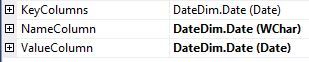
Now I have two fields that come up in the list of attributes for the Date Dimension, one for Date (string) and one for Date.Value (date datatype). 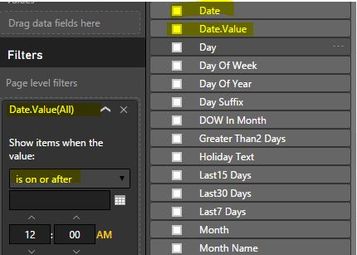
I just wanted to ask if this is by design? Is there a way to keep that just one date field but look at the ValueColumn instead of now having two fields? Is there another way to manage this?
Thank you!

- Mark as New
- Bookmark
- Subscribe
- Mute
- Subscribe to RSS Feed
- Permalink
- Report Inappropriate Content
Hi @chasedq,
I am trying to add a trendline to a bar-chart where the x-axis is Months (Apr, May, Jun,..). And I am unable to do so. I came across your post and found it helpful. How did you change the properties of the date attribute? Where do you go to get to this
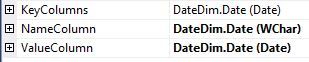
I am new Power BI user. And I am not sure how to get here.
Thanks!!

- Mark as New
- Bookmark
- Subscribe
- Mute
- Subscribe to RSS Feed
- Permalink
- Report Inappropriate Content
Is the actual key of the Date dimension a different field? A common approach to these types of tables it to use an integer column and then things like the "Date" field are there but aren't actually used for the FK relationships.
And, where did you change the data type? In the source, data view, query view, etc.?
- Mark as New
- Bookmark
- Subscribe
- Mute
- Subscribe to RSS Feed
- Permalink
- Report Inappropriate Content
Yes, the actual key is a surrogate key called DateDimID. Good suggestion, I'll try this out and get back to you.
The datatype was already a datetime field from the source so I didn't really change the datatype per se, just the properties of the dimensions.

- Mark as New
- Bookmark
- Subscribe
- Mute
- Subscribe to RSS Feed
- Permalink
- Report Inappropriate Content
what is the solution to this issue.


- Mark as New
- Bookmark
- Subscribe
- Mute
- Subscribe to RSS Feed
- Permalink
- Report Inappropriate Content
I have also been having this issue (only saw this post now), using date.value seems to solve most of my issues around date functionality, does seem a bit silly though that this does this, so i dont think it needs a solution but it does just create unnecessary complexity, unless someone can explain why this is happening?
If I took the time to answer your question and I came up with a solution, please mark my post as a solution and /or give kudos freely for the effort 🙂 Thank you!
Proud to be a Super User!
- Mark as New
- Bookmark
- Subscribe
- Mute
- Subscribe to RSS Feed
- Permalink
- Report Inappropriate Content
Hi did you find any solutions to this. Dont want 2 fields. Any way to hide one field
- Mark as New
- Bookmark
- Subscribe
- Mute
- Subscribe to RSS Feed
- Permalink
- Report Inappropriate Content
Just thought I'd bump this up a bit 🙂
- Mark as New
- Bookmark
- Subscribe
- Mute
- Subscribe to RSS Feed
- Permalink
- Report Inappropriate Content
Happy Friday. Just another quick bump.


- Mark as New
- Bookmark
- Subscribe
- Mute
- Subscribe to RSS Feed
- Permalink
- Report Inappropriate Content
@chasedq, this issue can be reproduced on my side. I will report it internally to ask senior engineers for help. I will post back once I got any updates.
- Mark as New
- Bookmark
- Subscribe
- Mute
- Subscribe to RSS Feed
- Permalink
- Report Inappropriate Content
Helpful resources

Power BI Monthly Update - November 2025
Check out the November 2025 Power BI update to learn about new features.

Fabric Data Days
Advance your Data & AI career with 50 days of live learning, contests, hands-on challenges, study groups & certifications and more!

FabCon Atlanta 2026
Join us at FabCon Atlanta, March 16-20, for the ultimate Fabric, Power BI, AI and SQL community-led event. Save $200 with code FABCOMM.


