Join us at FabCon Atlanta from March 16 - 20, 2026, for the ultimate Fabric, Power BI, AI and SQL community-led event. Save $200 with code FABCOMM.
Register now!Vote for your favorite vizzies from the Power BI Dataviz World Championship submissions. Vote now!
Hi All,
Can some one help me to solve the below Problem. Not sure this can be done using BI. Guidance would be much appreciated.
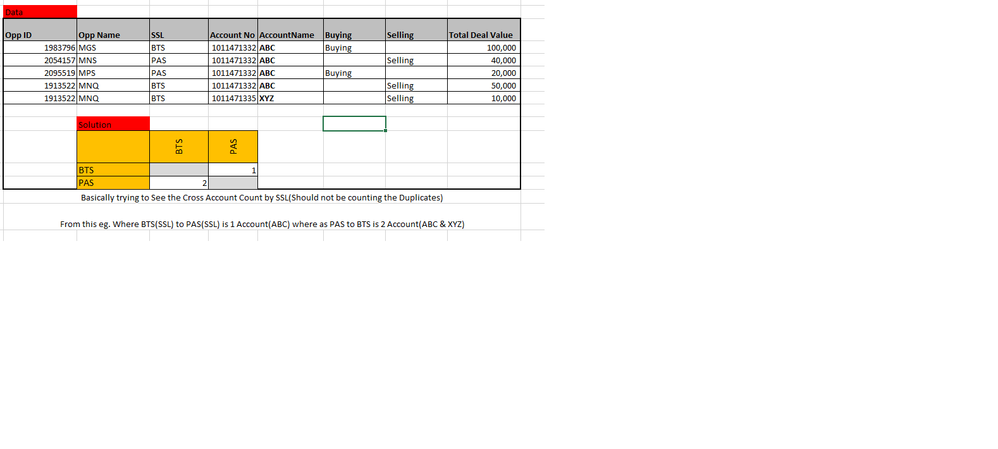
Basically trying to See the Cross Account Count by SSL(Should not be counting the Duplicates)
From this eg. Where BTS(SSL) to PAS(SSL) is 1 Account(ABC) where as PAS(SSL)to BTS(SSL) is 2 Account(ABC & XYZ)
Sample data
| Opp ID | Opp Name | SSL | Account No | AccountName | Buying | Selling | Total Deal Value |
| 1983796 | MGS | BTS | 1011471332 | ABC | Buying | 100,000 | |
| 2054157 | MNS | PAS | 1011471332 | ABC | Selling | 40,000 | |
| 2095519 | MPS | PAS | 1011471332 | ABC | Buying | 20,000 | |
| 1913522 | MNQ | BTS | 1011471332 | ABC | Selling | 50,000 | |
| 1913522 | MNQ | BTS | 1011471335 | XYZ | Selling | 10,000 | |
| BTS | PAS | ||||||
| BTS | 1 | ||||||
| PAS | 2 | ||||||
| Basically trying to See the Cross Account Count by SSL(Should not be counting the Duplicates) | |||||||
| From this eg. Where BTS(SSL) to PAS(SSL) is 1 Account(ABC) where as PAS to BTS is 2 Account(ABC & XYZ) |
@RanjanThammaiah - Is there a reason for SSL to be in both rows and columns? I mean, it can be done with a disconnected table most likely but a simple table/matrix visual with SSL and the default distinct count of Account No provides the correct results.
@Greg_Deckler Thanks for the response, basically need to undersatnd the Cross metrix numbers.
I have many SSL Where in the above Eg. BTS to PAS. The greyed out shound not have any counts(0).
It should go from Columns to Row(BTS to PAS, PAS to BTS).
Hope i haven't explained it well.,
Regards,
Ranjan
Vote for your favorite vizzies from the Power BI World Championship submissions!
If you love stickers, then you will definitely want to check out our Community Sticker Challenge!
Check out the January 2026 Power BI update to learn about new features.
| User | Count |
|---|---|
| 56 | |
| 53 | |
| 40 | |
| 17 | |
| 16 |
| User | Count |
|---|---|
| 122 | |
| 108 | |
| 44 | |
| 32 | |
| 26 |