FabCon is coming to Atlanta
Join us at FabCon Atlanta from March 16 - 20, 2026, for the ultimate Fabric, Power BI, AI and SQL community-led event. Save $200 with code FABCOMM.
Register now!- Power BI forums
- Get Help with Power BI
- Desktop
- Service
- Report Server
- Power Query
- Mobile Apps
- Developer
- DAX Commands and Tips
- Custom Visuals Development Discussion
- Health and Life Sciences
- Power BI Spanish forums
- Translated Spanish Desktop
- Training and Consulting
- Instructor Led Training
- Dashboard in a Day for Women, by Women
- Galleries
- Data Stories Gallery
- Themes Gallery
- Contests Gallery
- QuickViz Gallery
- Quick Measures Gallery
- Visual Calculations Gallery
- Notebook Gallery
- Translytical Task Flow Gallery
- TMDL Gallery
- R Script Showcase
- Webinars and Video Gallery
- Ideas
- Custom Visuals Ideas (read-only)
- Issues
- Issues
- Events
- Upcoming Events
Get Fabric Certified for FREE during Fabric Data Days. Don't miss your chance! Request now
- Power BI forums
- Forums
- Get Help with Power BI
- Desktop
- Re: Creating measure that counts Widgets if their ...
- Subscribe to RSS Feed
- Mark Topic as New
- Mark Topic as Read
- Float this Topic for Current User
- Bookmark
- Subscribe
- Printer Friendly Page


- Mark as New
- Bookmark
- Subscribe
- Mute
- Subscribe to RSS Feed
- Permalink
- Report Inappropriate Content
Creating measure that counts Widgets if their Parts arrival date is only within the current month
Slightly complicated to explain, but it's a simple request actually! Lets say I am trying to build widgets. Each widget receives multiple "Bill of Materials" (think of it as parts for the widgets, split into multiple orders) in order to complete building the widget. What I'm trying to do is only count the widgets who's EARLIEST Bill Of Materials arrival date is within the current month. As an example, say I'm building Widget A and it has 3 BillOfMaterials with the first one arriving in October and the 3rd one arriving in December. I DO NOT want to count this widget because it already received it's first BillOfMaterials order way back in October. Sample:
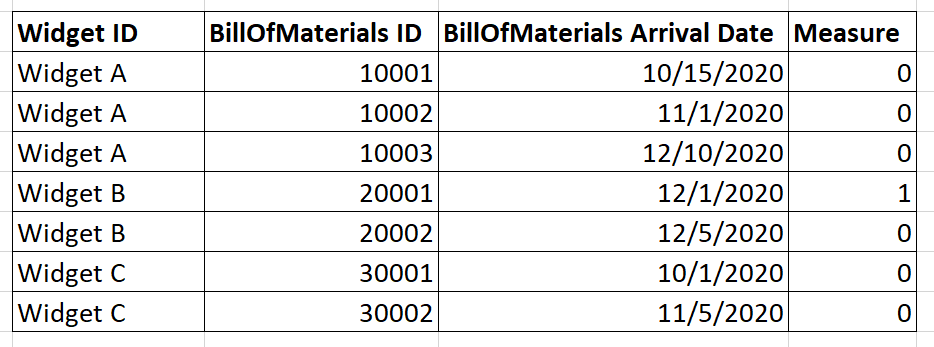
In my Sample above, I ONLY want to count Widget B once because it's earliest BillOfMaterials Arrival Date is in the current month. Please keep in mind that I have dozens of fields, so I will most definitely need to summarize my measure. This is what I have so far:
CALCULATE(
COUNTX(
SUMMARIZE(Table, Table[Widget_ID], "cnt",
MIN(Table[BillOfMaterials_Arrival_Date])),
[cnt]
),
FILTER ( Table, Month(Now()) = Month (Table[BillOfMaterials_Arrival_Date]) )
)
Bonus: Say once I have this measure created, I want to create a similar measure that does the same thing except only count the widgets if they received their BillOfMaterials in PREVIOUS month (instead of current month). Any help is appreciated.
Solved! Go to Solution.
- Mark as New
- Bookmark
- Subscribe
- Mute
- Subscribe to RSS Feed
- Permalink
- Report Inappropriate Content
I got it! Added some tweaks to @amitchandak 's DAX. Final Working DAX:
Measure1 =
CALCULATE(
DISTINCTCOUNT(Table[Widget ID]),
FILTER(Table,
CALCULATE(MONTH(MIN(Table[BillOfMaterials_Arrival_Date])) = MONTH(NOW()), ALLEXCEPT(Table,Table[Widget ID]))
),
NOT(ISBLANK(Table[BillOfMaterials_Arrival_Date]))
) + 0
The Bonus Measure is the same, except I flip the = sign to <.
Thank you all for your help!!!! hooray!!
- Mark as New
- Bookmark
- Subscribe
- Mute
- Subscribe to RSS Feed
- Permalink
- Report Inappropriate Content
I got it! Added some tweaks to @amitchandak 's DAX. Final Working DAX:
Measure1 =
CALCULATE(
DISTINCTCOUNT(Table[Widget ID]),
FILTER(Table,
CALCULATE(MONTH(MIN(Table[BillOfMaterials_Arrival_Date])) = MONTH(NOW()), ALLEXCEPT(Table,Table[Widget ID]))
),
NOT(ISBLANK(Table[BillOfMaterials_Arrival_Date]))
) + 0
The Bonus Measure is the same, except I flip the = sign to <.
Thank you all for your help!!!! hooray!!


- Mark as New
- Bookmark
- Subscribe
- Mute
- Subscribe to RSS Feed
- Permalink
- Report Inappropriate Content
If you always want to focus on Earliest arrival date, you could add a new column to your table that flags this date:
Please @mention me in your reply if you want a response.
Copying DAX from this post? Click here for a hack to quickly replace it with your own table names
Has this post solved your problem? Please Accept as Solution so that others can find it quickly and to let the community know your problem has been solved.
If you found this post helpful, please give Kudos C
I work as a Microsoft trainer and consultant, specialising in Power BI and Power Query.
www.excelwithallison.com
- Mark as New
- Bookmark
- Subscribe
- Mute
- Subscribe to RSS Feed
- Permalink
- Report Inappropriate Content
I tried to make the dimension, but it gives me zero for everything 😞

- Mark as New
- Bookmark
- Subscribe
- Mute
- Subscribe to RSS Feed
- Permalink
- Report Inappropriate Content
@RustyNails , You try measures like. All measure should follow this
measure = calculate(Min(Table[Billof material ID]), filter(Table,Table[BillOfMaterials_Arrival_Date] = calculate(Min(Table[BillOfMaterials_Arrival_Date]), allexpcept(Table,table[Widget ID]))))
measure = calculate(count(Table[Widget_ID]), filter(Table,Table[BillOfMaterials_Arrival_Date] = calculate(Min(Table[BillOfMaterials_Arrival_Date]), allexpcept(Table,table[Widget ID]))))
Or you can create a flag like this and filter on 1
flag =
var _min = minx(filter(Table, [BillOfMaterials_Arrival_Date] <=earlier([BillOfMaterials_Arrival_Date]) && [Widget ID] = earlier([Widget ID])),[BillOfMaterials_Arrival_Date])
return
if([BillOfMaterials_Arrival_Date] =_min,1,0)
- Mark as New
- Bookmark
- Subscribe
- Mute
- Subscribe to RSS Feed
- Permalink
- Report Inappropriate Content
Hello,
Unfortunately this didn't quite work.
The measure you have simply looks at whether there's an earlier BillofMaterials_Arrival_date regardless of which month, and that is not what I'm looking for. What I'm looking for is that for any particular Widget ID, if a BillOfMaterials_Arrival_Date already arrived in previous month, I want to Ignore that Widget ID from my counts. However, for any Widget ID that has a BillOfMaterials_Arrival_Date only for current month. I want to count that Widget. If you would like to imagine, a Widget ID has a monthly budget associated to it and the first time a BillOfMaterial_ID arrives, it hits our budget for that month only (regardless if it has more BillOfMaterial_ID's arriving in later months). First come first serve sort of a deal.
The part in your measure calculation which is calculate(Min(Table[BillOfMaterials_Arrival_Date]), allexpcept(Table,table[Widget ID])) will tell me the earliest BillOfMaterials_Arrival_Date. This is partially correct. I want to make sure that this earliest date is NOT falling in the previous month. When I Implement the measure I get this result:
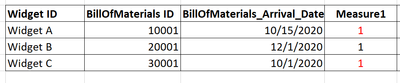
This is not what I want based on my Original Sample. In my Sample, I only want to count Widget B because that's the only Widget that has had a BillOfMaterials_Arrival_Date in current month, which is December in our case. I apologize if I was unclear in my post. Thank you so much for your help. Much appreciated.

Helpful resources

Power BI Monthly Update - November 2025
Check out the November 2025 Power BI update to learn about new features.

Fabric Data Days
Advance your Data & AI career with 50 days of live learning, contests, hands-on challenges, study groups & certifications and more!

FabCon Atlanta 2026
Join us at FabCon Atlanta, March 16-20, for the ultimate Fabric, Power BI, AI and SQL community-led event. Save $200 with code FABCOMM.


