cancel
Showing results for 
Search instead for 
Did you mean: 

Get Fabric Certified for FREE during Fabric Data Days. Don't miss your chance! Request now

Reply
Anonymous
Not applicable

Creating a score based on a Start date and an End date.

Hello all, I have 2 columns importing a start date and an end date.

What I need to do is create a 'Todays target score' out of 100.


For example:

Start Date = 01/01/19

End Date = 31/12/19

Todays Target Score = 90 (example)


Any help would be great, im doing all of this

1 ACCEPTED SOLUTION

Hi @Anonymous ,

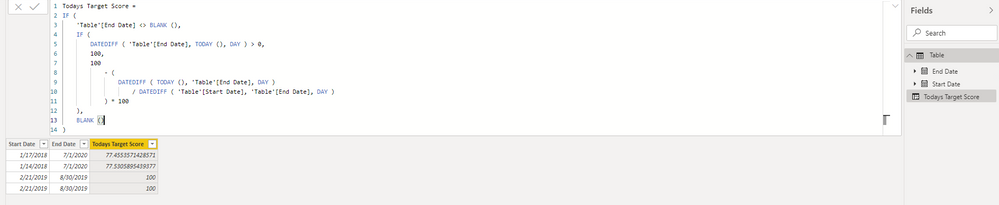
Try the following formula:

Todays Target Score = 
IF (
    'Table'[End Date] <> BLANK (),
    IF (
        DATEDIFF ( 'Table'[End Date], TODAY (), DAY ) > 0,
        100,
        100
            - (
                DATEDIFF ( TODAY (), 'Table'[End Date], DAY )
                    / DATEDIFF ( 'Table'[Start Date], 'Table'[End Date], DAY )
            ) * 100
    ),
    BLANK ()
)

31.PNG

Here is a demo, please try it:

https://qiuyunus-my.sharepoint.com/:u:/g/personal/pbipro_qiuyunus_onmicrosoft_com/EYI86vLniLtOm093BPT3T5QBMANCTKg6xIqMX-Px_-X6pw?e=Vbp94m

Best Regards,

Community Support Team _ Joey
If this post helps, then please consider Accept it as the solution to help the other members find it more quickly.

View solution in original post

4 REPLIES 4
v-joesh-msft
Solution Sage
Solution Sage

Hi @Anonymous ,

Could you provide more information containing your calculation logic? Kindly share your sample data and expected result if you don't have any Confidential Information. Please upload your files to One Drive and share the link here.

Best Regards,

Community Support Team _ Joey
If this post helps, then please consider Accept it as the solution to help the other members find it more quickly.

az38
Community Champion
Community Champion

hi @Anonymous 

how does this target score should be calculated? its unclear

do not hesitate to give a kudo to useful posts and mark solutions as solution


do not hesitate to give a kudo to useful posts and mark solutions as solution
LinkedIn
Anonymous
Not applicable

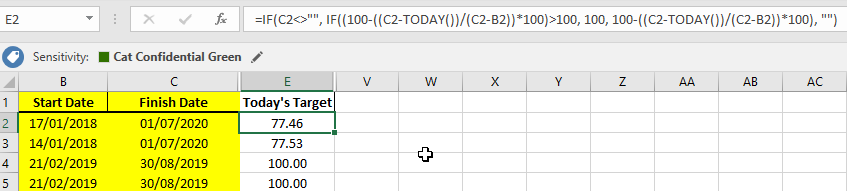
Sorry if I wasnt clear enough, im in the process of intergrating my existing spreadsheet used to calculate a score for each project based on the start date and end date specified by the project owner. As you can see in the picture attached, if todays date is within the range itll give a score 0-100 to show todays target score. If the date has passed todays date it will show as 100 meaning the project should be complete.


Ive tried to use the below 'if' statement in a new custom column, but it fails to work. Wasnt sure if I was overcomplicating this.


2019-12-12 07-45-38_Start.png

Hi @Anonymous ,

Try the following formula:

Todays Target Score = 
IF (
    'Table'[End Date] <> BLANK (),
    IF (
        DATEDIFF ( 'Table'[End Date], TODAY (), DAY ) > 0,
        100,
        100
            - (
                DATEDIFF ( TODAY (), 'Table'[End Date], DAY )
                    / DATEDIFF ( 'Table'[Start Date], 'Table'[End Date], DAY )
            ) * 100
    ),
    BLANK ()
)

31.PNG

Here is a demo, please try it:

https://qiuyunus-my.sharepoint.com/:u:/g/personal/pbipro_qiuyunus_onmicrosoft_com/EYI86vLniLtOm093BPT3T5QBMANCTKg6xIqMX-Px_-X6pw?e=Vbp94m

Best Regards,

Community Support Team _ Joey
If this post helps, then please consider Accept it as the solution to help the other members find it more quickly.

Helpful resources

Announcements
November Power BI Update Carousel

Power BI Monthly Update - November 2025

Check out the November 2025 Power BI update to learn about new features.

Fabric Data Days Carousel

Fabric Data Days

Advance your Data & AI career with 50 days of live learning, contests, hands-on challenges, study groups & certifications and more!

FabCon Atlanta 2026 carousel

FabCon Atlanta 2026

Join us at FabCon Atlanta, March 16-20, for the ultimate Fabric, Power BI, AI and SQL community-led event. Save $200 with code FABCOMM.

Top Solution Authors
Top Kudoed Authors