FabCon is coming to Atlanta
Join us at FabCon Atlanta from March 16 - 20, 2026, for the ultimate Fabric, Power BI, AI and SQL community-led event. Save $200 with code FABCOMM.
Register now!- Power BI forums
- Get Help with Power BI
- Desktop
- Service
- Report Server
- Power Query
- Mobile Apps
- Developer
- DAX Commands and Tips
- Custom Visuals Development Discussion
- Health and Life Sciences
- Power BI Spanish forums
- Translated Spanish Desktop
- Training and Consulting
- Instructor Led Training
- Dashboard in a Day for Women, by Women
- Galleries
- Data Stories Gallery
- Themes Gallery
- Contests Gallery
- QuickViz Gallery
- Quick Measures Gallery
- Visual Calculations Gallery
- Notebook Gallery
- Translytical Task Flow Gallery
- TMDL Gallery
- R Script Showcase
- Webinars and Video Gallery
- Ideas
- Custom Visuals Ideas (read-only)
- Issues
- Issues
- Events
- Upcoming Events
The Power BI Data Visualization World Championships is back! Get ahead of the game and start preparing now! Learn more
- Power BI forums
- Forums
- Get Help with Power BI
- Desktop
- Re: Creating a Rank for each Item By Custumer
- Subscribe to RSS Feed
- Mark Topic as New
- Mark Topic as Read
- Float this Topic for Current User
- Bookmark
- Subscribe
- Printer Friendly Page

- Mark as New
- Bookmark
- Subscribe
- Mute
- Subscribe to RSS Feed
- Permalink
- Report Inappropriate Content
Creating a Rank for each Item By Custumer
Hi! tnx a lot for reading my post,
My goal is to obtain the row TOP in powerr bi using rankx,
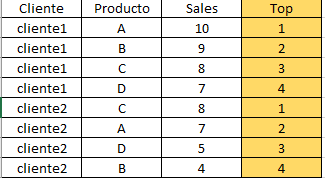
This is a rank for each item by customer in the same table.
My data model looks like this.
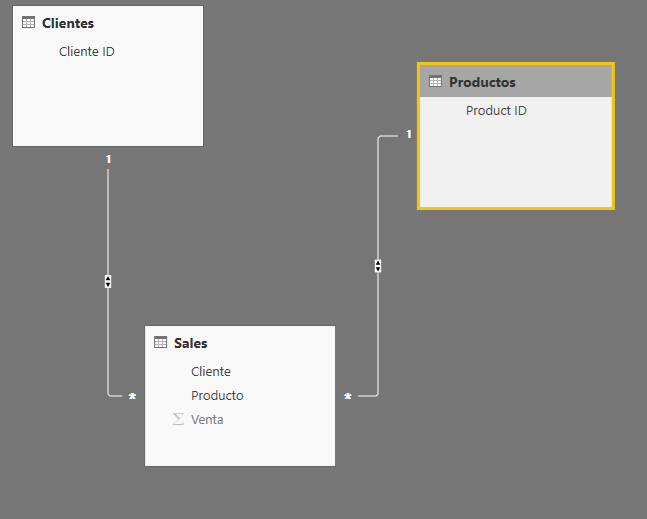
any Help will be much appreciated,
Thanks!
Solved! Go to Solution.


- Mark as New
- Bookmark
- Subscribe
- Mute
- Subscribe to RSS Feed
- Permalink
- Report Inappropriate Content
@aquanr18 Please try this as a "New Column"
Top = RANKX(FILTER(Test58Rank,Test58Rank[Client]=EARLIER(Test58Rank[Client])),Test58Rank[Sales],Test58Rank[Sales],DESC)

Did I answer your question? Mark my post as a solution!
Proud to be a PBI Community Champion


- Mark as New
- Bookmark
- Subscribe
- Mute
- Subscribe to RSS Feed
- Permalink
- Report Inappropriate Content
I guess you wanna do it as a calculated column:
Ranking =
    VAR Sls = Sales[Sales]
RETURN
    CALCULATE(
        RANKX(
            Sales,
            Sales[Sales],
            Sls
        ),
        ALLEXCEPT( Sales, Sales[Cliente] )
    )
Did I answer your question correctly? Mark my answer as a solution!
Proud to be a Datanaut!
- Mark as New
- Bookmark
- Subscribe
- Mute
- Subscribe to RSS Feed
- Permalink
- Report Inappropriate Content
Hi! thanks ! but the formula has something wrong
I got the error "A single value form column 'Sales' in the table 'Sales' cannot be determined. This can happen when a measure formula refers to a column that contains many values without an aggregation such as min, max, count or sum to get a single result'
I tryed to agreggate the sales by SUM but got nothing out of the formula.
What should I do?
- Mark as New
- Bookmark
- Subscribe
- Mute
- Subscribe to RSS Feed
- Permalink
- Report Inappropriate Content
are you using the formula in a measure or calculated column ?
Did I answer your question correctly? Mark my answer as a solution!
Proud to be a Datanaut!
- Mark as New
- Bookmark
- Subscribe
- Mute
- Subscribe to RSS Feed
- Permalink
- Report Inappropriate Content
I have try both, in the measure i got the previus error,
If I use a calculated the error is 'Function 'RANKX' dose not support comparing values of type text with values of type integer, consider using the value or format function to convert one of the values'
- Mark as New
- Bookmark
- Subscribe
- Mute
- Subscribe to RSS Feed
- Permalink
- Report Inappropriate Content
can you post the table on which you apply this formula via a calculated column
Did I answer your question correctly? Mark my answer as a solution!
Proud to be a Datanaut!
- Mark as New
- Bookmark
- Subscribe
- Mute
- Subscribe to RSS Feed
- Permalink
- Report Inappropriate Content
Here you can see the table I'm using
https://drive.google.com/open?id=1VNrH9QlZ6BKpP4NbC08qrmYJbVCi_o17
- Mark as New
- Bookmark
- Subscribe
- Mute
- Subscribe to RSS Feed
- Permalink
- Report Inappropriate Content
@aquanr18 Please try this as a "New Column"
Top = RANKX(FILTER(Test58Rank,Test58Rank[Client]=EARLIER(Test58Rank[Client])),Test58Rank[Sales],Test58Rank[Sales],DESC)
Did I answer your question? Mark my post as a solution!
Proud to be a PBI Community Champion
- Mark as New
- Bookmark
- Subscribe
- Mute
- Subscribe to RSS Feed
- Permalink
- Report Inappropriate Content
Thanks ! this is exactly what I wanted, may you explain how does the formula work?
- Mark as New
- Bookmark
- Subscribe
- Mute
- Subscribe to RSS Feed
- Permalink
- Report Inappropriate Content
@aquanr18 That's cool !!
Just to make it simple - If you are from SQL background, It is just similar to RANK() OVER() along with PARTITION BY.
So here we want to rank for each group (in this case client) that's why we have nested the FILTER particular client records (each group) and then assigning a rank. To identify current row group, EARLIER function came into picture. That is it.... May be official Microsoft Documentation will explain it better
Did I answer your question? Mark my post as a solution!
Proud to be a PBI Community Champion

Helpful resources

Power BI Dataviz World Championships
The Power BI Data Visualization World Championships is back! Get ahead of the game and start preparing now!

Power BI Monthly Update - December 2025
Check out the December 2025 Power BI Holiday Recap!

FabCon Atlanta 2026
Join us at FabCon Atlanta, March 16-20, for the ultimate Fabric, Power BI, AI and SQL community-led event. Save $200 with code FABCOMM.

| User | Count |
|---|---|
| 38 | |
| 37 | |
| 33 | |
| 32 | |
| 29 |


| User | Count |
|---|---|
| 132 | |
| 88 | |
| 82 | |
| 68 | |
| 64 |


