Forum Discussion

Creating Date scrolling within Power BU
Hi all,
Maybe I'm not seeing it, but I am not seeing the capabilitiy in Power BI of setting a date filter that I can scroll through. I want to be able to navigate through my chart by clicking an up or down button to navigate through a 12-month period of data. For example, if I have 36 months of data, with a 12 month view, I want to be able to navigate through this filter using an up or down control button, so that when I am on June, I can click up to start at July, or down to start at May.
Thanks for any input!
You can only filter DateTime in your report using the filter as described in the previos posts. We do have a proper Time Slicing capability pretty high in our backlog. You can also check and leave your additional votes and comments in related feature request below.
Thanks,
Alex.
5 Replies
- andreMemorable Member
if you drag a DateTime field into a filter area, you should then be able to use the calendar control to make your selection.
- pflipperNew Member
Thanks for you input Andre.
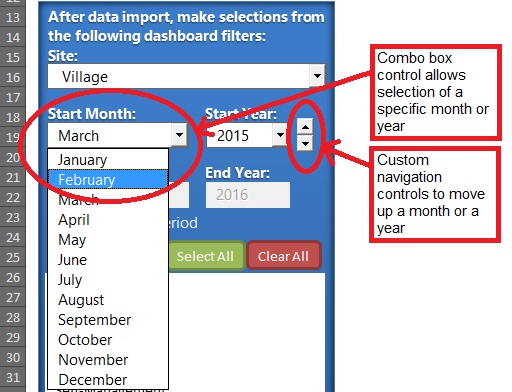
Instead of a calendar widget, which IMHO is better as a specific date selector, I was hoping for something more along the lines of this:
This is an example of something created in Excel, but could as well have been easily created in Access. Instead of a widget to select a specific date, there is a control to allow for selection for month or year, as well as a way for easy navigation through a month using a control to move the date back or forward.
In order for me to transition clients to utilize their underlying data in a more user friendly manner (using Power BI, perhaps), I was hoping that Power BI would provide something along these lines, or something similar (like a bar below that chart that would allow the user to move along a timeline).
Are you, or is anyone else reading this, aware of something like this in the current version of Power BI? Or a way to create this?
Thanks for any additional input!
 AlexGorevPower BI Team
You can only filter DateTime in your report using the filter as described in the previos posts. We do have a proper Time Slicing capability pretty high in our backlog. You can also check and leave your additional votes and comments in related feature request below.
Thanks,
Alex.