FabCon is coming to Atlanta
Join us at FabCon Atlanta from March 16 - 20, 2026, for the ultimate Fabric, Power BI, AI and SQL community-led event. Save $200 with code FABCOMM.
Register now!- Power BI forums
- Get Help with Power BI
- Desktop
- Service
- Report Server
- Power Query
- Mobile Apps
- Developer
- DAX Commands and Tips
- Custom Visuals Development Discussion
- Health and Life Sciences
- Power BI Spanish forums
- Translated Spanish Desktop
- Training and Consulting
- Instructor Led Training
- Dashboard in a Day for Women, by Women
- Galleries
- Data Stories Gallery
- Themes Gallery
- Contests Gallery
- QuickViz Gallery
- Quick Measures Gallery
- Visual Calculations Gallery
- Notebook Gallery
- Translytical Task Flow Gallery
- TMDL Gallery
- R Script Showcase
- Webinars and Video Gallery
- Ideas
- Custom Visuals Ideas (read-only)
- Issues
- Issues
- Events
- Upcoming Events
Get Fabric Certified for FREE during Fabric Data Days. Don't miss your chance! Request now
- Power BI forums
- Forums
- Get Help with Power BI
- Desktop
- Re: Create second Calendar table from an original ...
- Subscribe to RSS Feed
- Mark Topic as New
- Mark Topic as Read
- Float this Topic for Current User
- Bookmark
- Subscribe
- Printer Friendly Page

- Mark as New
- Bookmark
- Subscribe
- Mute
- Subscribe to RSS Feed
- Permalink
- Report Inappropriate Content
Create second Calendar table from an original Calendar table
Hi -
I a have calendar table with with two columns, Date [=Calendar(Date(2015, 1, 1), Date(2018, 12, 31)] and a Measure [= "Y" or "N"].
I want create a second calendar table that includes the Dates from the original where the measure equals "Y" (see tables below).
Thank you, Mark
| Original Table | Second Table | ||
| Date | Measure | Date | |
| 1/1/2015 | N | ||
| 1/2/2015 | N | ||
| 1/3/2015 | Y | 1/3/2015 | |
| 1/4/2015 | Y | ===> | 1/4/2015 |
| : | : | ||
| 12/30/2018 | Y | 12/30/2018 | |
| 12/31/2018 | N |


- Mark as New
- Bookmark
- Subscribe
- Mute
- Subscribe to RSS Feed
- Permalink
- Report Inappropriate Content
So, you should be able to do that like this:
New Calendar =
VAR __table = ADDCOLUMNS(ALL('Date'),"__Measure",[Measure])
RETURN
FILTER(__table,[__Measure] = "Y")
Follow on LinkedIn
@ me in replies or I'll lose your thread!!!
Instead of a Kudo, please vote for this idea
Become an expert!: Enterprise DNA
External Tools: MSHGQM
YouTube Channel!: Microsoft Hates Greg
Latest book!: DAX For Humans
DAX is easy, CALCULATE makes DAX hard...
- Mark as New
- Bookmark
- Subscribe
- Mute
- Subscribe to RSS Feed
- Permalink
- Report Inappropriate Content
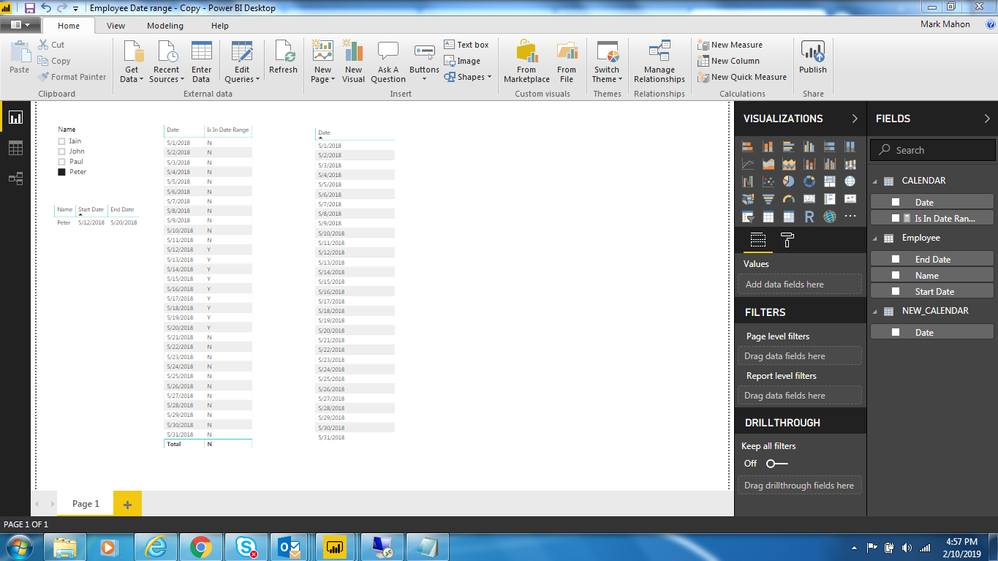
Hi Greg - The new calendar didn't seem to work, as it seemd to ignore the filter, and shows the entire range of the original calendar.
Would you have any suggestions?
The sample code was adjusted as shown below ...
NEW_CALENDAR =
VAR __table = ADDCOLUMNS(ALL('CALENDAR'[Date]),"__Measure",'CALENDAR'[Is In Date Range])
RETURN
FILTER('CALENDAR','CALENDAR'[Is In Date Range] = "Y")
A picture of the original calendar and new calander is below. I am wanting the New Calendar to show only 5/12/2018 to 5/20/2018
- Mark as New
- Bookmark
- Subscribe
- Mute
- Subscribe to RSS Feed
- Permalink
- Report Inappropriate Content
@Anonymous, not sure, I created it in my test environment and it seems to work. See attached Page 10. Calendar, New Calendar and Measure 4.
Follow on LinkedIn
@ me in replies or I'll lose your thread!!!
Instead of a Kudo, please vote for this idea
Become an expert!: Enterprise DNA
External Tools: MSHGQM
YouTube Channel!: Microsoft Hates Greg
Latest book!: DAX For Humans
DAX is easy, CALCULATE makes DAX hard...
- Mark as New
- Bookmark
- Subscribe
- Mute
- Subscribe to RSS Feed
- Permalink
- Report Inappropriate Content
Hi Greg - I didn't see any attachments (Go Bucks! ... I see you are from Columbus.)
- Mark as New
- Bookmark
- Subscribe
- Mute
- Subscribe to RSS Feed
- Permalink
- Report Inappropriate Content
OK, let me try that again.
Follow on LinkedIn
@ me in replies or I'll lose your thread!!!
Instead of a Kudo, please vote for this idea
Become an expert!: Enterprise DNA
External Tools: MSHGQM
YouTube Channel!: Microsoft Hates Greg
Latest book!: DAX For Humans
DAX is easy, CALCULATE makes DAX hard...
- Mark as New
- Bookmark
- Subscribe
- Mute
- Subscribe to RSS Feed
- Permalink
- Report Inappropriate Content
Got it. Thanks. And yes your example works.
In my example, the indicator (Measure4) in Calendar is dynamic based on a slicer value so the dates with "Y" (Measure4) changes from slicer to value to value. And for whatever the reason, Measure4 in New Calendar won't change and mirror what is in Calendar.
Thanks for your help.
- Mark as New
- Bookmark
- Subscribe
- Mute
- Subscribe to RSS Feed
- Permalink
- Report Inappropriate Content
@Anonymous - Yes, unfortunately that is correct. A calculated table is not dynamic, it only updates upon data refresh. Let me think about that and what you are trying to accomplish. Can you provide a use case? Because it should be possible to generate a measure that essentially filters your table correctly and provides the appearance of another calendar table but the usefulness of that is going to depend on what you are actually trying to accomplish.
Follow on LinkedIn
@ me in replies or I'll lose your thread!!!
Instead of a Kudo, please vote for this idea
Become an expert!: Enterprise DNA
External Tools: MSHGQM
YouTube Channel!: Microsoft Hates Greg
Latest book!: DAX For Humans
DAX is easy, CALCULATE makes DAX hard...
- Mark as New
- Bookmark
- Subscribe
- Mute
- Subscribe to RSS Feed
- Permalink
- Report Inappropriate Content
I can provide a pbix file which will have have the exact specifics of what I am trying to accomplish. Is that what you mean by
"use case"?
I will try to get that this evening.
Thanks, Mark
- Mark as New
- Bookmark
- Subscribe
- Mute
- Subscribe to RSS Feed
- Permalink
- Report Inappropriate Content
By use case, I just trying to understand why you need this second table. Is it just for display purposes or are you using it in another calculation or ?
Follow on LinkedIn
@ me in replies or I'll lose your thread!!!
Instead of a Kudo, please vote for this idea
Become an expert!: Enterprise DNA
External Tools: MSHGQM
YouTube Channel!: Microsoft Hates Greg
Latest book!: DAX For Humans
DAX is easy, CALCULATE makes DAX hard...
- Mark as New
- Bookmark
- Subscribe
- Mute
- Subscribe to RSS Feed
- Permalink
- Report Inappropriate Content
Hi Greg - I really appreciate your comments on this subject. Thank you. Mark
Ok. I thought I posted this last night, but apparently the connection was lost and the upload failed (which I discovered this morning).
Short Answer:
The "New_Calendar" supports visuals.
More Words:
User makes selection from Slicer which is connected to a table with start and end dates. The selected start and end dates populate a measure (= Measure4 in your example) in table "Calendar" which really shows the range of dates. The "Calendar" table is the Base date table (if you will) and spans a large time frame of say 1/1/21016 to 12/31/2026. That range of dates (usually a rolling 2 year period) is used to populate "New_Calendar" (in DAX jargon this is referred to as a Date Dimension table). The report's visuals run off of "New_Calendar".
Other Details:
The table connected to the Slicer is downloaded from a SQL database (refreshed daily). The New_Calendar will need other date related columns (e.g., Fiscal Year, etc. which I still need to figure out) around the Date range defined by Measure4.
I wanted to upload a pbix file that has shows it (but alas don't have the permission to upload the files).
- Mark as New
- Bookmark
- Subscribe
- Mute
- Subscribe to RSS Feed
- Permalink
- Report Inappropriate Content
@Anonymous - OK, so crazy thought, why not just use a measure that returns N if it is not in the date range and Y if it is and use that as a visual filter instead of creating an entirely new table?
Follow on LinkedIn
@ me in replies or I'll lose your thread!!!
Instead of a Kudo, please vote for this idea
Become an expert!: Enterprise DNA
External Tools: MSHGQM
YouTube Channel!: Microsoft Hates Greg
Latest book!: DAX For Humans
DAX is easy, CALCULATE makes DAX hard...
- Mark as New
- Bookmark
- Subscribe
- Mute
- Subscribe to RSS Feed
- Permalink
- Report Inappropriate Content
Thank you for the idea, I will take a look at it. Simple always beats Complicated.
- Mark as New
- Bookmark
- Subscribe
- Mute
- Subscribe to RSS Feed
- Permalink
- Report Inappropriate Content
I will give that a try . Thank you. Just such a newbe to DAX, "simple" things take questions to learn.
Helpful resources

Power BI Monthly Update - November 2025
Check out the November 2025 Power BI update to learn about new features.

Fabric Data Days
Advance your Data & AI career with 50 days of live learning, contests, hands-on challenges, study groups & certifications and more!

FabCon Atlanta 2026
Join us at FabCon Atlanta, March 16-20, for the ultimate Fabric, Power BI, AI and SQL community-led event. Save $200 with code FABCOMM.


