Forum Discussion

 Helper V
Create measure % of total
 10 years ago
Hey Nirrobi,
can you try this?
Import % of Total = var bigTotal = SUMX(ALL(Sheet1[Customer]), CALCULATE(SUM(Sheet1[Import]) + SUM(Sheet1[Export])))
                    return DIVIDE(SUM([Import]),bigTotal)
Basically
ALL(Sheet1[Customer])
Forces it to do the calculation across all your customers.
CALCULATE(SUM(Sheet1[Import]) + SUM(Sheet1[Export])
Says to do the sum of Import and Export on a row by row basis i.e. the total
Wrapped with sumx it translates to, for all customers calculate the total on a row by row basis and then add together all the totals to get your Total of all totals.
Your % of total then just becomes:
DIVIDE(SUM([Import]),bigTotal)
This is the output that i get:

 Helper V
I tried and succeed many thanks.
can you pleaes help me with the below problem:
I need to create cumulative percentage in simple table.
| Cumm % | % of total | AMOUNT | CLIENT |
| 17% | 17% | 100 | AAA |
| 50% | 33% | 200 | BBB |
| 100% | 50% | 300 | CCC |
| 100% | 100% | 600 | TOTAL |

 Advocate V
Hello,
To calculate a cumulative percent.
You can use again to DAX formula to create a new measure.
I not sure but you can try a solution like this
Cumm = CALCULATE(SUM([%Total]), FILTER(ALL([Customer]), [%Total] <= 1))
Regards
- allaboutdata10 years ago
Advocate II
Hi Nirrobi,
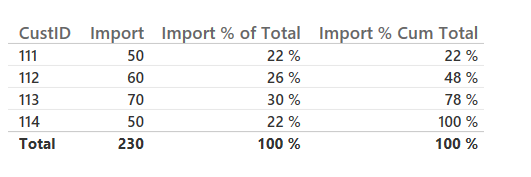
not sure where you got with this. I couldn't get exactly what you were looking for but this seems to be the best solution at the moment.
Import % Cumu* Total = var bigTotal = SUMX(ALL(Sheet1[CustID]), CALCULATE(SUM(Sheet1[Import])))
                     return DIVIDE(SUMX(FILTER(All(Sheet1[CustID]), Sheet1[CustID] <= MAX(Sheet1[CustID])),CALCULATE(SUM(Sheet1[Import]))),bigTotal)
You'll notice i had to use a customer Id which was an integer id representation of each customer. This is because the DAX <= operator cannot compare two strings. I thought sort by might be an option but the operator doesn't seem to call through to that.
This results with a table like below:
The first line of code:
var bigTotal = SUMX(ALL(Sheet1[CustID]), CALCULATE(SUM(Sheet1[Import])))
Like prior calculates the overall total.
The filter command in the second line:
FILTER(All(Sheet1[CustID]), Sheet1[CustID] <= MAX(Sheet1[CustID]))
Tells the calculation to only look at customer ids which less than the one you're currently looking at in the calculation.
Coupled with SUMX and then doing the division.
Let me know if that works.
Note if you want to use it in a table with the other measure created earlier you will need to create a measure based on that ID instead.
Import % of Total CustID = var bigTotal = SUMX(ALL(Sheet1[CustID]), CALCULATE(SUM(Sheet1[Import]) + SUM(Sheet1[Export])))
                    return DIVIDE(SUM([Import]),bigTotal)