Forum Discussion

yatinpurohit's avatar
yatinpurohit
Icon for Helper I rankHelper I
8 years ago
Solved

Create dynamic DAX table filtered by slicer from another table

Good Day everyone,


Requesting some help with this issue after searching for over few hour. I have a table with surver responses for events called SurveyList. it has 2 columns Question and Answer. One question is "What event you attended". The table has other questions related to events.


My requirement is to create a new dynamic table with a column that will store unique (Distinct) values from column Answer where the question is "What event you attended". Effectively, I want to use the new table column as a slicer to filter specific event's feedback/report. 


I checked and to the best of my understanding unfortunately a slicer does not support visual filter.


Thanks in advance

  • v-xjiin-msft's avatar
    v-xjiin-msft
    8 years ago

    Hi yatinpurohit,


    Check this:


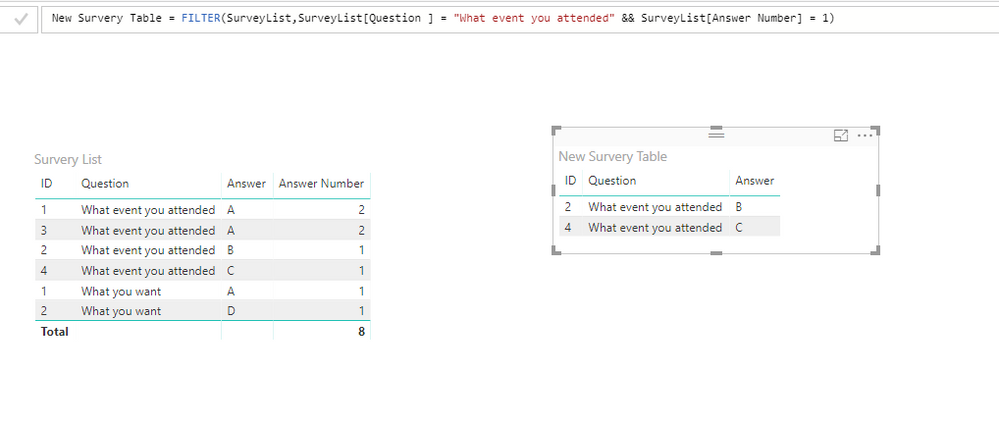
    First create a new calculated column to calculate the number of Answers for each Question to find out the Distinct values. Something like:


    Answer Number =
    CALCULATE (
        COUNT ( SurveyList[Answer] ),
        ALLEXCEPT ( SurveyList, SurveyList[Question ], SurveyList[Answer] )
    )


    Then create a new calculated table:


    New Survery Table =
    FILTER (
        SurveyList,
        SurveyList[Question ] = "What event you attended"
            && SurveyList[Answer Number] = 1
    )


    If above method doesn't satisfy your requirement. Please share us more detailed information like some sample data and its corresponding expected result. So that we can know your actual situation and provide more accurate suggestions.


    Thanks,
    Xi Jin.

4 Replies

    • yatinpurohit's avatar
      yatinpurohit
      Icon for Helper I rankHelper I

      Sorry, may be I was not clear. I am not trying to create a table from slicer. I m trying to create a table from another table's column with a condition .

      • v-xjiin-msft's avatar
        v-xjiin-msft
        Icon for Solution Sage rankSolution Sage

        Hi yatinpurohit,


        Check this:


        First create a new calculated column to calculate the number of Answers for each Question to find out the Distinct values. Something like:


        Answer Number =
        CALCULATE (
            COUNT ( SurveyList[Answer] ),
            ALLEXCEPT ( SurveyList, SurveyList[Question ], SurveyList[Answer] )
        )


        Then create a new calculated table:


        New Survery Table =
        FILTER (
            SurveyList,
            SurveyList[Question ] = "What event you attended"
                && SurveyList[Answer Number] = 1
        )


        If above method doesn't satisfy your requirement. Please share us more detailed information like some sample data and its corresponding expected result. So that we can know your actual situation and provide more accurate suggestions.


        Thanks,
        Xi Jin.

    • hachulsiu001's avatar
      hachulsiu001
      Frequent Visitor

      Hi MattAllington ,

      do you know why I can create dynamic measure using IN ALLSELECTED as filter

      ISVEurC1conv =
      var per1 = ALLSELECTED(Period1[period1])
      return
      CALCULATE(sum(q20_Monthly[ISV EURConstConv]),filter(q20_Monthly,q20_Monthly[Document Date.Year Month Number] in per1))
       
      and why the same does not work when I want to create a table using FILTER:
      DynTable2 =
      var per1= ALLSELECTED(Period1[period1])
      return
      FILTER(q20_Monthly, q20_Monthly[Document Date.Year Month Number] IN per1)