FabCon is coming to Atlanta
Join us at FabCon Atlanta from March 16 - 20, 2026, for the ultimate Fabric, Power BI, AI and SQL community-led event. Save $200 with code FABCOMM.
Register now!- Power BI forums
- Get Help with Power BI
- Desktop
- Service
- Report Server
- Power Query
- Mobile Apps
- Developer
- DAX Commands and Tips
- Custom Visuals Development Discussion
- Health and Life Sciences
- Power BI Spanish forums
- Translated Spanish Desktop
- Training and Consulting
- Instructor Led Training
- Dashboard in a Day for Women, by Women
- Galleries
- Data Stories Gallery
- Themes Gallery
- Contests Gallery
- Quick Measures Gallery
- Notebook Gallery
- Translytical Task Flow Gallery
- TMDL Gallery
- R Script Showcase
- Webinars and Video Gallery
- Ideas
- Custom Visuals Ideas (read-only)
- Issues
- Issues
- Events
- Upcoming Events
To celebrate FabCon Vienna, we are offering 50% off select exams. Ends October 3rd. Request your discount now.
- Power BI forums
- Forums
- Get Help with Power BI
- Desktop
- Create a new column from other column
- Subscribe to RSS Feed
- Mark Topic as New
- Mark Topic as Read
- Float this Topic for Current User
- Bookmark
- Subscribe
- Printer Friendly Page


- Mark as New
- Bookmark
- Subscribe
- Mute
- Subscribe to RSS Feed
- Permalink
- Report Inappropriate Content
Create a new column from other column
Dear all,
I have a table with many millions of rows and I want to extract a data master to connect it with the budget table.
The DAX formula is:
KIT CATEGORY=
DISTINCT(
SELECTEDCOLUMNS(
KIT;
"COUNTRY"; KIT[COUNTRY];
"PRODUCT";KIT[PRODUCT];
"TYPE"; KIT[TYPE]
)
)
But an error message appears related to the relationship:
Apologies because it's in Spanish.

Thank you to everybody!!
Solved! Go to Solution.


- Mark as New
- Bookmark
- Subscribe
- Mute
- Subscribe to RSS Feed
- Permalink
- Report Inappropriate Content
modifying data source is the best solution ever 🙂
do not hesitate to give a kudo to useful posts and mark solutions as solution


- Mark as New
- Bookmark
- Subscribe
- Mute
- Subscribe to RSS Feed
- Permalink
- Report Inappropriate Content
Hi @jlarques ,
Glad to hear that. Please accept your solution above so that people who may have the same question can get the solution directly.
Best Regards,
Icey
- Mark as New
- Bookmark
- Subscribe
- Mute
- Subscribe to RSS Feed
- Permalink
- Report Inappropriate Content
Hi @az38
yes, I'm sure, but let me check with time and I'll tell you something.
Thanks for all your help and time! You gave me an answer very fast! I'll mark your solution as a solution if it's working well.
Thanks again!
- Mark as New
- Bookmark
- Subscribe
- Mute
- Subscribe to RSS Feed
- Permalink
- Report Inappropriate Content
same error, but don't worry. I'll try to put it in another way. I thought was easier to get the data from another table to have a master.
Thanks again for all your help! I'm going to fight with this issue and I'll publish the solution if I find it!
Regards,
José Luis
- Mark as New
- Bookmark
- Subscribe
- Mute
- Subscribe to RSS Feed
- Permalink
- Report Inappropriate Content
thanks again for your quick answer last week.
Finally, I spoke with the IT department to modify the data source and I got the data exactly as I wanted it.
Again, very grateful for all your help.
Regards,
- Mark as New
- Bookmark
- Subscribe
- Mute
- Subscribe to RSS Feed
- Permalink
- Report Inappropriate Content
- Mark as New
- Bookmark
- Subscribe
- Mute
- Subscribe to RSS Feed
- Permalink
- Report Inappropriate Content
- Mark as New
- Bookmark
- Subscribe
- Mute
- Subscribe to RSS Feed
- Permalink
- Report Inappropriate Content
Hi @az38
it was no relationship but I created:
- From Kit[Product] to Kit Category[Product] many to one.
The error only appears when I want to add the Type column. If I deleted it, I have a table named Kit Category with two columns; Country and Product.
Thanks for your help.
- Mark as New
- Bookmark
- Subscribe
- Mute
- Subscribe to RSS Feed
- Permalink
- Report Inappropriate Content
so, @jlarques
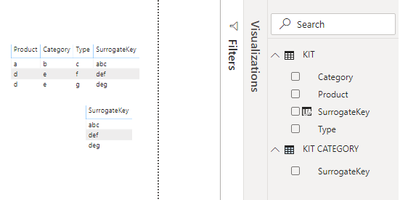
as i understand it works without type column because each product in your data source has the only category.
but when you add "type" column, you get a few rows with the same product and category but with different types
as you have a many-to-one relations it became impossible, because many product from Kit table have relations with many products from Kit Category
for my point, the best solution is to create in Kit table calculated column
SurrogateKey = concatenate('Table'[Product];concatenate('Table'[Category];'Table'[Type]))
then try to build a master table:
KIT CATEGORY=
      DISTINCT(
                KIT[SurrogateKey]
       )
and create a relationship many-to-one by this SurrogateKey field
do not hesitate to give a kudo to useful posts and mark solutions as solution
Linkedin
- Mark as New
- Bookmark
- Subscribe
- Mute
- Subscribe to RSS Feed
- Permalink
- Report Inappropriate Content
Hi @az38
thanks for your quick answer.
When I try to create a calculated column on the KIT CATEGORY table, the Concatenated formula cannot show me any table, only the KIT CATEGORY fields, so, I cannot add other external columns from the KIT table.
Any ideas?
Thanks again.
- Mark as New
- Bookmark
- Subscribe
- Mute
- Subscribe to RSS Feed
- Permalink
- Report Inappropriate Content
- Mark as New
- Bookmark
- Subscribe
- Mute
- Subscribe to RSS Feed
- Permalink
- Report Inappropriate Content
When I create a new column with the DISTINCT formula, an error appears with this text:
"A table of several values was provided, where a single value was expected".
Thanks again!
- Mark as New
- Bookmark
- Subscribe
- Mute
- Subscribe to RSS Feed
- Permalink
- Report Inappropriate Content

Helpful resources

Power BI Monthly Update - September 2025
Check out the September 2025 Power BI update to learn about new features.

Fabric Community Update - August 2025
Find out what's new and trending in the Fabric community.


