Join us at FabCon Atlanta from March 16 - 20, 2026, for the ultimate Fabric, Power BI, AI and SQL community-led event. Save $200 with code FABCOMM.
Register now!Get Fabric Certified for FREE during Fabric Data Days. Don't miss your chance! Request now
Hello,
I'm trying to use more Power BI in my daily use. I have a striaght forward use case but I need help exectuing.
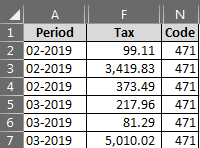
My data is structured and loads into PBI error free. Here is my data.
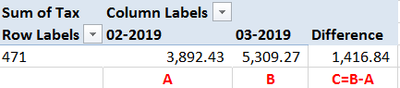
My Goal: Summarize tax by month and calculate a variance between most recent month and prior month. This is how it is current performed in excel.
I've tried pivoting month and tax into their own columns based on other forum posts. This has mostly worked. My issue is I can not get the data to dynamically update for the next months data.
What would be the recommended steps to accomplish this? Should I continue with the pivoted columns or is there a better way to summarize this data.
Any help would be appreciated!
Thanks!
Solved! Go to Solution.
Hi @bjsrm8 ,
In Power BI, you could create measure to achive your desired output.
Assuming that you have data sample like below.
Code Period Tax
| 471 | February 2019 | 10 |
| 471 | February 2019 | 20 |
| 471 | February 2019 | 30 |
| 471 | March 2019 | 40 |
| 471 | March 2019 | 50 |
| 471 | March 2019 | 60 |
| 472 | February 2019 | 25 |
| 472 | February 2019 | 35 |
| 472 | February 2019 | 45 |
| 472 | March 2019 | 20 |
| 472 | March 2019 | 25 |
| 472 | March 2019 | 30 |
Please create the measure below.
thismonth =
CALCULATE (
SUM ( Table1[Tax] ),
FILTER (
'Table1',
'Table1'[Period].[MonthNo] = MONTH ( TODAY () )
&& 'Table1'[Code] = MAX ( 'Table1'[Code] )
)
)
previous_month =
VAR thismonth =
MONTH ( TODAY () )
VAR previous_month =
IF ( thismonth = 1, 12, thismonth - 1 )
RETURN
CALCULATE (
SUM ( Table1[Tax] ),
FILTER (
'Table1',
'Table1'[Period].[MonthNo] = previous_month
&& 'Table1'[Code] = MAX ( 'Table1'[Code] )
)
)
Difference = 'Table1'[thismonth]-'Table1'[previous_month]
Here is the output.
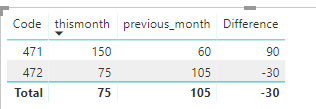
More details, please refer to my attachement.
Best Regards,
Cherry
Hi @bjsrm8 ,
In Power BI, you could create measure to achive your desired output.
Assuming that you have data sample like below.
Code Period Tax
| 471 | February 2019 | 10 |
| 471 | February 2019 | 20 |
| 471 | February 2019 | 30 |
| 471 | March 2019 | 40 |
| 471 | March 2019 | 50 |
| 471 | March 2019 | 60 |
| 472 | February 2019 | 25 |
| 472 | February 2019 | 35 |
| 472 | February 2019 | 45 |
| 472 | March 2019 | 20 |
| 472 | March 2019 | 25 |
| 472 | March 2019 | 30 |
Please create the measure below.
thismonth =
CALCULATE (
SUM ( Table1[Tax] ),
FILTER (
'Table1',
'Table1'[Period].[MonthNo] = MONTH ( TODAY () )
&& 'Table1'[Code] = MAX ( 'Table1'[Code] )
)
)
previous_month =
VAR thismonth =
MONTH ( TODAY () )
VAR previous_month =
IF ( thismonth = 1, 12, thismonth - 1 )
RETURN
CALCULATE (
SUM ( Table1[Tax] ),
FILTER (
'Table1',
'Table1'[Period].[MonthNo] = previous_month
&& 'Table1'[Code] = MAX ( 'Table1'[Code] )
)
)
Difference = 'Table1'[thismonth]-'Table1'[previous_month]
Here is the output.
More details, please refer to my attachement.
Best Regards,
Cherry
Thank you for helping me! I greatly appreciate it.
Check out the November 2025 Power BI update to learn about new features.
Advance your Data & AI career with 50 days of live learning, contests, hands-on challenges, study groups & certifications and more!