cancel
Showing results for 
Search instead for 
Did you mean: 

Try your skills in the Power BI Dataviz World Championship! Round one ends June 26. Join now

Reply
Anonymous
Not applicable

Create Dynamic Text to Alert User Based on Measure

Hi everyone,


I'm making a report to analyze some data. I want to implement an alert to check that the data uploaded is done correctly. Let's say I have data that looks like this:


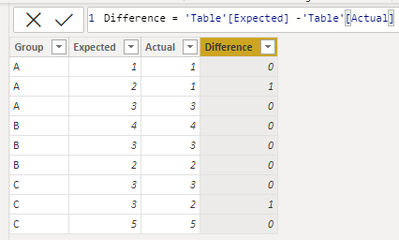
GroupExpectedActualDifference (DAX)
A110
A211
A330
B440
B330
B220
C330
C321
C550


My end goal is to have a text box or card of some sort that will say something like:
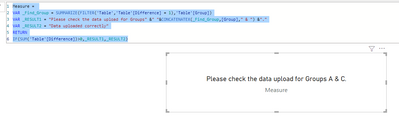
"Please check the data upload for Groups A & C."

or "Data uploaded correctly" if all Groups produce 0s for Difference.

What's a good way to accomplish this? Thanks!

1 ACCEPTED SOLUTION
Anonymous
Not applicable

Hi @Anonymous ,


Please try this code to create a measure.

Measure = 
VAR _Find_Group = SUMMARIZE(FILTER('Table','Table'[Difference] = 1),'Table'[Group])
VAR _RESULT1 = "Please check the data upload for Groups" &" "&CONCATENATEX(_Find_Group,[Group]," & ") &"."
VAR _RESULT2 = "Data uploaded correctly"
RETURN
IF(SUM('Table'[Difference])>0,_RESULT1,_RESULT2)

My Sample:

RicoZhou_1-1659066091818.png

Result is as below.

RicoZhou_0-1659066046404.png


Best Regards,
Rico Zhou


If this post helps, then please consider Accept it as the solution to help the other members find it more quickly.


View solution in original post

2 REPLIES 2
Anonymous
Not applicable

Hi @Anonymous ,


Please try this code to create a measure.

Measure = 
VAR _Find_Group = SUMMARIZE(FILTER('Table','Table'[Difference] = 1),'Table'[Group])
VAR _RESULT1 = "Please check the data upload for Groups" &" "&CONCATENATEX(_Find_Group,[Group]," & ") &"."
VAR _RESULT2 = "Data uploaded correctly"
RETURN
IF(SUM('Table'[Difference])>0,_RESULT1,_RESULT2)

My Sample:

RicoZhou_1-1659066091818.png

Result is as below.

RicoZhou_0-1659066046404.png


Best Regards,
Rico Zhou


If this post helps, then please consider Accept it as the solution to help the other members find it more quickly.


Anonymous
Not applicable

That works! Thanks for the help, Rico!

Helpful resources

Announcements
Fabric Data Days is here Carousel

Data Days 2026

Don't miss out on Data Days, June 15 through August 7. Learn Fabric, Power BI, SQL, AI and more.

Power BI DataViz World Championships carousel

Power BI DataViz World Championships - June 2026

A new Power BI DataViz World Championship is coming this June! Don't miss out on submitting your entry.