Don't miss your chance to take the Fabric Data Engineer (DP-700) exam on us!
Learn moreWe've captured the moments from FabCon & SQLCon that everyone is talking about, and we are bringing them to the community, live and on-demand. Starts on April 14th. Register now
Dear community,
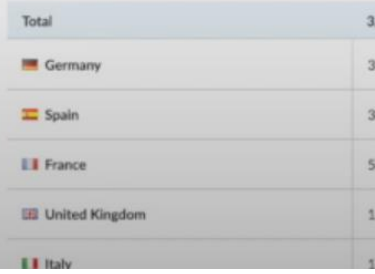
I'm getting images from URL in my table but i want to get like this in the Grid (flag+Name of Country):
This is where i am at so far:
Thank you in advance,
Solved! Go to Solution.
No, the problem is not a limitation of the visual but the way a tabular model handles data types on fields. In order to get the image the data type must be web url. If you try to combine it with a country name the field type becomes text and the image is not retrieved.
Hi i can't find my country "Morocco" in the dashborad countries list whenver i select africa as a region.
Can you please help ?
Perhaps there is no data for Morocco in the measure that is being displayed so the row does not show up.
No, the problem is not a limitation of the visual but the way a tabular model handles data types on fields. In order to get the image the data type must be web url. If you try to combine it with a country name the field type becomes text and the image is not retrieved.
According to the answer on this post it is not possible to combine an image and text into a single field because of the different data types. You will have to put the country name in a different field right next to the flag.
https://community.powerbi.com/t5/Desktop/Matrix-with-Image-and-Text/td-p/1680338
Thank you. is there a vizual that can help achieve the desired output, apart from that?
If you have recently started exploring Fabric, we'd love to hear how it's going. Your feedback can help with product improvements.
A new Power BI DataViz World Championship is coming this June! Don't miss out on submitting your entry.
Share feedback directly with Fabric product managers, participate in targeted research studies and influence the Fabric roadmap.
| User | Count |
|---|---|
| 55 | |
| 40 | |
| 35 | |
| 19 | |
| 18 |
| User | Count |
|---|---|
| 71 | |
| 70 | |
| 38 | |
| 35 | |
| 23 |