Join us at FabCon Atlanta from March 16 - 20, 2026, for the ultimate Fabric, Power BI, AI and SQL community-led event. Save $200 with code FABCOMM.
Register now!Vote for your favorite vizzies from the Power BI Dataviz World Championship submissions. Vote now!
Hello PBI Masters 😃
Background: we have information like below:
| Review Name | Review Date | Product Purchase Date |
| Name A | 06/05/2020 | 04/30/2020 |
| Name B | 06/25/2020 | 05/06/2020 |
| Name C | 06/30/2020 | 06/21/2020 |
| Name D | 07/05/2020 | 06/15/2020 |
| Name E | 07/13/2020 | 04/30/2020 |
| Name F | 07/15/2020 | 07/01/2020 |
| Name G | 07/16/2020 | 04/30/2020 |
| Name H | 07/25/2020 | 06/15/2020 |
Report filter pane has a time slicer for the users to choose a time period.
The whole report is filtered based on Review Date since that's the users interested in.
The goal: (within the 8 reviews in the example in the table above)
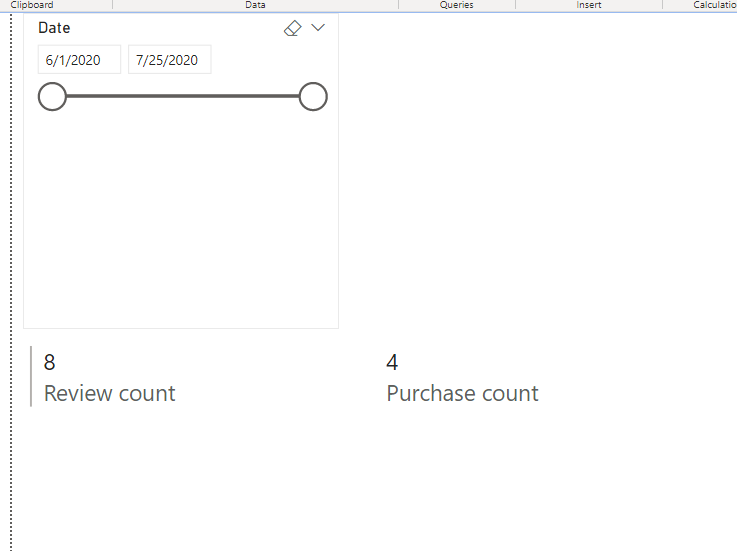
When the user chose: Time Period: 06/01/2020 - 07/25/2020
The Review Count: 8 (because 8 reviews were posted during the chosen time)
The purchase count during chosen time period: 4 (because within those reviews, only 4 purchase were made)
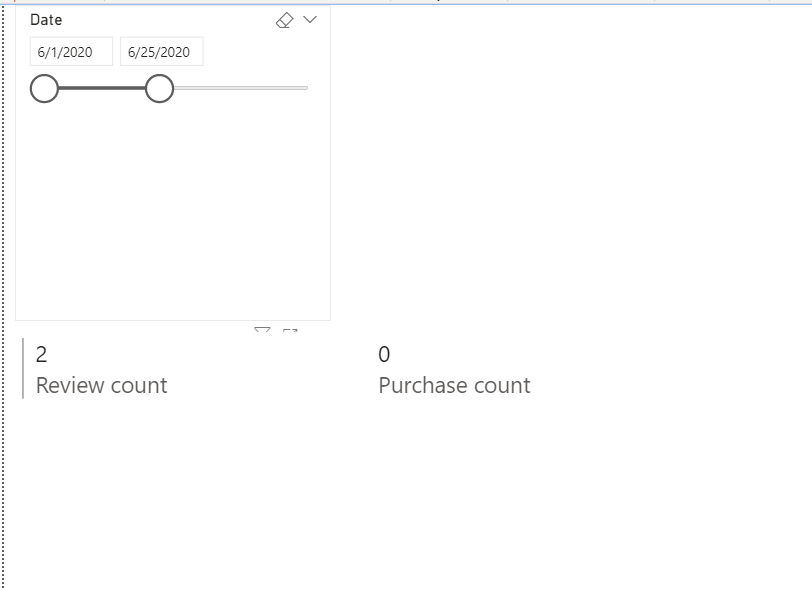
When the user chose: Time Period: 06/01/2020 - 06/25/2020
The Review Count: 2 (because 2 reviews were posted during the chosen time)
The purchase count during chosen time period: 0 (because within those reviews, none purchase were made during the same period)
Please help 💛 lots thanks!
Solved! Go to Solution.
Hi @Anonymous ,
I modified @Ashish_Mathur 's measure like so:
Purchase count =
CALCULATE (
COUNTROWS ( Data ),
Data[Product Purchase Date] IN VALUES ( 'Calendar'[Date] )
) + 0Review count = COUNTROWS(Data)
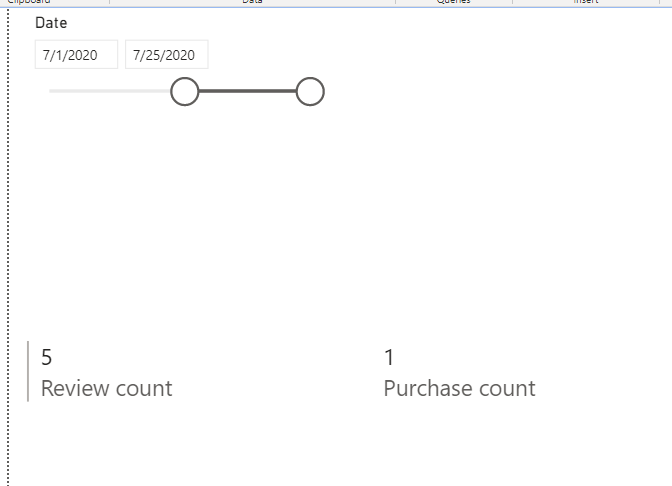
And get this:
Best Regards,
Icey
If this post helps, then please consider Accept it as the solution to help the other members find it more quickly.
Hi @Anonymous ,
I modified @Ashish_Mathur 's measure like so:
Purchase count =
CALCULATE (
COUNTROWS ( Data ),
Data[Product Purchase Date] IN VALUES ( 'Calendar'[Date] )
) + 0Review count = COUNTROWS(Data)
And get this:
Best Regards,
Icey
If this post helps, then please consider Accept it as the solution to help the other members find it more quickly.
Thank you @Icey and thank you @Ashish_Mathur for helping.
Ashish's file plus Icey's modification on the measure made it perfect!
Have a great day ahead!
You are welcome.
Hi,
You may download my PBI file from here.
Hope this helps.
Vote for your favorite vizzies from the Power BI World Championship submissions!
If you love stickers, then you will definitely want to check out our Community Sticker Challenge!
Check out the January 2026 Power BI update to learn about new features.
| User | Count |
|---|---|
| 57 | |
| 55 | |
| 42 | |
| 16 | |
| 16 |
| User | Count |
|---|---|
| 113 | |
| 106 | |
| 38 | |
| 35 | |
| 26 |