- Power BI forums
- Updates
- News & Announcements
- Get Help with Power BI
- Desktop
- Service
- Report Server
- Power Query
- Mobile Apps
- Developer
- DAX Commands and Tips
- Custom Visuals Development Discussion
- Health and Life Sciences
- Power BI Spanish forums
- Translated Spanish Desktop
- Power Platform Integration - Better Together!
- Power Platform Integrations (Read-only)
- Power Platform and Dynamics 365 Integrations (Read-only)
- Training and Consulting
- Instructor Led Training
- Dashboard in a Day for Women, by Women
- Galleries
- Community Connections & How-To Videos
- COVID-19 Data Stories Gallery
- Themes Gallery
- Data Stories Gallery
- R Script Showcase
- Webinars and Video Gallery
- Quick Measures Gallery
- 2021 MSBizAppsSummit Gallery
- 2020 MSBizAppsSummit Gallery
- 2019 MSBizAppsSummit Gallery
- Events
- Ideas
- Custom Visuals Ideas
- Issues
- Issues
- Events
- Upcoming Events
- Community Blog
- Power BI Community Blog
- Custom Visuals Community Blog
- Community Support
- Community Accounts & Registration
- Using the Community
- Community Feedback
Register now to learn Fabric in free live sessions led by the best Microsoft experts. From Apr 16 to May 9, in English and Spanish.
- Power BI forums
- Forums
- Get Help with Power BI
- Desktop
- Re: Count of previous week
- Subscribe to RSS Feed
- Mark Topic as New
- Mark Topic as Read
- Float this Topic for Current User
- Bookmark
- Subscribe
- Printer Friendly Page

- Mark as New
- Bookmark
- Subscribe
- Mute
- Subscribe to RSS Feed
- Permalink
- Report Inappropriate Content
Count of previous week
Hello all,
As im beginner with PBI, im coming to experts here. I have following issue:
I have table with 2 columns (Target date and Status) in excel.
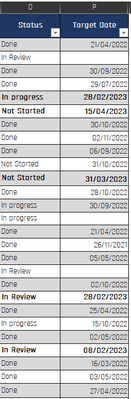
I want to create 2x DAX measures.
Measure 1 conditions:
- Filter only In progress ,In review and Not started rows in Status collumn
- Filter only rows with dates in Target date collumn (Avoid empty rows)
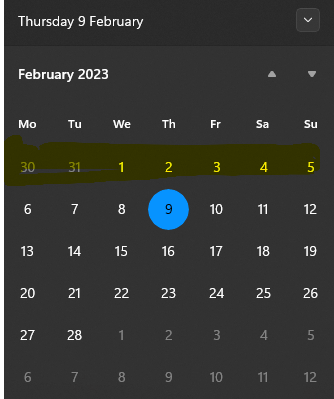
- Count only rows with dates which are in range of current week (means in the range of 6 to 12th of February)

Measure 2 conditions:
- Filter only In progress ,In review and Not started rows in Status collumn
- Filter only rows with dates in Target date collumn (Avoid empty rows)
- Count rows with dates which have dates until end of previous week (all the dates until 5 of February)
Thank you for help, much appreciated
Solved! Go to Solution.

- Mark as New
- Bookmark
- Subscribe
- Mute
- Subscribe to RSS Feed
- Permalink
- Report Inappropriate Content
Try this:
Measure1 =
CALCULATE (
COUNTROWS ( YourTableName),
FILTER (
YourTableName,
YourTableName[Status] in ({"In progress", "In Review", "Not started"})
&& WEEKNUM ( YourTableName[Target Date] )
= WEEKNUM ( TODAY () )
&& YEAR ( YourTableName[Target Date] ) = YEAR ( TODAY () )
))
Hopefully you can work out measure 2! 🙂
- Mark as New
- Bookmark
- Subscribe
- Mute
- Subscribe to RSS Feed
- Permalink
- Report Inappropriate Content
For Measure2 you just need to substract from the week number:
Measure2 =
CALCULATE (
COUNTROWS ( YourTableName),
FILTER (
YourTableName,
YourTableName[Status] in ({"In progress", "In Review", "Not started"})
&& WEEKNUM ( YourTableName[Target Date] )
= WEEKNUM ( TODAY () -1 )
&& YEAR ( YourTableName[Target Date] ) = YEAR ( TODAY () )
))
- Mark as New
- Bookmark
- Subscribe
- Mute
- Subscribe to RSS Feed
- Permalink
- Report Inappropriate Content
@AdaKAda Thanks, but second measure doesnt work 😞
It counts only the dates for 2023 year and I would like to count all the years (2022,2021,etc...)
- Mark as New
- Bookmark
- Subscribe
- Mute
- Subscribe to RSS Feed
- Permalink
- Report Inappropriate Content
OK so all weeks which are NOT current week? 😄
Measure2 =
CALCULATE (
COUNTROWS ( YourTableName),
FILTER (
YourTableName,
YourTableName[Status] in ({"In progress", "In Review", "Not started"})
&& NOT
(WEEKNUM ( YourTableName[Target Date] ) = WEEKNUM ( TODAY () )
&& YEAR ( YourTableName[Target Date] ) = YEAR ( TODAY () ))
))
- Mark as New
- Bookmark
- Subscribe
- Mute
- Subscribe to RSS Feed
- Permalink
- Report Inappropriate Content
@AdaKAda - I want to count rows from all the weeks (from this year and previous years) before current week. But measure 2 is still giving me incorrect value (I believe it counts blank rows in target date as well, for some reason)
- Mark as New
- Bookmark
- Subscribe
- Mute
- Subscribe to RSS Feed
- Permalink
- Report Inappropriate Content
If the problem is blanks, this should do:
Measure2 =
CALCULATE (
COUNTROWS ( YourTableName),
FILTER (
YourTableName,
YourTableName[Status] in ({"In progress", "In Review", "Not started"})
&& NOT
(WEEKNUM ( YourTableName[Target Date] ) = WEEKNUM ( TODAY () )
&& YEAR ( YourTableName[Target Date] ) = YEAR ( TODAY () ))
&& NOT(ISBLANK(financials[Date2]))
))
- Mark as New
- Bookmark
- Subscribe
- Mute
- Subscribe to RSS Feed
- Permalink
- Report Inappropriate Content
- Mark as New
- Bookmark
- Subscribe
- Mute
- Subscribe to RSS Feed
- Permalink
- Report Inappropriate Content
@AdaKAda thanks very much! it works
but cant figure out the measure 2. could you help, please? 🙂
- Mark as New
- Bookmark
- Subscribe
- Mute
- Subscribe to RSS Feed
- Permalink
- Report Inappropriate Content
Try this:
Measure1 =
CALCULATE (
COUNTROWS ( YourTableName),
FILTER (
YourTableName,
YourTableName[Status] in ({"In progress", "In Review", "Not started"})
&& WEEKNUM ( YourTableName[Target Date] )
= WEEKNUM ( TODAY () )
&& YEAR ( YourTableName[Target Date] ) = YEAR ( TODAY () )
))
Hopefully you can work out measure 2! 🙂

Helpful resources

Microsoft Fabric Learn Together
Covering the world! 9:00-10:30 AM Sydney, 4:00-5:30 PM CET (Paris/Berlin), 7:00-8:30 PM Mexico City

Power BI Monthly Update - April 2024
Check out the April 2024 Power BI update to learn about new features.

Fabric Community Update - April 2024
Find out what's new and trending in the Fabric Community.

| User | Count |
|---|---|
| 113 | |
| 97 | |
| 80 | |
| 69 | |
| 59 |


| User | Count |
|---|---|
| 150 | |
| 119 | |
| 104 | |
| 87 | |
| 67 |


