FabCon is coming to Atlanta
Join us at FabCon Atlanta from March 16 - 20, 2026, for the ultimate Fabric, Power BI, AI and SQL community-led event. Save $200 with code FABCOMM.
Register now!- Power BI forums
- Get Help with Power BI
- Desktop
- Service
- Report Server
- Power Query
- Mobile Apps
- Developer
- DAX Commands and Tips
- Custom Visuals Development Discussion
- Health and Life Sciences
- Power BI Spanish forums
- Translated Spanish Desktop
- Training and Consulting
- Instructor Led Training
- Dashboard in a Day for Women, by Women
- Galleries
- Data Stories Gallery
- Themes Gallery
- Contests Gallery
- QuickViz Gallery
- Quick Measures Gallery
- Visual Calculations Gallery
- Notebook Gallery
- Translytical Task Flow Gallery
- TMDL Gallery
- R Script Showcase
- Webinars and Video Gallery
- Ideas
- Custom Visuals Ideas (read-only)
- Issues
- Issues
- Events
- Upcoming Events
The Power BI Data Visualization World Championships is back! Get ahead of the game and start preparing now! Learn more
- Power BI forums
- Forums
- Get Help with Power BI
- Desktop
- Re: Count consecutive days based on selected date ...
- Subscribe to RSS Feed
- Mark Topic as New
- Mark Topic as Read
- Float this Topic for Current User
- Bookmark
- Subscribe
- Printer Friendly Page

- Mark as New
- Bookmark
- Subscribe
- Mute
- Subscribe to RSS Feed
- Permalink
- Report Inappropriate Content
Count consecutive days based on selected date by location
Hi, Please help!!
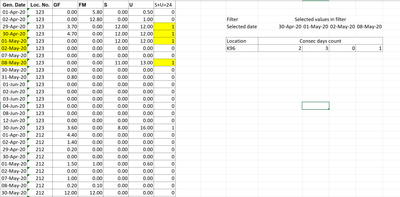
Left side in the below image is the data set. I need to count the number of consecutive occurences of digit 1.
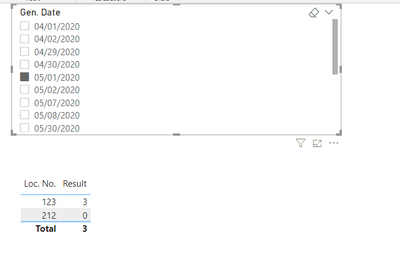
Count has to happen based on the selected date in the report. Like if select 01-May-2020, then consec count = 3
Solved! Go to Solution.


- Mark as New
- Bookmark
- Subscribe
- Mute
- Subscribe to RSS Feed
- Permalink
- Report Inappropriate Content
Hi, @Anonymous
Based on your description, I created data to reproduce your scenraio. The pbix file is attached in the end.
Table:
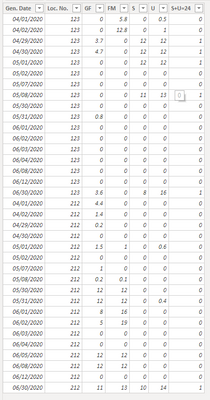
You may create a measure as below.
Result =
var tab =
ADDCOLUMNS(
    ALL('Table'),
    "L1",
    CALCULATE(
        MAX('Table'[Gen. Date]),
        FILTER(
            ALL('Table'),
            'Table'[Loc. No.]=EARLIER('Table'[Loc. No.])&&
            'Table'[Gen. Date]<EARLIER('Table'[Gen. Date])&&
            'Table'[S+U=24]=1
        )
    ),
    "L",
    CALCULATE(
        MAX('Table'[Gen. Date]),
        FILTER(
            ALL('Table'),
            'Table'[Loc. No.]=EARLIER('Table'[Loc. No.])&&
            'Table'[Gen. Date]<EARLIER('Table'[Gen. Date])
        )
    )
)
var newtab =
ADDCOLUMNS(
    tab,
    "flag",
    IF(
       [L1]=[L]&&NOT(ISBLANK([L])),
     1,0
    )
)
var t =
ADDCOLUMNS(
    newtab,
    "Re",
    var _loc = [Loc. No.]
    var _date = [Gen. Date]
    return
    IF(
        [S+U=24]=1,
        IF(
            ISBLANK([L1])||[flag]=0,
            1,
            1+
            COUNTROWS(
                FILTER(
                    newtab,
                    [Loc. No.]=_loc&&
                    [Gen. Date]<=_date&&
                    [flag]=1&&
                    NOT(ISBLANK([L]))
                )
            )
        )
    )
)
var _result =
SUMX(
    SUMMARIZE(
        'Table',
        'Table'[Loc. No.],
        "x",
        SUMX(
            FILTER(
                t,
                [Gen. Date]=SELECTEDVALUE('Table'[Gen. Date])&&
                [Loc. No.]=EARLIER('Table'[Loc. No.])
            ),
            [Re]
        )
    ),
    [x]
)
return
IF(
    ISBLANK(_result),
    0,
    _result
)
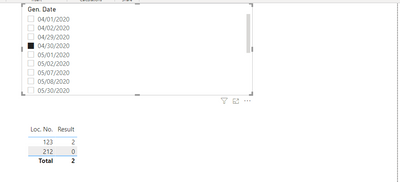
Result:
Best Regards
Allan
If this post helps, then please consider Accept it as the solution to help the other members find it more quickly.
- Mark as New
- Bookmark
- Subscribe
- Mute
- Subscribe to RSS Feed
- Permalink
- Report Inappropriate Content
Hi, @Anonymous
Based on your description, I created data to reproduce your scenraio. The pbix file is attached in the end.
Table:
You may create a measure as below.
Result =
var tab =
ADDCOLUMNS(
    ALL('Table'),
    "L1",
    CALCULATE(
        MAX('Table'[Gen. Date]),
        FILTER(
            ALL('Table'),
            'Table'[Loc. No.]=EARLIER('Table'[Loc. No.])&&
            'Table'[Gen. Date]<EARLIER('Table'[Gen. Date])&&
            'Table'[S+U=24]=1
        )
    ),
    "L",
    CALCULATE(
        MAX('Table'[Gen. Date]),
        FILTER(
            ALL('Table'),
            'Table'[Loc. No.]=EARLIER('Table'[Loc. No.])&&
            'Table'[Gen. Date]<EARLIER('Table'[Gen. Date])
        )
    )
)
var newtab =
ADDCOLUMNS(
    tab,
    "flag",
    IF(
       [L1]=[L]&&NOT(ISBLANK([L])),
     1,0
    )
)
var t =
ADDCOLUMNS(
    newtab,
    "Re",
    var _loc = [Loc. No.]
    var _date = [Gen. Date]
    return
    IF(
        [S+U=24]=1,
        IF(
            ISBLANK([L1])||[flag]=0,
            1,
            1+
            COUNTROWS(
                FILTER(
                    newtab,
                    [Loc. No.]=_loc&&
                    [Gen. Date]<=_date&&
                    [flag]=1&&
                    NOT(ISBLANK([L]))
                )
            )
        )
    )
)
var _result =
SUMX(
    SUMMARIZE(
        'Table',
        'Table'[Loc. No.],
        "x",
        SUMX(
            FILTER(
                t,
                [Gen. Date]=SELECTEDVALUE('Table'[Gen. Date])&&
                [Loc. No.]=EARLIER('Table'[Loc. No.])
            ),
            [Re]
        )
    ),
    [x]
)
return
IF(
    ISBLANK(_result),
    0,
    _result
)
Result:
Best Regards
Allan
If this post helps, then please consider Accept it as the solution to help the other members find it more quickly.


- Mark as New
- Bookmark
- Subscribe
- Mute
- Subscribe to RSS Feed
- Permalink
- Report Inappropriate Content
@Anonymous - OK, if this has to be dynamic then it has to be a measure, not a column. So, perhaps something like this:
Measure =
  VAR __Table =
    ADDCOLUMNS(
      ADDCOLUMNS(
        'Table',
        "Next",MINX(FILTER(ALL('Table'),[Gen Date]>EARLIER([Gen Date])),[Gen Date])
      ),
      "Diff",([Next] - [Gen Date])*1.
    )
RETURN
  COUNTROWS(FILTER(__Table,[Diff]=1))
Wasn't able to test. If you provide data in text in a table that I can copy, will mock it up in a PBIX for you.
Follow on LinkedIn
@ me in replies or I'll lose your thread!!!
Instead of a Kudo, please vote for this idea
Become an expert!: Enterprise DNA
External Tools: MSHGQM
YouTube Channel!: Microsoft Hates Greg
Latest book!: DAX For Humans
DAX is easy, CALCULATE makes DAX hard...
- Mark as New
- Bookmark
- Subscribe
- Mute
- Subscribe to RSS Feed
- Permalink
- Report Inappropriate Content
@Greg_Deckler - Thank you helping me on this. Please find below the sample data. a pbix file will help.
| Gen. Date | Loc. No. | GF | FM | S | U | S+U=24 |
| 01-Apr-20 | 123 | 0.00 | 5.80 | 0.00 | 0.50 | 0 |
| 02-Apr-20 | 123 | 0.00 | 12.80 | 0.00 | 1.00 | 0 |
| 29-Apr-20 | 123 | 3.70 | 0.00 | 12.00 | 12.00 | 1 |
| 30-Apr-20 | 123 | 4.70 | 0.00 | 12.00 | 12.00 | 1 |
| 01-May-20 | 123 | 0.00 | 0.00 | 12.00 | 12.00 | 1 |
| 02-May-20 | 123 | 0.00 | 0.00 | 0.00 | 0.00 | 0 |
| 07-May-20 | 123 | 0.00 | 0.00 | 0.00 | 0.00 | 0 |
| 08-May-20 | 123 | 0.00 | 0.00 | 11.00 | 13.00 | 1 |
| 30-May-20 | 123 | 0.00 | 0.00 | 0.00 | 0.00 | 0 |
| 31-May-20 | 123 | 0.80 | 0.00 | 0.00 | 0.00 | 0 |
| 01-Jun-20 | 123 | 0.00 | 0.00 | 0.00 | 0.00 | 0 |
| 02-Jun-20 | 123 | 0.00 | 0.00 | 0.00 | 0.00 | 0 |
| 03-Jun-20 | 123 | 0.00 | 0.00 | 0.00 | 0.00 | 0 |
| 04-Jun-20 | 123 | 0.00 | 0.00 | 0.00 | 0.00 | 0 |
| 08-Jun-20 | 123 | 0.00 | 0.00 | 0.00 | 0.00 | 0 |
| 12-Jun-20 | 123 | 0.00 | 0.00 | 0.00 | 0.00 | 0 |
| 30-Jun-20 | 123 | 3.60 | 0.00 | 8.00 | 16.00 | 1 |
| 01-Apr-20 | 212 | 4.40 | 0.00 | 0.00 | 0.00 | 0 |
| 02-Apr-20 | 212 | 1.40 | 0.00 | 0.00 | 0.00 | 0 |
| 29-Apr-20 | 212 | 0.20 | 0.00 | 0.00 | 0.00 | 0 |
| 30-Apr-20 | 212 | 0.00 | 0.00 | 0.00 | 0.00 | 0 |
| 01-May-20 | 212 | 1.50 | 1.00 | 0.00 | 0.60 | 0 |
| 02-May-20 | 212 | 0.00 | 0.00 | 0.00 | 0.00 | 0 |
| 07-May-20 | 212 | 1.00 | 0.00 | 0.00 | 0.00 | 0 |
| 08-May-20 | 212 | 0.20 | 0.10 | 0.00 | 0.00 | 0 |
| 30-May-20 | 212 | 12.00 | 12.00 | 0.00 | 0.00 | 0 |
| 31-May-20 | 212 | 12.00 | 12.00 | 0.00 | 0.40 | 0 |
| 01-Jun-20 | 212 | 8.00 | 16.00 | 0.00 | 0.00 | 0 |
| 02-Jun-20 | 212 | 5.00 | 19.00 | 0.00 | 0.00 | 0 |
| 03-Jun-20 | 212 | 0.00 | 0.00 | 0.00 | 0.00 | 0 |
| 04-Jun-20 | 212 | 0.00 | 0.00 | 0.00 | 0.00 | 0 |
| 05-Jun-20 | 212 | 12.00 | 12.00 | 0.00 | 0.00 | 0 |
| 08-Jun-20 | 212 | 12.00 | 12.00 | 0.00 | 0.00 | 0 |
| 12-Jun-20 | 212 | 0.00 | 0.00 | 0.00 | 0.00 | 0 |
| 30-Jun-20 | 212 | 11.00 | 13.00 | 10.00 | 14.00 | 1 |
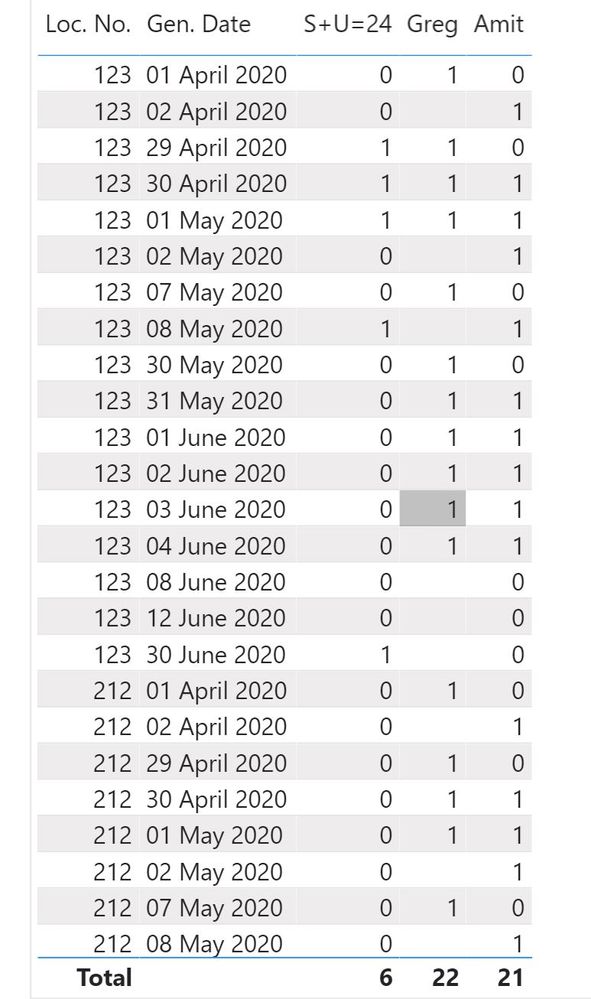
I applied both suggestions from Amit and Greg and below is the result.


- Mark as New
- Bookmark
- Subscribe
- Mute
- Subscribe to RSS Feed
- Permalink
- Report Inappropriate Content
@Anonymous , Create a new column like this and add that
if(not(isblank(maxx(filter(Table,[Gen Date] = earlier([Gen Date])-1),[Gen Date]))),1,0)
- Mark as New
- Bookmark
- Subscribe
- Mute
- Subscribe to RSS Feed
- Permalink
- Report Inappropriate Content
Thank you @amitchandak . I created a column with your suggested defintion and included in the below post. Request you to review and let me know. Should I change to get the correct result?
- Mark as New
- Bookmark
- Subscribe
- Mute
- Subscribe to RSS Feed
- Permalink
- Report Inappropriate Content
@Anonymous - I have included a PBIX file below sig. You want Table (36). Not sure if it is what you want. Are you trying to emulate S+U=24 column is that the desired output? Please confirm or deny. If no, then what is the desired output?
Column =
  VAR __NextDate = MINX(FILTER(ALL('Table (36)'),[Gen. Date]>EARLIER([Gen. Date]) && [Loc. No.]=EARLIER([Loc. No.]) && [S+U=24]=1),[Gen. Date])
  VAR __Next = MAXX(FILTER('Table (36)',[Gen. Date]=__NextDate),[S+U=24])
RETURN
  IF([S+U=24]=1 && __Next=1,1,0)
Follow on LinkedIn
@ me in replies or I'll lose your thread!!!
Instead of a Kudo, please vote for this idea
Become an expert!: Enterprise DNA
External Tools: MSHGQM
YouTube Channel!: Microsoft Hates Greg
Latest book!: DAX For Humans
DAX is easy, CALCULATE makes DAX hard...
- Mark as New
- Bookmark
- Subscribe
- Mute
- Subscribe to RSS Feed
- Permalink
- Report Inappropriate Content
@Greg_Deckler - Below is the output I am trying to get..For a date selected I want to see the consecutive count that represents the outage. Its like if Scheduled (S) + Unscheduled (U) = 24 hrs in a day, then it means there is a outage on the machine/location.

Helpful resources

Power BI Monthly Update - November 2025
Check out the November 2025 Power BI update to learn about new features.

Fabric Data Days
Advance your Data & AI career with 50 days of live learning, contests, hands-on challenges, study groups & certifications and more!

FabCon Atlanta 2026
Join us at FabCon Atlanta, March 16-20, for the ultimate Fabric, Power BI, AI and SQL community-led event. Save $200 with code FABCOMM.


