Don't miss your chance to take exam DP-600 or DP-700 on us!
Request nowLearn from the best! Meet the four finalists headed to the FINALS of the Power BI Dataviz World Championships! Register now
Hi,
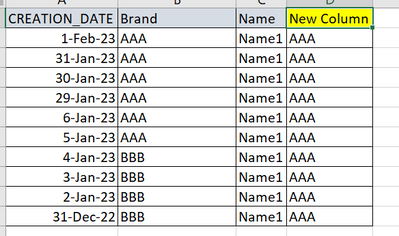
I have a table with a date column. I want to create a new column that will look at the latest "Brand" value and put it in the entire column. in this case : latest value is 1 feb 23 therefore we should put "AAA" in the entire column.
How can in please achieve that ?
thanks
Solved! Go to Solution.
Hi,
measure, not column
thanks for your help !
As Olga said, use a measure, not a column
I'd do it differently though.
FIRST OF ALL, disable auto time detection - otherwise the last date is going to be way later than your actual date.
File - options and settings - options - current file - data load - time intelligence - unclick "Auto date/time for new.."
Then use this in a MEASURE. You may have to change the table/column names to fit your data.
Lookuplast =
VAR Last = MAX('Table'[Datecolumn])
RETURN
LOOKUPVALUE('Table'[Brand], 'Table'[Datecolumn], [Last])
thank you !
Hi,
measure, not column
Share feedback directly with Fabric product managers, participate in targeted research studies and influence the Fabric roadmap.
Check out the February 2026 Power BI update to learn about new features.
| User | Count |
|---|---|
| 51 | |
| 40 | |
| 37 | |
| 14 | |
| 14 |
| User | Count |
|---|---|
| 85 | |
| 69 | |
| 38 | |
| 29 | |
| 27 |