cancel
Showing results for 
Search instead for 
Did you mean: 

The Power BI Data Visualization World Championships is back! Get ahead of the game and start preparing now! Learn more

Reply
Anonymous
Not applicable

Copy Visual - Clipboard Item not Collected Format not Supported

Currently I am using the Power BI Desktop in company laptop. I can put excel files and create charts as I want. To be able to present the charts, I need to copy them to PowerPoint. Per company policy, I am not allowed to publish the data or use the cloud based Power BI Service. Therefore I need to copy paste the charts. This should not be an issue since I don't need the charts dynamic, static is fine with me.  


Now coming to my problem, I am unable to copy and paste. I can right-click the chart and then click Copy > Copy visual (1st Screenshot). However, once I click that I get the Clipboard Item not Collected: Format not Supported by Office Clipboard error (2nd Screenshot). After vigorous research I couldn't find a solution to my problem. In some forums/posts users advise using snippet tools when working with Power BI Desktop, though I can't go this route since the chart/s I want to use doesn't fit in one screen. I am perfectly fine with using workarounds if applicable, though obviously prefer direct solution.


I can provide additional information and screenshots if needed. 
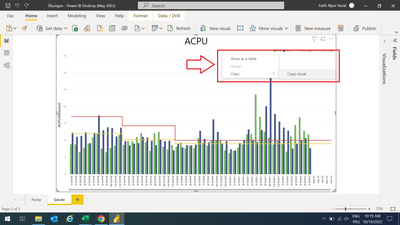
 

Screenshot (2).png

Screenshot (3).png


I need to find a way for this issue. This app is so useful and I don't want to be unable to use it due to some random minor issue like this.

Thanks in advance.

1 ACCEPTED SOLUTION
amitchandak
Super User
Super User

@Anonymous , You can do that from Power BI desktop to Power bi desktop as of now. You need to take screenshot for office

Share with Power BI Enthusiasts: Full Power BI Video (20 Hours) YouTube
Microsoft Fabric Series 60+ Videos YouTube
Microsoft Fabric Hindi End to End YouTube

View solution in original post

2 REPLIES 2
amitchandak
Super User
Super User

@Anonymous , You can do that from Power BI desktop to Power bi desktop as of now. You need to take screenshot for office

Share with Power BI Enthusiasts: Full Power BI Video (20 Hours) YouTube
Microsoft Fabric Series 60+ Videos YouTube
Microsoft Fabric Hindi End to End YouTube
Anonymous
Not applicable

Are there any ways to adjust my table size so that I can fit in one page? It seems minimum spacing I can go for a line chart is 20pixels. And unfortunately it is not enough for me.

Helpful resources

Announcements
November Power BI Update Carousel

Power BI Monthly Update - November 2025

Check out the November 2025 Power BI update to learn about new features.

Fabric Data Days Carousel

Fabric Data Days

Advance your Data & AI career with 50 days of live learning, contests, hands-on challenges, study groups & certifications and more!

FabCon Atlanta 2026 carousel

FabCon Atlanta 2026

Join us at FabCon Atlanta, March 16-20, for the ultimate Fabric, Power BI, AI and SQL community-led event. Save $200 with code FABCOMM.

Top Kudoed Authors