Don't miss your chance to take the Fabric Data Engineer (DP-700) exam on us!
Learn moreWe've captured the moments from FabCon & SQLCon that everyone is talking about, and we are bringing them to the community, live and on-demand. Starts on April 14th. Register now
Hello,
Whenever i try to connect to my excel file, it shows all range from A1 to end,
I want to connnect to data in specific table range name,
Is it possible, and how to do it
Thank you
Solved! Go to Solution.
First get your definitions clear.
A range is not the same as a table.
So first create your named range of - better - your table in your Excel workbook.
Save the workbook.
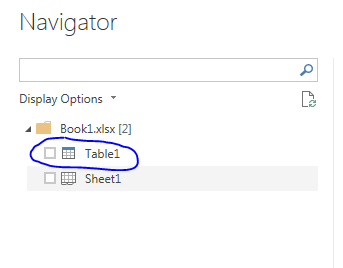
Connect to the workbook (using "From Excel"), which will give you a list of usable objects, including your table (or range) and the worksheet(s).
Now drill down to the table (or range).
First get your definitions clear.
A range is not the same as a table.
So first create your named range of - better - your table in your Excel workbook.
Save the workbook.
Connect to the workbook (using "From Excel"), which will give you a list of usable objects, including your table (or range) and the worksheet(s).
Now drill down to the table (or range).
Hi @MarcelBeug ,
For some reason I do not get a list of my tables from the excel sheet. Would you mind posting the generated M code for how it connects to the source?
Thanks
Michael
Solved my problem:
Seems I was working with old workbook file types. After converting them to the latest Excel workbook types the tables where visible in the natigation step of Power Query.
Hi @MarcelBeug
Thank you for your feedback,
This is wierd,
Today i can see the table category (not just sheet)
So, problem solved
Thank you
update: i realized that this is because my file is protected with such DRM so the table category is not showing (i must open it first to have acces to the file from pbi)
If you have recently started exploring Fabric, we'd love to hear how it's going. Your feedback can help with product improvements.
A new Power BI DataViz World Championship is coming this June! Don't miss out on submitting your entry.
Share feedback directly with Fabric product managers, participate in targeted research studies and influence the Fabric roadmap.
| User | Count |
|---|---|
| 53 | |
| 37 | |
| 35 | |
| 19 | |
| 17 |
| User | Count |
|---|---|
| 74 | |
| 69 | |
| 39 | |
| 35 | |
| 23 |