Forum Discussion

CarlsBerg999's avatar
CarlsBerg999
Icon for Helper V rankHelper V
5 years ago
Solved

Concatenate values

Hi,


I need to create a calculated column to my dataset called "Concatenated values". The column lists all employees with the same Job except for the current person. Therefore we have three analysts and on Jessie's row, the two others are listed. How do i do this in a calculated column?


NameJobConcatenated values
JessieAnalystJohn, Dave
JohnAnalystJessie, Dave
MaryConsultantMatt
MattConsultantMary
DaveAnalystJessie, John
  • Jihwan_Kim's avatar
    Jihwan_Kim
    5 years ago

    Hi, CarlsBerg999 

    Thank you for your feedback.

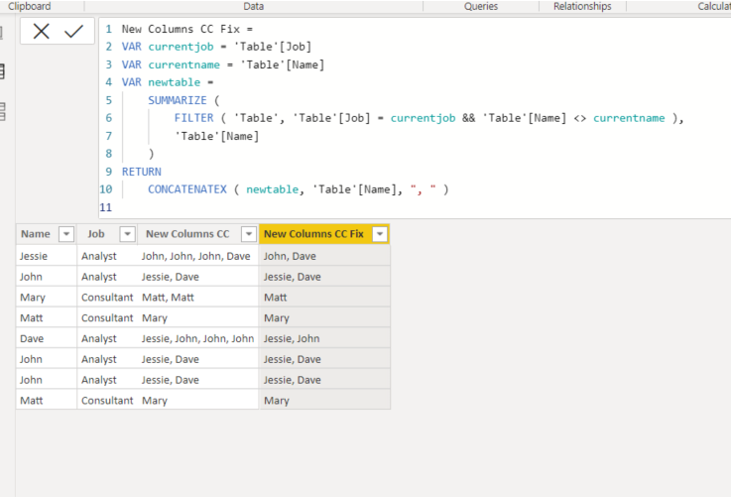
    I tried to create a new sample based on the explanation.


    Please check the link down below, and please try the below formula to create a new unique column.


    New Columns CC Fix =
    VAR currentjob = 'Table'[Job]
    VAR currentname = 'Table'[Name]
    VAR newtable =
    SUMMARIZE (
    FILTER ( 'Table', 'Table'[Job] = currentjob && 'Table'[Name] <> currentname ),
    'Table'[Name]
    )
    RETURN
    CONCATENATEX ( newtable, 'Table'[Name], ", " )


    https://www.dropbox.com/s/kf1y8k6hentdgdj/carls.pbix?dl=0 


    Hi, My name is Jihwan Kim.


    If this post helps, then please consider accept it as the solution to help other members find it faster, and give a big thumbs up.


    Linkedin: linkedin.com/in/jihwankim1975/

    Twitter: twitter.com/Jihwan_JHKIM

3 Replies

  • Hi, CarlsBerg999 

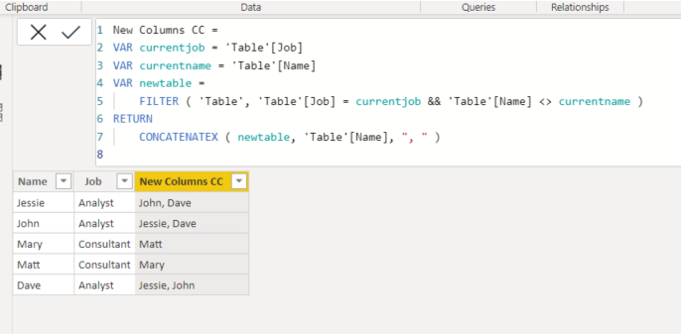
    Please check the below.


    New Columns CC =
    VAR currentjob = 'Table'[Job]
    VAR currentname = 'Table'[Name]
    VAR newtable =
    FILTER ( 'Table', 'Table'[Job] = currentjob && 'Table'[Name] <> currentname )
    RETURN
    CONCATENATEX ( newtable, 'Table'[Name], ", " )


    Hi, My name is Jihwan Kim.


    If this post helps, then please consider accept it as the solution to help other members find it faster, and give a big thumbs up.


    Linkedin: linkedin.com/in/jihwankim1975/

    Twitter: twitter.com/Jihwan_JHKIM

    • CarlsBerg999's avatar
      CarlsBerg999
      Icon for Helper V rankHelper V

      Hi, 

      This seems to be doing the trick but the dataset contains the same name multiple times. Is it possible to return only the unique values? For example, now I have John 67 times on the Concatenax column

      • Jihwan_Kim's avatar
        Jihwan_Kim
        Icon for Super User rankSuper User

        Hi, CarlsBerg999 

        Thank you for your feedback.

        I tried to create a new sample based on the explanation.


        Please check the link down below, and please try the below formula to create a new unique column.


        New Columns CC Fix =
        VAR currentjob = 'Table'[Job]
        VAR currentname = 'Table'[Name]
        VAR newtable =
        SUMMARIZE (
        FILTER ( 'Table', 'Table'[Job] = currentjob && 'Table'[Name] <> currentname ),
        'Table'[Name]
        )
        RETURN
        CONCATENATEX ( newtable, 'Table'[Name], ", " )


        https://www.dropbox.com/s/kf1y8k6hentdgdj/carls.pbix?dl=0 


        Hi, My name is Jihwan Kim.


        If this post helps, then please consider accept it as the solution to help other members find it faster, and give a big thumbs up.


        Linkedin: linkedin.com/in/jihwankim1975/

        Twitter: twitter.com/Jihwan_JHKIM