cancel
Showing results for 
Search instead for 
Did you mean: 

Get Fabric Certified for FREE during Fabric Data Days. Don't miss your chance! Request now

Reply
sd89
Regular Visitor

Computing Year on Year Sales Growth based on dynamic date range selection

Hi


I have a data which consists of sales and a date range. I want to compute year on year growth for a particular date range. For example, if I select date range 3-3-2020 to 7-8-2020 using a slicer, the total sales for this period is 500, I want to compute what was the growth rate compared to the same period last year that is 3-3-2019 to 7-8-2019. I am able to compute this years sales by using the function TotalSales = Calculate (Sum(Data[Sales]), DATESBETWEEN(Data[Date], Min(Data[Date]), Max(Data[Date])). However, I am unable to compute the sales from 3-3-2019 to 7-8-2019 reliably. I have tried two approches


1. Using SamePeriodLastYear Function


LastYearSales =  Calculate (Sum(Data[Sales]), SAMEPERIODLASTYEAR(Data[Date]). This function is giving me the shifted sales but I am unable to filter it to my date range. I am getting all the sales till 2019. 


2. I tried to extract the min and max value of the selected slicer and then tried to adjust by a year to get to the previous year date range. I am able to get the date range and it works but in some instance if I move the lover end of my slicer from 1-1-2020 the sum for the last year becomes blank while in other circumstances it is giving the correct result.


Any help would be greatly appreciated.


Regards,

Shounak

1 ACCEPTED SOLUTION
v-yingjl
Community Support
Community Support

Hi @sd89 ,

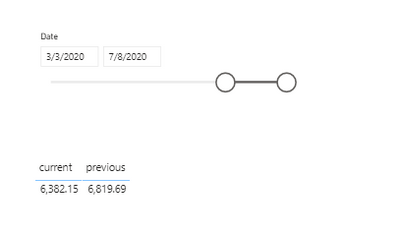
The previous year value shows blank could be caused by there is no data about 2018 year vallue when you choose 2019.

In addition, we'd better to have a continous date column when using Time-intelligence function like datesbetween, sampleperiodlastyear etc.

You can try to calculate previous year value like this:

previous =
VAR _min =
    CALCULATE ( MIN ( 'Table'[Date] ), ALLSELECTED ( 'Table' ) )
VAR _max =
    CALCULATE ( MAX ( 'Table'[Date] ), ALLSELECTED ( 'Table' ) )
RETURN
    CALCULATE (
        SUM ( 'Table'[Sales] ),
        FILTER (
            ALL ( 'Table' ),
            'Table'[Date]
                >= DATE ( YEAR ( _min ) - 1, MONTH ( _min ), DAY ( _min ) )
                && 'Table'[Date]
                    <= DATE ( YEAR ( _max ) - 1, MONTH ( _max ), DAY ( _max ) )
        )
    )

re.png

Attached a sample file in the below, hopes to help you.


Best Regards,
Yingjie Li

If this post helps then please consider Accept it as the solution to help the other members find it more quickly.

View solution in original post

1 REPLY 1
v-yingjl
Community Support
Community Support

Hi @sd89 ,

The previous year value shows blank could be caused by there is no data about 2018 year vallue when you choose 2019.

In addition, we'd better to have a continous date column when using Time-intelligence function like datesbetween, sampleperiodlastyear etc.

You can try to calculate previous year value like this:

previous =
VAR _min =
    CALCULATE ( MIN ( 'Table'[Date] ), ALLSELECTED ( 'Table' ) )
VAR _max =
    CALCULATE ( MAX ( 'Table'[Date] ), ALLSELECTED ( 'Table' ) )
RETURN
    CALCULATE (
        SUM ( 'Table'[Sales] ),
        FILTER (
            ALL ( 'Table' ),
            'Table'[Date]
                >= DATE ( YEAR ( _min ) - 1, MONTH ( _min ), DAY ( _min ) )
                && 'Table'[Date]
                    <= DATE ( YEAR ( _max ) - 1, MONTH ( _max ), DAY ( _max ) )
        )
    )

re.png

Attached a sample file in the below, hopes to help you.


Best Regards,
Yingjie Li

If this post helps then please consider Accept it as the solution to help the other members find it more quickly.

Helpful resources

Announcements
November Power BI Update Carousel

Power BI Monthly Update - November 2025

Check out the November 2025 Power BI update to learn about new features.

Fabric Data Days Carousel

Fabric Data Days

Advance your Data & AI career with 50 days of live learning, contests, hands-on challenges, study groups & certifications and more!

FabCon Atlanta 2026 carousel

FabCon Atlanta 2026

Join us at FabCon Atlanta, March 16-20, for the ultimate Fabric, Power BI, AI and SQL community-led event. Save $200 with code FABCOMM.

Top Solution Authors
Top Kudoed Authors