cancel
Showing results for 
Search instead for 
Did you mean: 

Vote for your favorite vizzies from the Power BI Dataviz World Championship submissions. Vote now!

Reply
swolfe2
Helper I
Helper I

Composite Model: If week number not on aggregation table, go back to fact table?

I've been asked by the business to come up with a method to provide fast reporting for the past 8 weeks, while leaving all previous weeks available to query knowing those scenarios will take a performance hit.

Here's the current model:
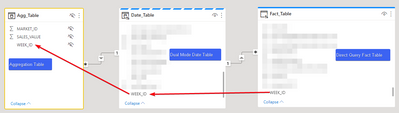
swolfe2_1-1652963879680.png


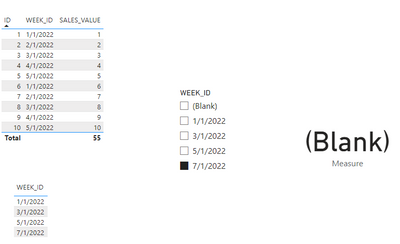
When the user selects a week in the previous 8 weeks from the date table, which is also on the aggregation table, I can tell that it's working correctly in DAX studio with an aggregation hit. However, once a user selects a week that is NOT on the aggregation table, but is on the date table, DAX studio shows that it's still an aggregation hit and the measure returns null. 

It shouldn't be possible for it to have found a match on the agg table since this week number doesn't exist on it:
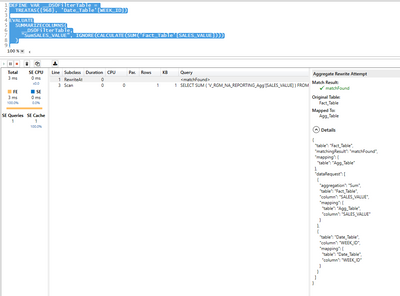
swolfe2_2-1652963982870.png

Any help/direction would be greatly appreciated!


2 ACCEPTED SOLUTIONS
Anonymous
Not applicable

Hi @swolfe2 ,


Sorry for that the information you have provided is not making the problem clear to me.

According to this: However, once a user selects a week that is NOT on the aggregation table, but is on the date table, DAX studio shows that it's still an aggregation hit and the measure returns null. 

It shouldn't be possible for it to have found a match on the agg table since this week number doesn't exist on it.


Actually I think It's an expected behavior:

Eyelyn9_0-1653291642170.png


Best Regards,
Eyelyn Qin

View solution in original post

Yes, that's the same behavior I'm seeing on my side. 


I suppose the DAX that's being generated is just looking for "Is there an aggregated column based off of the year?" and not also "Does this year exist on the aggregated table, too?".

View solution in original post

2 REPLIES 2
Anonymous
Not applicable

Hi @swolfe2 ,


Sorry for that the information you have provided is not making the problem clear to me.

According to this: However, once a user selects a week that is NOT on the aggregation table, but is on the date table, DAX studio shows that it's still an aggregation hit and the measure returns null. 

It shouldn't be possible for it to have found a match on the agg table since this week number doesn't exist on it.


Actually I think It's an expected behavior:

Eyelyn9_0-1653291642170.png


Best Regards,
Eyelyn Qin

Yes, that's the same behavior I'm seeing on my side. 


I suppose the DAX that's being generated is just looking for "Is there an aggregated column based off of the year?" and not also "Does this year exist on the aggregated table, too?".

Helpful resources

Announcements
Power BI DataViz World Championships

Power BI Dataviz World Championships

Vote for your favorite vizzies from the Power BI World Championship submissions!

Sticker Challenge 2026 Carousel

Join our Community Sticker Challenge 2026

If you love stickers, then you will definitely want to check out our Community Sticker Challenge!

January Power BI Update Carousel

Power BI Monthly Update - January 2026

Check out the January 2026 Power BI update to learn about new features.

FabCon Atlanta 2026 carousel

FabCon Atlanta 2026

Join us at FabCon Atlanta, March 16-20, for the ultimate Fabric, Power BI, AI and SQL community-led event. Save $200 with code FABCOMM.