Join us at FabCon Vienna from September 15-18, 2025
The ultimate Fabric, Power BI, SQL, and AI community-led learning event. Save €200 with code FABCOMM.
Get registered- Power BI forums
- Get Help with Power BI
- Desktop
- Service
- Report Server
- Power Query
- Mobile Apps
- Developer
- DAX Commands and Tips
- Custom Visuals Development Discussion
- Health and Life Sciences
- Power BI Spanish forums
- Translated Spanish Desktop
- Training and Consulting
- Instructor Led Training
- Dashboard in a Day for Women, by Women
- Galleries
- Data Stories Gallery
- Themes Gallery
- Contests Gallery
- Quick Measures Gallery
- Notebook Gallery
- Translytical Task Flow Gallery
- TMDL Gallery
- R Script Showcase
- Webinars and Video Gallery
- Ideas
- Custom Visuals Ideas (read-only)
- Issues
- Issues
- Events
- Upcoming Events
Compete to become Power BI Data Viz World Champion! First round ends August 18th. Get started.
- Power BI forums
- Forums
- Get Help with Power BI
- Desktop
- Re: Comparing current vs last year sales - multipl...
- Subscribe to RSS Feed
- Mark Topic as New
- Mark Topic as Read
- Float this Topic for Current User
- Bookmark
- Subscribe
- Printer Friendly Page

- Mark as New
- Bookmark
- Subscribe
- Mute
- Subscribe to RSS Feed
- Permalink
- Report Inappropriate Content
Comparing current vs last year sales - multiple date columns
Hello,
I have a sales table that looks as follows:
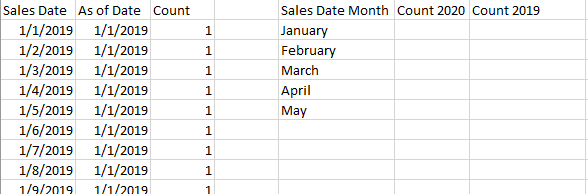
How can I calculate the columns Count 2020, Count 2019, by using the As of date column as a filter in a visual?
Ej: As of date: 2/1/2020 vs. 2/1/2019
Thank you!
Solved! Go to Solution.
- Mark as New
- Bookmark
- Subscribe
- Mute
- Subscribe to RSS Feed
- Permalink
- Report Inappropriate Content
Hi @Anonymous ,
Pbix as attached, hopefully works for you.
Best Regards,
Jay
Community Support Team _ Jay Wang
If this post helps, then please consider Accept it as the solution to help the other members find it more quickly.
- Mark as New
- Bookmark
- Subscribe
- Mute
- Subscribe to RSS Feed
- Permalink
- Report Inappropriate Content
Hi @Anonymous ,
Try
C_Y = SUM('Table'[count])

L_Y = CALCULATE(SUM('Table'[count]),FILTER(ALL('Table'),'Table'[As of date]=EDATE(SELECTEDVALUE('Table'[As of date]),-12)))
Result would be shown as below.


Best Regards,
Jay
Community Support Team _ Jay Wang
If this post helps, then please consider Accept it as the solution to help the other members find it more quickly.
- Mark as New
- Bookmark
- Subscribe
- Mute
- Subscribe to RSS Feed
- Permalink
- Report Inappropriate Content
Hi @Anonymous .
My desired output is a table, so I'm getting a fixed value for the L_Y measure for each month.
The table is able to show
Count 2020= CALCULATE(sum(table[count]),table[sales date]>=date(2020,1,1),table[sales date]<=date(2020,12,31))
values in the output table, for January to December of this year
Thanks
- Mark as New
- Bookmark
- Subscribe
- Mute
- Subscribe to RSS Feed
- Permalink
- Report Inappropriate Content
Hi @Anonymous ,
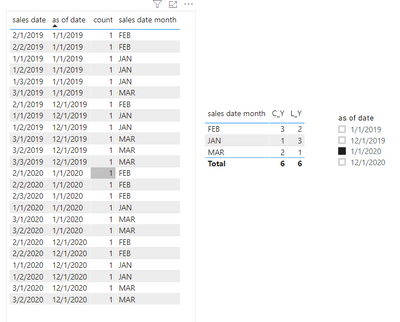
Check if the visual below is what you want.
C_Y = CALCULATE(SUM('Table'[count]),FILTER(ALLEXCEPT('Table','Table'[sales date month]),'Table'[as of date] in VALUES('Table'[as of date])))

L_Y = CALCULATE(SUM('Table'[count]),FILTER(ALLEXCEPT('Table','Table'[sales date month]),EDATE('Table'[as of date],12) in VALUES('Table'[as of date])))

Best Regards,
Jay
Community Support Team _ Jay Wang
If this post helps, then please consider Accept it as the solution to help the other members find it more quickly.
- Mark as New
- Bookmark
- Subscribe
- Mute
- Subscribe to RSS Feed
- Permalink
- Report Inappropriate Content
Hi @Anonymous.
The measures didn't worked for me.
Can you please share your pbix file?
Thank you!
- Mark as New
- Bookmark
- Subscribe
- Mute
- Subscribe to RSS Feed
- Permalink
- Report Inappropriate Content
Hi @Anonymous ,
Pbix as attached, hopefully works for you.
Best Regards,
Jay
Community Support Team _ Jay Wang
If this post helps, then please consider Accept it as the solution to help the other members find it more quickly.
- Mark as New
- Bookmark
- Subscribe
- Mute
- Subscribe to RSS Feed
- Permalink
- Report Inappropriate Content
Hello @Anonymous and @Greg_Deckler
The following worked for me, modifying the code you provided:
Thank you so much for your help!


- Mark as New
- Bookmark
- Subscribe
- Mute
- Subscribe to RSS Feed
- Permalink
- Report Inappropriate Content
Measure2 = SUMX(FILTER('Table',[As of Date] <= 0DATE(2019,2,1)),[Count])
Follow on LinkedIn
@ me in replies or I'll lose your thread!!!
Instead of a Kudo, please vote for this idea
Become an expert!: Enterprise DNA
External Tools: MSHGQM
YouTube Channel!: Microsoft Hates Greg
Latest book!: DAX For Humans
DAX is easy, CALCULATE makes DAX hard...
- Mark as New
- Bookmark
- Subscribe
- Mute
- Subscribe to RSS Feed
- Permalink
- Report Inappropriate Content
Thank you @Greg_Deckler
I was able to get the "As of date" field as a visual filter.
How to transform the measure 2, to get the value 1 year before the one I selected on the filter?
- Mark as New
- Bookmark
- Subscribe
- Mute
- Subscribe to RSS Feed
- Permalink
- Report Inappropriate Content
Measure2 =
VAR __TheChosenOne = SELECTEDVALUE('Table'[Date]) // this is your slicer
RETURN
SUMX(FILTER('Table',[As of Date] <= DATE(YEAR(__TheChosenOne) - 1,MONTH(__TheChosenOne),DAY(__TheChosenOne)),[Count])
Follow on LinkedIn
@ me in replies or I'll lose your thread!!!
Instead of a Kudo, please vote for this idea
Become an expert!: Enterprise DNA
External Tools: MSHGQM
YouTube Channel!: Microsoft Hates Greg
Latest book!: DAX For Humans
DAX is easy, CALCULATE makes DAX hard...
- Mark as New
- Bookmark
- Subscribe
- Mute
- Subscribe to RSS Feed
- Permalink
- Report Inappropriate Content
I calculated Count 2020 with the measure (no date table needed so far):
Count 2020= CALCULATE(sum(table[count]),table[sales date]>=date(2020,1,1),table[sales date]<=date(2020,12,31))
If I select 2/1/2020 "As of date" visual filter, Count 2020 works in the output table.
The measure 2, using a data table looks as:
Measure 2 =
VAR TheChosenOne = SELECTEDVALUE('Date'[Date])
return
sumx(filter(table,table[As of date]<=DATE(year(TheChosenOne)-1,month(TheChosenOne),day(TheChosenOne)),table[Count 2020]))
Unfortunately for Measure 2 I got the error: too many arguments were passed to the FILTER function. The maximum argument count for the function is 2.
- Mark as New
- Bookmark
- Subscribe
- Mute
- Subscribe to RSS Feed
- Permalink
- Report Inappropriate Content
Well, let's match up the parens:
Measure 2 =
VAR TheChosenOne = SELECTEDVALUE('Date'[Date])
return
sumx(
filter(
table,
table[As of date]<=
DATE(
year(TheChosenOne)-1,
month(TheChosenOne),
day(TheChosenOne)
)
),
table[Count 2020]
)
Found it!
Follow on LinkedIn
@ me in replies or I'll lose your thread!!!
Instead of a Kudo, please vote for this idea
Become an expert!: Enterprise DNA
External Tools: MSHGQM
YouTube Channel!: Microsoft Hates Greg
Latest book!: DAX For Humans
DAX is easy, CALCULATE makes DAX hard...
- Mark as New
- Bookmark
- Subscribe
- Mute
- Subscribe to RSS Feed
- Permalink
- Report Inappropriate Content
Thank you for checking @Greg_Deckler .
I got the following error in the output table: Can't display the visual:
MdxScript(Model) (133,44) Calculation error in message ('table'[Measure 2]: An argument of function 'DATE' has the wrong data type or the result is too large or too small.
I changed the value type to Whole number, and I'm still getting the error.
Can you please check?
- Mark as New
- Bookmark
- Subscribe
- Mute
- Subscribe to RSS Feed
- Permalink
- Report Inappropriate Content
Follow on LinkedIn
@ me in replies or I'll lose your thread!!!
Instead of a Kudo, please vote for this idea
Become an expert!: Enterprise DNA
External Tools: MSHGQM
YouTube Channel!: Microsoft Hates Greg
Latest book!: DAX For Humans
DAX is easy, CALCULATE makes DAX hard...
- Mark as New
- Bookmark
- Subscribe
- Mute
- Subscribe to RSS Feed
- Permalink
- Report Inappropriate Content
I'm getting the message with both date selected, and no date selected in the slicer.
Helpful resources

Power BI Monthly Update - August 2025
Check out the August 2025 Power BI update to learn about new features.

Fabric Community Update - August 2025
Find out what's new and trending in the Fabric community.


| User | Count |
|---|---|
| 85 | |
| 71 | |
| 68 | |
| 64 | |
| 47 |


