cancel
Showing results for 
Search instead for 
Did you mean: 

View all the Fabric Data Days sessions on demand. View schedule

Reply
schoden
Post Partisan
Post Partisan

Compare values of two measures

Hi All, 


I have two measures from two different table- both measures calculates sum of value with condition applied.


In the end I want to check if values from those two measures are equal or not. 


Final check = IF( Grand Margin== Margin , 1, 0)


final check.JPG


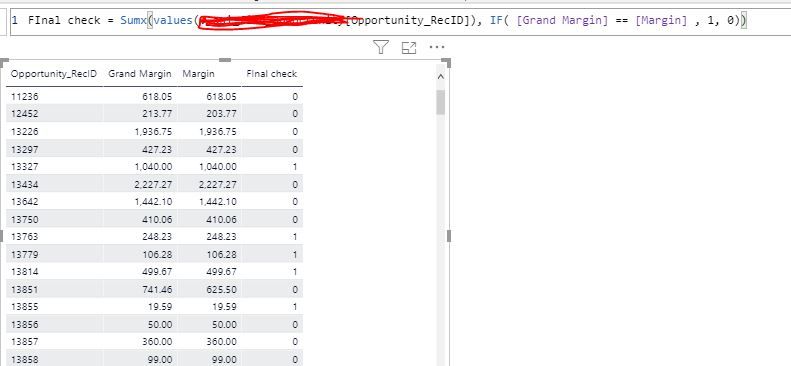
It doesnt really compare the values correctly.


Please help.


Cheers :D. 

7 REPLIES 7
amitchandak
Super User
Super User

@schoden , Try like

Final check = Sumx(values(Oppurtunity_recID), IF( [Grand Margin] = [Margin] , 1, 0))


Assumed [Grand Margin] , [Margin]  are measures

Share with Power BI Enthusiasts: Full Power BI Video (20 Hours) YouTube
Microsoft Fabric Series 60+ Videos YouTube
Microsoft Fabric Hindi End to End YouTube

Hi @amitchandak 


It seems it it not iterating at row level.


final check.JPG

Anonymous
Not applicable

Hi @schoden,

AFAIK, measure formula results not changed by hosted tables. Did these measure formulas extract values from the same table field? If this is a case, I think you need to create an unconnected table and modify one of your formulas to use this new table field in source or these measure formulas will get the same result from the filter. (Dax format can't get different results from these same table field)

Regards,

Xiaoxin Sheng

@Anonymous  Hi , 


I have two tables connected with one-to- many relationships. Each table has one measure and I am trying to compare those two measure values. 

Anonymous
Not applicable

HI @schoden,

Can you please share pbix file with some dummy data to test?

How to Get Your Question Answered Quickly 

Regards,

Xiaoxin Sheng

@schoden , is opportunityrow_id is at the lowest level?

If not use that. Also are the avaiale as column at in table , you can try a colum like


Final check =  IF( [Grand Margin] = [Margin] , 1, 0)

Share with Power BI Enthusiasts: Full Power BI Video (20 Hours) YouTube
Microsoft Fabric Series 60+ Videos YouTube
Microsoft Fabric Hindi End to End YouTube

Yes @amitchandak 

The first one was a new column , 


using SUMX - I changed to measure. 


both showed same.

Helpful resources

Announcements
November Power BI Update Carousel

Power BI Monthly Update - November 2025

Check out the November 2025 Power BI update to learn about new features.

Fabric Data Days Carousel

Fabric Data Days

Advance your Data & AI career with 50 days of live learning, contests, hands-on challenges, study groups & certifications and more!

FabCon Atlanta 2026 carousel

FabCon Atlanta 2026

Join us at FabCon Atlanta, March 16-20, for the ultimate Fabric, Power BI, AI and SQL community-led event. Save $200 with code FABCOMM.

Top Solution Authors
Top Kudoed Authors