FabCon is coming to Atlanta
Join us at FabCon Atlanta from March 16 - 20, 2026, for the ultimate Fabric, Power BI, AI and SQL community-led event. Save $200 with code FABCOMM.
Register now!- Power BI forums
- Get Help with Power BI
- Desktop
- Service
- Report Server
- Power Query
- Mobile Apps
- Developer
- DAX Commands and Tips
- Custom Visuals Development Discussion
- Health and Life Sciences
- Power BI Spanish forums
- Translated Spanish Desktop
- Training and Consulting
- Instructor Led Training
- Dashboard in a Day for Women, by Women
- Galleries
- Data Stories Gallery
- Themes Gallery
- Contests Gallery
- QuickViz Gallery
- Quick Measures Gallery
- Visual Calculations Gallery
- Notebook Gallery
- Translytical Task Flow Gallery
- TMDL Gallery
- R Script Showcase
- Webinars and Video Gallery
- Ideas
- Custom Visuals Ideas (read-only)
- Issues
- Issues
- Events
- Upcoming Events
The Power BI Data Visualization World Championships is back! Get ahead of the game and start preparing now! Learn more
- Power BI forums
- Forums
- Get Help with Power BI
- Desktop
- Re: Compare data to same previous period
- Subscribe to RSS Feed
- Mark Topic as New
- Mark Topic as Read
- Float this Topic for Current User
- Bookmark
- Subscribe
- Printer Friendly Page


- Mark as New
- Bookmark
- Subscribe
- Mute
- Subscribe to RSS Feed
- Permalink
- Report Inappropriate Content
Compare data to same previous period
I'm working to visualize Google Analytics data in both Google Data Studio and Power BI. In Google Data Studio you can add an automatic comparison to the same previous period in a scorecard. Is there a way to do this with Power BI and DAX? I'm not looking to compare with same time last month or year. But for instance, if the date slicer is set to the last 30 days, I want a scorecard to say that the number has risen or dropped compared to the 30 days before the selected period. Does anyone have a solution or best practice on this matter?


- Mark as New
- Bookmark
- Subscribe
- Mute
- Subscribe to RSS Feed
- Permalink
- Report Inappropriate Content
@Paulien1989 I am running into the same problem. I think the following instruction would guide you to create such a dynamic calculation in Power BI.
http://radacad.com/previous-dynamic-period-dax-calculation
However, I think Power BI should provide this feature in the date slicer. If I have multiple measures that I want to compare, then I have to create a previous period measure for each of them. That's too much work, right?
Here is the idea that you can vote:

- Mark as New
- Bookmark
- Subscribe
- Mute
- Subscribe to RSS Feed
- Permalink
- Report Inappropriate Content
@Paulien1989 wrote:
I'm working to visualize Google Analytics data in both Google Data Studio and Power BI. In Google Data Studio you can add an automatic comparison to the same previous period in a scorecard. Is there a way to do this with Power BI and DAX? I'm not looking to compare with same time last month or year. But for instance, if the date slicer is set to the last 30 days, I want a scorecard to say that the number has risen or dropped compared to the 30 days before the selected period. Does anyone have a solution or best practice on this matter?
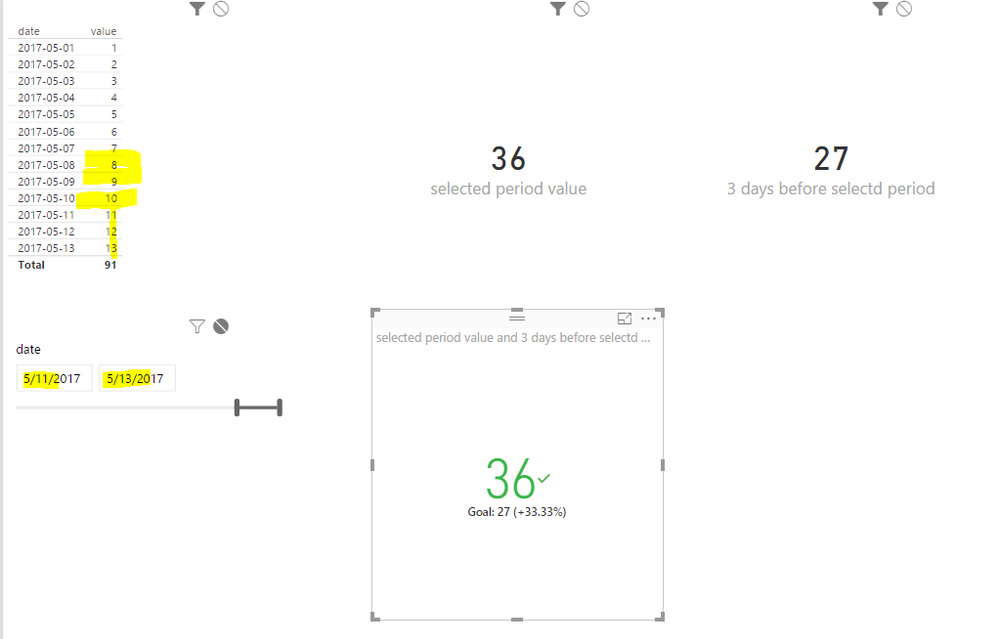
You can surely do that in Power BI. For instance, in below sample, create two measures and put them in a KPI visual. Check a demo in the attached zip file.
selected period value = SUM('Table'[value])

3 days before selectd period =
VAR minSelectedDate =
 MIN ( 'Table'[date] )
VAR startDate = minSelectedDate - 3
RETURN
 CALCULATE (
 SUM ( 'Table'[value] ),
 FILTER (
 ALL ( 'Table' ),
 'Table'[date] >= startDate
 && 'Table'[date] < minSelectedDate
 )
 )
- Mark as New
- Bookmark
- Subscribe
- Mute
- Subscribe to RSS Feed
- Permalink
- Report Inappropriate Content
That's not what I'm looking for.
If I do that and I change the date slicer to cover a month, it's going to compare a month to only three days before the selected start date. I'm looking for a solution that will automatically cover the same previous period every time I change the data slicer. So when I set it to a month, I want an automatic comparison to the month before. If I set it to 15 days, I want an automatic comparison to the 15 days before that. If I set the date slicer to 188 random days, I want an automatic comparison to the 188 days preceedingly.
(But yes, good thinking it should be with the KPI visual, thanks).
- Mark as New
- Bookmark
- Subscribe
- Mute
- Subscribe to RSS Feed
- Permalink
- Report Inappropriate Content
Then change the second measure a little bit.
3 days before selectd period =
VAR minSelectedDate =
    MIN ( 'Table'[date] )
VAR maxSelectedDate =
    MAX ( 'Table'[date] )
VAR periodDays =
    INT ( maxSelectedDate - minSelectedDate )
VAR startDate = minSelectedDate - periodDays
RETURN
    CALCULATE (
        SUM ( 'Table'[value] ),
        FILTER (
            ALL ( 'Table' ),
            'Table'[date] >= startDate
                && 'Table'[date] < minSelectedDate
        )
    )
- Mark as New
- Bookmark
- Subscribe
- Mute
- Subscribe to RSS Feed
- Permalink
- Report Inappropriate Content
Hmm it looks good, but it's not working. I want to compare the number of goal completions between the selected period and the previous period. When I use your measure, it looks like this:


- Mark as New
- Bookmark
- Subscribe
- Mute
- Subscribe to RSS Feed
- Permalink
- Report Inappropriate Content
Were you able to solve this?
I would like to do the same thing you are trying to do here.
- Mark as New
- Bookmark
- Subscribe
- Mute
- Subscribe to RSS Feed
- Permalink
- Report Inappropriate Content
What if put those two measures to split card visuals? By the way, could you share a pbix file with sample data?

Helpful resources

Power BI Monthly Update - November 2025
Check out the November 2025 Power BI update to learn about new features.

Fabric Data Days
Advance your Data & AI career with 50 days of live learning, contests, hands-on challenges, study groups & certifications and more!

FabCon Atlanta 2026
Join us at FabCon Atlanta, March 16-20, for the ultimate Fabric, Power BI, AI and SQL community-led event. Save $200 with code FABCOMM.


