


cancel
Showing results for 
Search instead for 
Did you mean: 

The Power BI Data Visualization World Championships is back! Get ahead of the game and start preparing now! Learn more

Reply
PavBidani
Helper II
Helper II

Compare a week data to prior week's data - Week data may be less than 7 days, so need to compare les

Hello All,

I am trying to compare Compare a week data to prior week's data - Week data may be less than 7 days, so need to compare the same number of days.  

Data has 4 days in week 23.  

PavBidani_1-1696949555271.png

Need to compare to the first 4 days in week 22

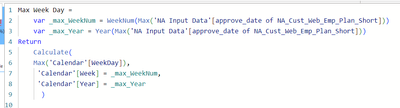
Getting the following error on my Max Week Day

PavBidani_2-1696949728447.png


PavBidani_0-1696949301347.png


Many thanks for your suggestions.

Open to other ways to do it.

Thanks,

Pav

1 ACCEPTED SOLUTION
Data-estDog
Resolver II
Resolver II

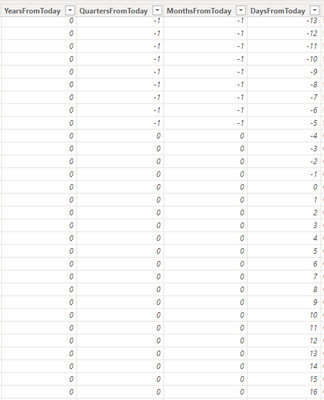
I typically add columns to the date dimension YearsFromToday, MonthsFromToday, DaysFromToday, etc. 

Negative is in the past, 0 is the current, positive is the future.

I have access to the DB views, but you can do this in Transform as well. See example, you could also have a "WeeksFromToday"

DataestDog_0-1696950606967.png

DataestDog_1-1696950868042.png


Then your DAX becomes stupid simple, to use your example:
Sale Count Week 1 = Calculate(Sale_count, DaysFromToday > -7 && DaysFromToday <= 0)
Sale Count Week 2 = Calculate(Sale_count, DaysFromToday > -14 && DaysFromToday <= -7)
....


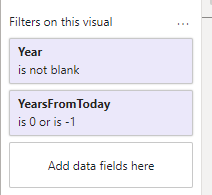
Or better yet, leave sale count as it is and just apply a filter to the KPI or visual (unless you want to combine different weeks on different lines or etc on the same viz) Then you don't need a new measure for every week.
example: 

DataestDog_2-1696951371363.png


If I answered your question, please mark my post as solution, Appreciate your Kudos 


View solution in original post

2 REPLIES 2
PavBidani
Helper II
Helper II

Thanks

Data-estDog
Resolver II
Resolver II

I typically add columns to the date dimension YearsFromToday, MonthsFromToday, DaysFromToday, etc. 

Negative is in the past, 0 is the current, positive is the future.

I have access to the DB views, but you can do this in Transform as well. See example, you could also have a "WeeksFromToday"

DataestDog_0-1696950606967.png

DataestDog_1-1696950868042.png


Then your DAX becomes stupid simple, to use your example:
Sale Count Week 1 = Calculate(Sale_count, DaysFromToday > -7 && DaysFromToday <= 0)
Sale Count Week 2 = Calculate(Sale_count, DaysFromToday > -14 && DaysFromToday <= -7)
....


Or better yet, leave sale count as it is and just apply a filter to the KPI or visual (unless you want to combine different weeks on different lines or etc on the same viz) Then you don't need a new measure for every week.
example: 

DataestDog_2-1696951371363.png


If I answered your question, please mark my post as solution, Appreciate your Kudos 


Helpful resources

Announcements
Power BI DataViz World Championships

Power BI Dataviz World Championships

The Power BI Data Visualization World Championships is back! Get ahead of the game and start preparing now!

December 2025 Power BI Update Carousel

Power BI Monthly Update - December 2025

Check out the December 2025 Power BI Holiday Recap!

FabCon Atlanta 2026 carousel

FabCon Atlanta 2026

Join us at FabCon Atlanta, March 16-20, for the ultimate Fabric, Power BI, AI and SQL community-led event. Save $200 with code FABCOMM.

Users online (3,142)