Forum Discussion
Dexter1088
7 years agoFrequent Visitor
Combine Rows in 1 Column when keeping the other columns the same
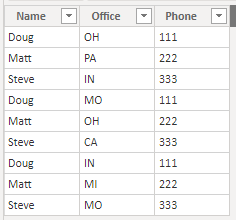
Hi There, Can anyone help me with combining rows in a column? I want the data to be the same in all the other columns. Example: (Combine Office Column) Name Office Phone Doug OH 1...
- 7 years ago
Hi,
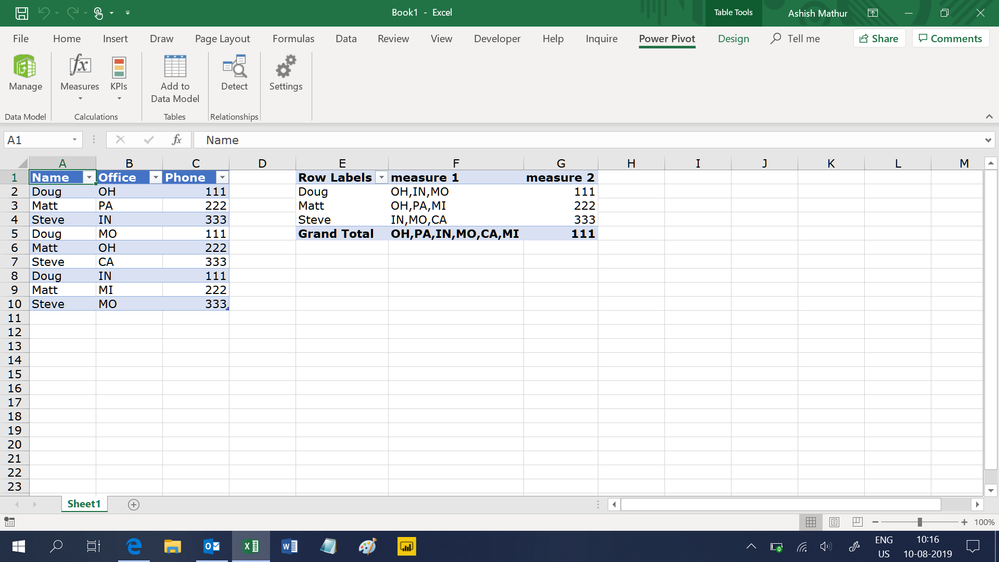
Try these measures
=CONCATENATEX(VALUES(Data[Office]),Data[Office],",")
=min(Data[Phone])
Hope this helps.
Dexter1088
7 years agoFrequent Visitor
Maybe I'm doing it wrong, but when I do that I get this
| Name | Office | Phone | Combined Office |
| Doug | OH, MO, IN | 111 | OH, PA, IN, MO, CA, MI |
| Matt | PA, OH, MI | 222 | OH, PA, IN, MO, CA, MI |
| Steve | IN, CA, MO | 333 | OH, PA, IN, MO, CA, MI |
It just shows all the possibilites on every row. Thanks!
Nathaniel_C
Community Champion
7 years agoHi Dexter1088 ,
Are you building this in a measure, and if so what are you using to display this? I used your original data to build my table in Power BI. I then created the measure from above and added it to the matrix shown above turning off the subtotals to get that picture. How are you trying to display this?
If you are trying to place this in the original data table, it won't work as it violates data rules having one piece of data in each cell.
If this solves your question, please mark it as the solution.