Fabric Data Days starts November 4th!
Advance your Data & AI career with 50 days of live learning, dataviz contests, hands-on challenges, study groups & certifications and more!
Get registered- Power BI forums
- Get Help with Power BI
- Desktop
- Service
- Report Server
- Power Query
- Mobile Apps
- Developer
- DAX Commands and Tips
- Custom Visuals Development Discussion
- Health and Life Sciences
- Power BI Spanish forums
- Translated Spanish Desktop
- Training and Consulting
- Instructor Led Training
- Dashboard in a Day for Women, by Women
- Galleries
- Data Stories Gallery
- Themes Gallery
- Contests Gallery
- Quick Measures Gallery
- Visual Calculations Gallery
- Notebook Gallery
- Translytical Task Flow Gallery
- TMDL Gallery
- R Script Showcase
- Webinars and Video Gallery
- Ideas
- Custom Visuals Ideas (read-only)
- Issues
- Issues
- Events
- Upcoming Events
Get Fabric Certified for FREE during Fabric Data Days. Don't miss your chance! Learn more
- Power BI forums
- Forums
- Get Help with Power BI
- Desktop
- Combine 3 column names in same list to Use Same Co...
- Subscribe to RSS Feed
- Mark Topic as New
- Mark Topic as Read
- Float this Topic for Current User
- Bookmark
- Subscribe
- Printer Friendly Page

- Mark as New
- Bookmark
- Subscribe
- Mute
- Subscribe to RSS Feed
- Permalink
- Report Inappropriate Content
Combine 3 column names in same list to Use Same Conditional Color Parameters
I have 3 columns within a table that provide conditional color status with words "Complete", "In-Work", "Not Started".
STEP1: I've added a measure as follows (which only applies to 1 of the 3 columns):
Status Type Number =
VAR StatusType = SELECTEDVALUE('Table1'[FilesSent/Received])
RETURN

SWITCH(TRUE(),
StatusType = "Complete", 1,
StatusType = "In-Progress", 2,
StatusType = "Not Started", 3
)
STEP2: I've added a column with this function (that also only refers to 1 of 3 columns):
ColorStatus = IF( 'Table1'[FilesSent/Received]="Complete", "#85ff33",IF( 'Table1'[FilesSent/Received]="In-Progress", "Yellow", "Red"))
Once I've added the measure and the column w/ the function, all I have to do is: STEP3: go to the field values area, choose Conditional Format, FORMAT BY: FieldValue, BASED ON FIELD: "ColorStatus" and the column referenced in STEP1 turns to the appropriate colors.
Very new to PBI and syntax, I can't figure out how to combine all 3 columns into the Measure area of STEP1 (and STEP2) so all 3 columns can utilize the definitions to colorize. Tried using "AND" in between each field refc and also tried "OR" - neither of which work...also tried the below, also not an option either...
Surely I don't have to perform STEPS 1 & 2 over and over for each of the 3 columns?
Status Type Number =
VAR StatusType = SELECTEDVALUE('Table1'[FilesSent/Received]) AND = SELECTEDVALUE(Table1[Reconciliation Built]) AND = SELECTEDVALUE(Table1[Automated Interface Complete (Due)])
RETURN

SWITCH(TRUE(),
StatusType = "Complete", 1,
StatusType = "In-Progress", 2,
StatusType = "Not Started", 3
)
Solved! Go to Solution.
- Mark as New
- Bookmark
- Subscribe
- Mute
- Subscribe to RSS Feed
- Permalink
- Report Inappropriate Content
GOT CONDITIONAL FORMATTING WORKING! – HERE’S HOW:
===============================================================
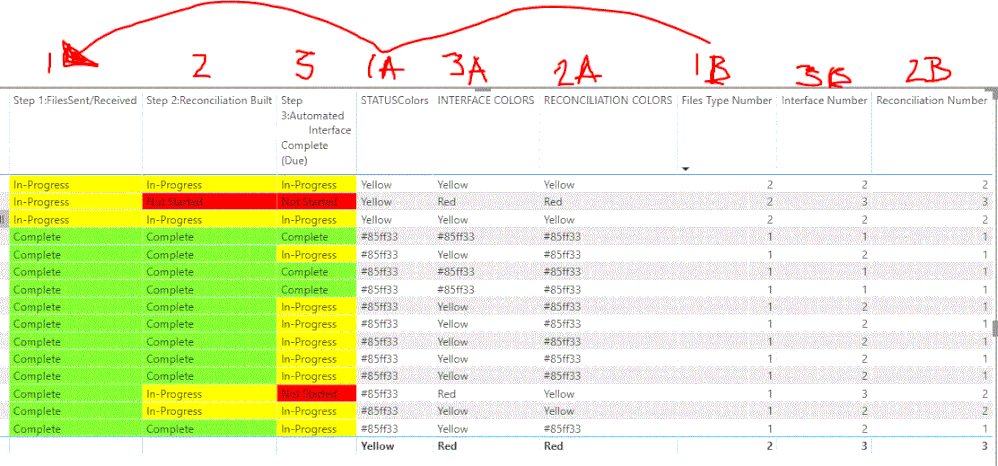
Created a column for each of the 3 status columns with an associated numerical value to verify desired outcome while the conversion from text to numeric to color occurred.
===============================================================
MEASURES CREATED:
FILES TYPE NUMBER:
Files Type Number =
VAR STN = MAX(Table1[Step 1:FilesSent/Received])
var status_number = SWITCH(STN,"Complete",1,"In-Progress",2,"Not Started",3)
RETURN status_number
INTERFACE NUMBER:
Interface Number =
VAR INTERFACE_VALUE = MAX(Table1[Step 3:Automated HMC Interface Complete (Due)])
var interface_number = SWITCH(INTERFACE_VALUE,"Complete",1,"In-Progress",2,"Not Started",3)
RETURN interface_number
RECONCILIATION NUMBER:
Reconciliation Number =
VAR RECONCILIATION_VALUE = MAX(Table1[Step 2:Reconciliation Built])
var reconciliation_number = SWITCH(RECONCILIATION_VALUE,"Complete",1,"In-Progress",2,"Not Started",3)
RETURN reconciliation_number
===============================================================
Then created 3 more measures creating 3 more columns for cross-verification:
===============================================================
MEASURE CREATED FOR EACH:
STATUSColors:
STATUSColors = IF( [Files Type Number] = 1, "#85ff33",IF( [Files Type Number] = 2, "Yellow", "Red"))
INTERFACE COLORS:
INTERFACE COLORS = IF( [Interface Number] = 1, "#85ff33",IF( [Interface Number] = 2, "Yellow", "Red"))
RECONCILIATION COLORS:
RECONCILIATION COLORS = IF( [Reconciliation Number] = 1, "#85ff33",IF( [Reconciliation Number] = 2, "Yellow", "Red"))
===============================================================
Then, the 3 main fields holding text status info, I selected each field in the VALUES area and set the drop-down CONDITIONAL FORMAT settings as follows:
Conditional Formatting> Background Color > Format by FIELD VALUE, BASED ON FIELD "STATUSColors" or "INTERFACE COLORS" or "RECONCILIATION COLORS"
(this applies the rules to the text columns) (these rules were set up in your measures steps previously)
==============================================================
A special thanks to @kentyler for help to resolve this challenge. Hoping it helps others new to PBI with breaking out the rudimentary parts to make colorization with TEXT work. Numbers is a breeze, text a bit more of a challenge.
- Mark as New
- Bookmark
- Subscribe
- Mute
- Subscribe to RSS Feed
- Permalink
- Report Inappropriate Content


- Mark as New
- Bookmark
- Subscribe
- Mute
- Subscribe to RSS Feed
- Permalink
- Report Inappropriate Content
We need to switch to a screen share. I've scheduled a zoom meeting for 3:30. Can you do that. I'll probably need your email address to invite you.
Did this post answer your question? Mark it as a solution so others can find it!
Help when you know. Ask when you don't!
Join the conversation at We Talk BI find out more about me at Slow BI
- Mark as New
- Bookmark
- Subscribe
- Mute
- Subscribe to RSS Feed
- Permalink
- Report Inappropriate Content
sounds good - I Private Messaged you --
we can update this post once a resolution is found
- Mark as New
- Bookmark
- Subscribe
- Mute
- Subscribe to RSS Feed
- Permalink
- Report Inappropriate Content
GOT CONDITIONAL FORMATTING WORKING! – HERE’S HOW:
===============================================================
Created a column for each of the 3 status columns with an associated numerical value to verify desired outcome while the conversion from text to numeric to color occurred.
===============================================================
MEASURES CREATED:
FILES TYPE NUMBER:
Files Type Number =
VAR STN = MAX(Table1[Step 1:FilesSent/Received])
var status_number = SWITCH(STN,"Complete",1,"In-Progress",2,"Not Started",3)
RETURN status_number
INTERFACE NUMBER:
Interface Number =
VAR INTERFACE_VALUE = MAX(Table1[Step 3:Automated HMC Interface Complete (Due)])
var interface_number = SWITCH(INTERFACE_VALUE,"Complete",1,"In-Progress",2,"Not Started",3)
RETURN interface_number
RECONCILIATION NUMBER:
Reconciliation Number =
VAR RECONCILIATION_VALUE = MAX(Table1[Step 2:Reconciliation Built])
var reconciliation_number = SWITCH(RECONCILIATION_VALUE,"Complete",1,"In-Progress",2,"Not Started",3)
RETURN reconciliation_number
===============================================================
Then created 3 more measures creating 3 more columns for cross-verification:
===============================================================
MEASURE CREATED FOR EACH:
STATUSColors:
STATUSColors = IF( [Files Type Number] = 1, "#85ff33",IF( [Files Type Number] = 2, "Yellow", "Red"))
INTERFACE COLORS:
INTERFACE COLORS = IF( [Interface Number] = 1, "#85ff33",IF( [Interface Number] = 2, "Yellow", "Red"))
RECONCILIATION COLORS:
RECONCILIATION COLORS = IF( [Reconciliation Number] = 1, "#85ff33",IF( [Reconciliation Number] = 2, "Yellow", "Red"))
===============================================================
Then, the 3 main fields holding text status info, I selected each field in the VALUES area and set the drop-down CONDITIONAL FORMAT settings as follows:
Conditional Formatting> Background Color > Format by FIELD VALUE, BASED ON FIELD "STATUSColors" or "INTERFACE COLORS" or "RECONCILIATION COLORS"
(this applies the rules to the text columns) (these rules were set up in your measures steps previously)
==============================================================
A special thanks to @kentyler for help to resolve this challenge. Hoping it helps others new to PBI with breaking out the rudimentary parts to make colorization with TEXT work. Numbers is a breeze, text a bit more of a challenge.
- Mark as New
- Bookmark
- Subscribe
- Mute
- Subscribe to RSS Feed
- Permalink
- Report Inappropriate Content
Here's the associated pic showing the breakdown explained above..
- Mark as New
- Bookmark
- Subscribe
- Mute
- Subscribe to RSS Feed
- Permalink
- Report Inappropriate Content
Try using & to concatenate fields. 'table'[field] & 'table'[other field]
Did this post answer your question? Mark it as a solution so others can find it!
Help when you know. Ask when you don't!
Join the conversation at We Talk BI find out more about me at Slow BI
- Mark as New
- Bookmark
- Subscribe
- Mute
- Subscribe to RSS Feed
- Permalink
- Report Inappropriate Content
no, @kentyler could not get it to work.. =-( If the below is not what you meant, please copy/paste/edit to be exactly to what you meant for me to change) - also got the attached error (image)
Status Type Number =
VAR StatusType = SELECTEDVALUE('Table1'[FilesSent/Received] & 'Table1'[Reconciliation Built] & 'Table1'[Automated Interface Complete (Due)])
RETURN

SWITCH(TRUE(),
StatusType = "Complete", 1,
StatusType = "In-Progress", 2,
StatusType = "Not Started", 3
)
- Mark as New
- Bookmark
- Subscribe
- Mute
- Subscribe to RSS Feed
- Permalink
- Report Inappropriate Content
here is the dope on SELECTEDVALUE
The function SELECTEDVALUE returns the value of the column reference passed as first argument if it is the only value available in the filter context, otherwise it returns blank or the default value passed as second argument. Here are a few examples of possible syntax.
SELECTEDVALUE ( Table[column] ) SELECTEDVALUE ( Table[column], "default value" ) SELECTEDVALUE ( Table[column], 0 ) |
so you probably need something like
var Files = SELECTEDVALUE('Table1'[FilesSent/Received])
var ReconBuilt = SELECTEDVALUE( 'Table1'[Reconciliation Built])
var InterfaceComplete = SELECTEDVALUE('Table1'[Automated Interface Complete (Due)])
var statustype = Files & REconBuilt & InterfaceComplete
Did this post answer your question? Mark it as a solution so others can find it!
Help when you know. Ask when you don't!
Join the conversation at We Talk BI find out more about me at Slow BI
- Mark as New
- Bookmark
- Subscribe
- Mute
- Subscribe to RSS Feed
- Permalink
- Report Inappropriate Content
Wow! that's kool @kentyler I like the way you laid that out... but it's not working just yet because the "ColorStatus" chunk is also still looking at only one table... and since it's not using the x I'm at a loss on how to change it to also ALLOW use of 3 diff tables for those specified colors??
Here's exactly how I updated my first chunk: (no errors so it appears to like it!)
Status Type Number =
VAR Files =SELECTEDVALUE(Table1[FilesSent/Received])
VAR ReconBuilt = SELECTEDVALUE(Table1[Reconciliation Built])
VAR InterfaceComplete = SELECTEDVALUE(Table1[Automated Interface Complete (Due)])
VAR StatusType = Files & ReconBuilt & InterfaceComplete
RETURN

SWITCH(TRUE(),
StatusType = "Complete", 1,
StatusType = "In-Progress", 2,
StatusType = "Not Started", 3
)
Here's the 2nd chunk that I'm guessing it keeping the table from fully colorzing all 3 columns properly (bc it only references 1 col): How do I fix this chunk?
ColorStatus = IF( 'Table1'[FilesSent/Received]="Complete", "#85ff33",IF( 'Table1'[FilesSent/Received]="In-Progress", "Yellow", "Red"))
- Mark as New
- Bookmark
- Subscribe
- Mute
- Subscribe to RSS Feed
- Permalink
- Report Inappropriate Content
You should be able to reference the measure "status type number" and say
IF( [status type number] = 1, "#85ff33",IF( [status type number] = 1, "Yellow", "Red"))
Did this post answer your question? Mark it as a solution so others can find it!
Help when you know. Ask when you don't!
Join the conversation at We Talk BI find out more about me at Slow BI
- Mark as New
- Bookmark
- Subscribe
- Mute
- Subscribe to RSS Feed
- Permalink
- Report Inappropriate Content
Like this? @kentyler Something's wrong: It has now made all 3 columns fully red for some reason?
ColorStatus = IF( [Status Type Number] = 1, "#85ff33",IF( [Status Type Number] = 2, "Yellow", "Red"))Do I need to add this ColorStatus script to the other? bc currently (and from the beginning) it has been freestanding.
- Mark as New
- Bookmark
- Subscribe
- Mute
- Subscribe to RSS Feed
- Permalink
- Report Inappropriate Content
They should both be measures.
The second measure gets the result of the first measure and returns a number 1,2, or 3
Try just adding the second measure to a report and see if it returns the correct number.
Then the question is, how are you turning the number into an actual color ?
Did this post answer your question? Mark it as a solution so others can find it!
Help when you know. Ask when you don't!
Join the conversation at We Talk BI find out more about me at Slow BI
- Mark as New
- Bookmark
- Subscribe
- Mute
- Subscribe to RSS Feed
- Permalink
- Report Inappropriate Content
ok @kentyler I've Created a 2nd Measure and moved the stuff that was in "ColorStatus" to the new Measure called: "StatusColors"
StatusColors = IF( [Status Type Number] = 1, "#85ff33",IF( [Status Type Number] = 2, "Yellow", "Red"))
The 1st pre-existing Measure still looks like this:
Status Type Number =
VAR Files =SELECTEDVALUE(Table1[FilesSent/Received])
VAR ReconBuilt = SELECTEDVALUE(Table1[Reconciliation Built])
VAR InterfaceComplete = SELECTEDVALUE(Table1[Automated HMC Interface Complete (Due)])
VAR StatusType = Files & ReconBuilt & InterfaceComplete
RETURN

SWITCH(TRUE(),
StatusType = "Complete", 1,
StatusType = "In-Progress", 2,
StatusType = "Not Started", 3
)
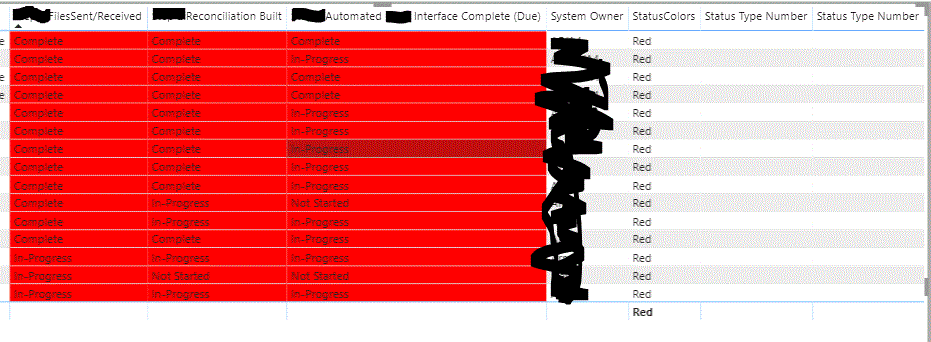
and here's what the table looks like (ALL COLORIZATION is now gone); the last "StatusColors" column all says "Red" for some reason?

Last, I returned to Values area of each of the 3 fields, clicked the Conditional Formatting>Background Color>FORMAT BY: Field value > BASED ON: "StatusColors" and now all 3 columns are all RED again... =-/
- Mark as New
- Bookmark
- Subscribe
- Mute
- Subscribe to RSS Feed
- Permalink
- Report Inappropriate Content
If you put the status type number measure in the report, what numbers does it return ?
Did this post answer your question? Mark it as a solution so others can find it!
Help when you know. Ask when you don't!
Join the conversation at We Talk BI find out more about me at Slow BI
- Mark as New
- Bookmark
- Subscribe
- Mute
- Subscribe to RSS Feed
- Permalink
- Report Inappropriate Content
@kentylerI'm not sure what you mean - (only been using this a wk so very much a newbie) can you note the steps I would take.. to "put the status # in the report" or screen shot if that's easier to explain?
- Mark as New
- Bookmark
- Subscribe
- Mute
- Subscribe to RSS Feed
- Permalink
- Report Inappropriate Content
drag the measure "
Status Type Number
onto your report
it should return a column of numbers
we're try to check and see if its returning the right numbers
if so
then our problem is in how we translate numbers to colors
if not, then we have a problem in how it selects numbers
Did this post answer your question? Mark it as a solution so others can find it!
Help when you know. Ask when you don't!
Join the conversation at We Talk BI find out more about me at Slow BI
- Mark as New
- Bookmark
- Subscribe
- Mute
- Subscribe to RSS Feed
- Permalink
- Report Inappropriate Content
@kentylerhere's what it shows... hopefully the result (no numbers) points to the issue?
- Mark as New
- Bookmark
- Subscribe
- Mute
- Subscribe to RSS Feed
- Permalink
- Report Inappropriate Content
OK
Temporarily change the measure to return the status type to see if selectedvalue is getting a type
Status Type Number =
VAR StatusType = SELECTEDVALUE('Table1'[FilesSent/Received])
RETURN StatusType

SWITCH(TRUE(),
StatusType = "Complete", 1,
StatusType = "In-Progress", 2,
StatusType = "Not Started", 3
)
Did this post answer your question? Mark it as a solution so others can find it!
Help when you know. Ask when you don't!
Join the conversation at We Talk BI find out more about me at Slow BI
- Mark as New
- Bookmark
- Subscribe
- Mute
- Subscribe to RSS Feed
- Permalink
- Report Inappropriate Content
ok
reduce the measure to
Status Type Number =
'Table1'[FilesSent/Received]
and see what you get
the code has been assuming you are getting a text string
Did this post answer your question? Mark it as a solution so others can find it!
Help when you know. Ask when you don't!
Join the conversation at We Talk BI find out more about me at Slow BI
- Mark as New
- Bookmark
- Subscribe
- Mute
- Subscribe to RSS Feed
- Permalink
- Report Inappropriate Content
sorry, you'll have to wrap the column reference in VALUES()
Status Type Number =
VALUES('Table1'[FilesSent/Received])
Did this post answer your question? Mark it as a solution so others can find it!
Help when you know. Ask when you don't!
Join the conversation at We Talk BI find out more about me at Slow BI
- Mark as New
- Bookmark
- Subscribe
- Mute
- Subscribe to RSS Feed
- Permalink
- Report Inappropriate Content
@kentylerok, made it look identical to your 2nd post (to include the revision) but image still won't come back -- however, that error is not popping up like it was..
Helpful resources

Fabric Data Days
Advance your Data & AI career with 50 days of live learning, contests, hands-on challenges, study groups & certifications and more!

Power BI Monthly Update - October 2025
Check out the October 2025 Power BI update to learn about new features.

FabCon Atlanta 2026
Join us at FabCon Atlanta, March 16-20, for the ultimate Fabric, Power BI, AI and SQL community-led event. Save $200 with code FABCOMM.


| User | Count |
|---|---|
| 80 | |
| 49 | |
| 35 | |
| 31 | |
| 30 |


