
Join us at FabCon Atlanta from March 16 - 20, 2026, for the ultimate Fabric, Power BI, AI and SQL community-led event. Save $200 with code FABCOMM.
Register now!Get Fabric Certified for FREE during Fabric Data Days. Don't miss your chance! Request now
Hi
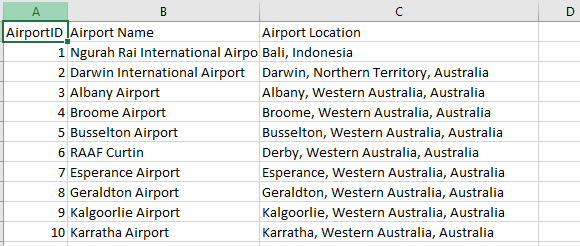
I have excel spread sheet in which i have three columns with data as shown below.
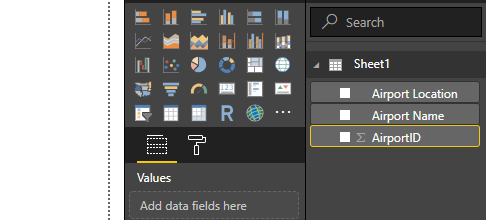
Airport ID is the unique. However, when i load the data into PowerBI the Airport ID field returns as a cummulative value rather than individual records.
The field adds individual value from each row and displays the cummulative value. how do i change it to display individual records ?
Solved! Go to Solution.
You can mark the default behaviour of the column not apply aggregation.
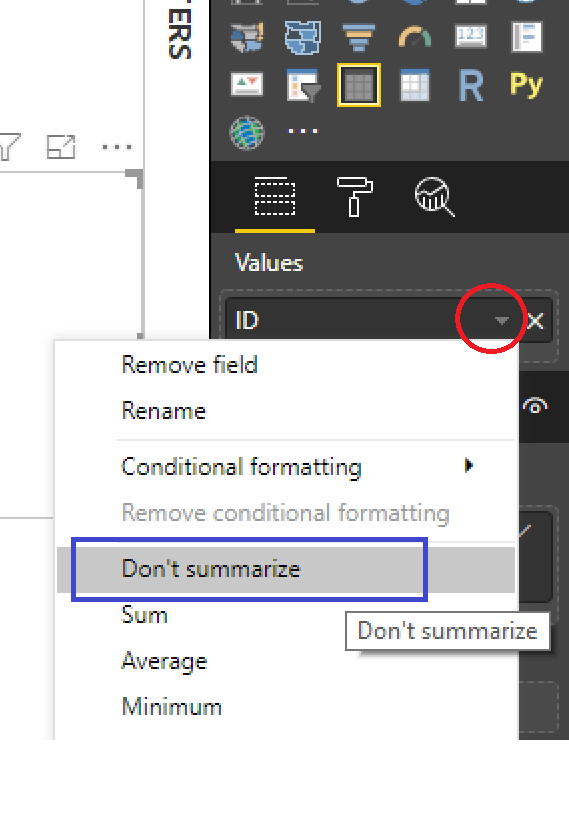
Select the column, go to the Modeling tab. In the Properties section you should see "Default Summarization". You could also click the arrow in the individual visual (next to the name of the column Airport ID) and there you can select not to summerize.
Regards,
Kristjan
@Anonymous
See following image:
You can mark the default behaviour of the column not apply aggregation.
Select the column, go to the Modeling tab. In the Properties section you should see "Default Summarization". You could also click the arrow in the individual visual (next to the name of the column Airport ID) and there you can select not to summerize.
Regards,
Kristjan
Check out the November 2025 Power BI update to learn about new features.
Advance your Data & AI career with 50 days of live learning, contests, hands-on challenges, study groups & certifications and more!