Forum Discussion

Column output based on another column value and time function
I have a table like that:
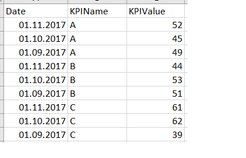
I'm comparing values from CurrentMonth vs PreviousMonth (based on the month selected in the slicer) for all of the KPIs, and based on that, I assign a specific result.
However, for each KPI, there is a logic behind when comparing. The logic is:
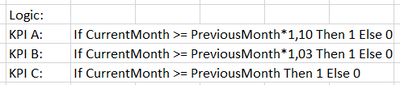
So, for KPI A, the CurrentMonth value must be 10% higher then PreviousMonth. When this is true, then assign 1. If not true, then 0. For KPI B, it has to be 3% higher. And for KPI C, it just need to be higher.
To pull the CurrentMonth and PreviousMonth values, I created two measures, one of them with a time function:
CurrentMonth = SUM( [KPIValue] )
PreviousMonth = CALCULATE (
SUM( [KPIValue] );
PREVIOUSMONTH( [Date] )
)
I tried to create a Column in my table to assign the output (Result), and used a Switch function like this:
Result = SWITCH (
[KPIName];
"KPI A"; IF( [CurrentMonth] >= [PreviousMonth]*1.10;1;0 );
"KPI B"; IF( [CurrentMonth] >= [PreviousMonth]*1.03;1;0 );
"KPI C"; IF( [CurrentMonth] >= [PreviousMonth];1;0 );
)
My issue is that when I try to use this Switch, it does not work, since the PreviousMonth come as blank (it can not calculate a time function for each row of the table - only works as a measure).
I'm now lost how should I proceed from here. I tried to create a Measure instead of a Column, but then the Switch function does not accept the KPIName as parameter.
Any ideas? Hope I've been clear here, if not, please let me know what further information you need.
Ale Please try this as a "Measure"
Result = SWITCH(SELECTEDVALUE(Test155[KPIName]),
                "A",IF(_KeyMeasures[Test155CurrMonth]>=_KeyMeasures[Test155PrevMonth]*1.10,1,0),
                "B",IF(_KeyMeasures[Test155CurrMonth]>=_KeyMeasures[Test155PrevMonth]*1.03,1,0),
                "C",IF(_KeyMeasures[Test155CurrMonth]>=_KeyMeasures[Test155PrevMonth],1,0),
                0)

4 Replies
- PattemManoharCommunity Champion
Ale Please try this as a "Measure"
Result = SWITCH(SELECTEDVALUE(Test155[KPIName]), "A",IF(_KeyMeasures[Test155CurrMonth]>=_KeyMeasures[Test155PrevMonth]*1.10,1,0), "B",IF(_KeyMeasures[Test155CurrMonth]>=_KeyMeasures[Test155PrevMonth]*1.03,1,0), "C",IF(_KeyMeasures[Test155CurrMonth]>=_KeyMeasures[Test155PrevMonth],1,0), 0) AleResolver II
Uow, I was missing the SELECTEDVALUE thing. I never heard about that (I started with PowerBI last week).
Apparently it worked! I also found a second solution but it envolves creating multiple columns on the dataset (previousmonth column, previousmonthvalue column, and from there the result column). It's not that elegant tho. I will stick with your solution. Thank you so much! dd96Frequent Visitor
Hello I am trying to write similar logic and not sure but can not reference column name in IF clause.
I am not sure what is _KeyMeasure here , is it a new table name ?
- AleResolver II