Join us at FabCon Atlanta from March 16 - 20, 2026, for the ultimate Fabric, Power BI, AI and SQL community-led event. Save $200 with code FABCOMM.
Register now!The Power BI Data Visualization World Championships is back! Get ahead of the game and start preparing now! Learn more
Hi!
I'm experiencing an issue where I have a column that is already set to Whole numbers, and all of my other columns are also set to whole numbers, yet the one column will not sum when I bring it into a visualization. It also won't have the Greek Sum symbol appear next to the line when I'm manipulating data, but when I got into edit queries, it shows that it is a number.
How do I solve this?
Thanks!
Solved! Go to Solution.
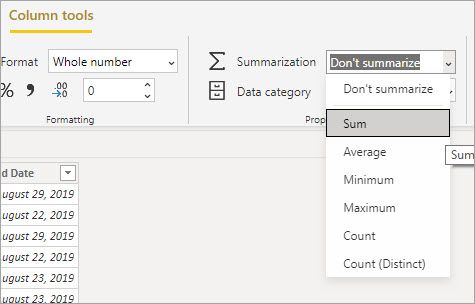
In the table you can set the summarization behavior for a column. My guess is it's set to 'Don't summarize' for the column that is causing you problems.
If this solves your issues please mark it as the solution. Kudos 👍 are nice too.
You may also try Change how a numeric field is aggregated and use SUM to add a measure.
What if it's a measure and not a table column that won't sumamrize?
You may also try Change how a numeric field is aggregated and use SUM to add a measure.
In the table you can set the summarization behavior for a column. My guess is it's set to 'Don't summarize' for the column that is causing you problems.
If this solves your issues please mark it as the solution. Kudos 👍 are nice too.
Check out the November 2025 Power BI update to learn about new features.
Advance your Data & AI career with 50 days of live learning, contests, hands-on challenges, study groups & certifications and more!